Most MySQL frontends stop at CRUD. Tables. Rows. Maybe a filter if you’re lucky. The moment you want something to happen when data changes, you’re back in glue-code land, duct-taping cron jobs, shell scripts, and half-remembered PHP from 2012.
That gap is where automation belongs. Not as an afterthought. Not bolted on with Zapier like a spoiler on a minivan. Right next to the data.
A MySQL frontend with automation is not about replacing your database. It’s about letting the database participate in the workflow.
I learned this the hard way. Years ago, I had a perfectly normal MySQL table for leads. New row meant “someone filled out a form.” What followed was a relay race of scripts: one to send an email, one to notify sales, one to update a status field. Each script knew just enough to be dangerous. When one failed, nobody noticed until the phone stopped ringing.
A frontend that knows when a row is created, updated, or deleted changes that dynamic completely.
What “automation” actually means in a MySQL frontend
Automation gets abused as a word. Sometimes it means full drag-and-drop workflows with neon arrows. Sometimes it means a cron job that emails you at 3 a.m.
In a practical MySQL frontend, automation usually means a few simple but powerful things:
- Triggers that run when a record is created, updated, or deleted
- Triggers that run on a schedule
- The ability to query and update other tables
- The ability to send emails
- The ability to call external services over HTTP
That’s it. No fireworks. No AI narrating your database like a sports commentator.
But those basics go a long way.
MySQL itself has triggers, of course. They’re fast. They’re also invisible to most teams and painful to maintain. Once you’ve debugged a trigger written by someone who left the company during the Obama administration, you start to appreciate visibility.
A frontend with automation makes those triggers explicit. You can see them. Edit them. Disable them. And, crucially, explain them to someone else without drawing diagrams that look like subway maps.
Why frontends without automation always leak complexity
Here’s a pattern I see constantly.
- Team starts with phpMyAdmin or Adminer.
- Someone asks for email notifications.
- A cron job appears.
- Someone asks for conditional logic.
- Another script appears.
- Six months later, nobody knows what runs when.
This isn’t a people problem. It’s a tooling problem.
phpMyAdmin was never meant to run a business. It’s a screwdriver. Great tool. Wrong job. According to Stack Overflow’s 2024 developer survey, MySQL is still used by over 40% of professional developers, making it one of the most common production databases in the world
That means millions of teams are running real workflows on top of tools that stop at “edit row.”
A MySQL frontend with automation closes that gap by letting the same system handle data and reactions to data.
A concrete example: new record, real consequences
Imagine a support_ticket table.
When a new ticket is created, you want to:
- Send a confirmation email to the customer
- Notify an internal mailbox
- Set an SLA deadline based on priority
In a frontend with automation, this becomes one trigger:
- Event: record created
- Logic: small code block
- Actions: email, update fields, optional HTTP call
No cron. No glue code. No “where does this live again?”
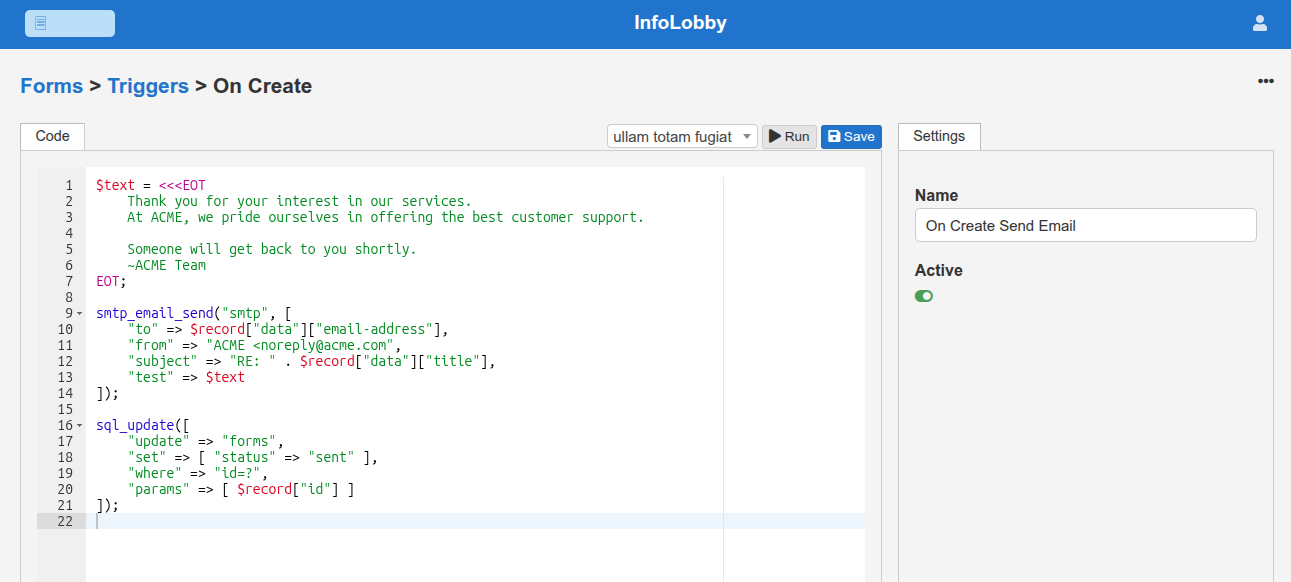
The interesting part is not the email. Email is boring. The interesting part is that the automation can query the database itself. It can look at related tables. It can compute values. It can update other rows. It behaves like a tiny, polite daemon that only wakes up when something relevant happens.
Scheduled automation: boring, essential, underappreciated
Event-based triggers get the spotlight. Scheduled automation does the real work.
Daily summaries. Weekly digests. Cleanup tasks. SLA checks. The stuff nobody wants to do manually and everybody forgets to document.
A MySQL frontend with automation should let you say:
- Every morning at 08:00
- Query this table
- Send a summary email
- Update a “last_notified” field
That’s not glamorous. It’s also the difference between a system that feels alive and one that quietly rots.
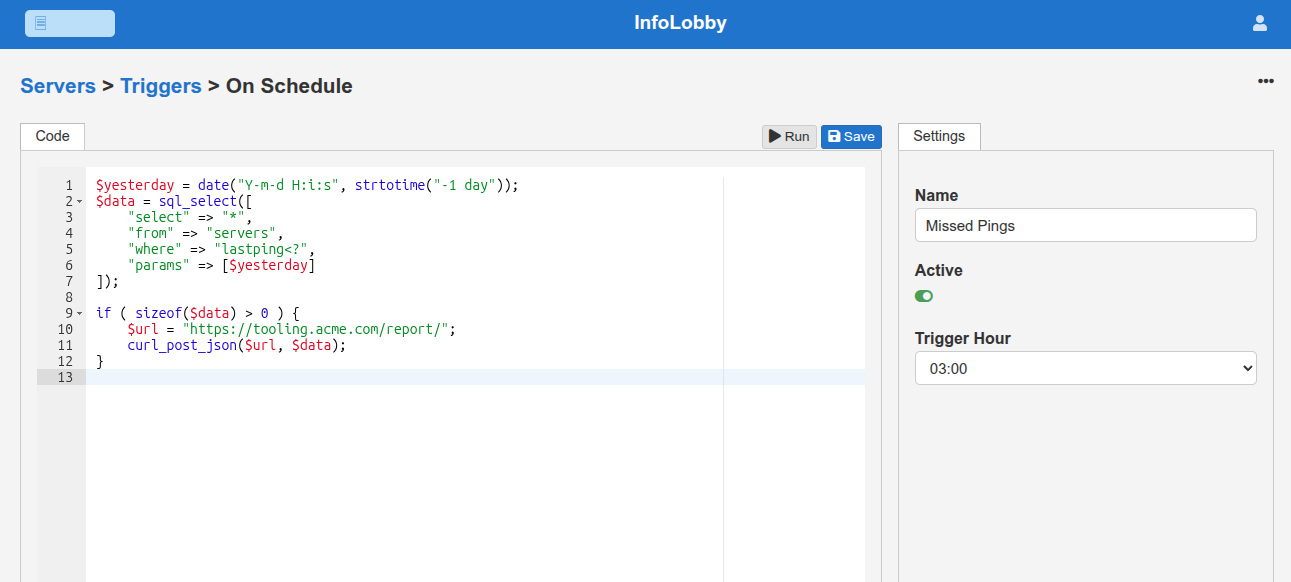
According to a 2023 study by Zapier, 94% of SMB workers say they perform repetitive, time-consuming tasks, and automation saves them an average of 10 hours per week
Most of that time loss happens around data that already lives in a database.
Webhooks: when your database listens instead of shouts
Email is outbound. Webhooks are inbound. This matters.
A MySQL frontend with automation should be able to receive HTTP pings and treat them as events. That opens up a lot of quiet power.
- A backup script pings the system when it completes
- A CI job reports status
- An external form submits data
- Another service signals completion
When a webhook is received, the automation can insert or update records, trigger emails, or fan out more HTTP calls.
It’s like giving your database ears.
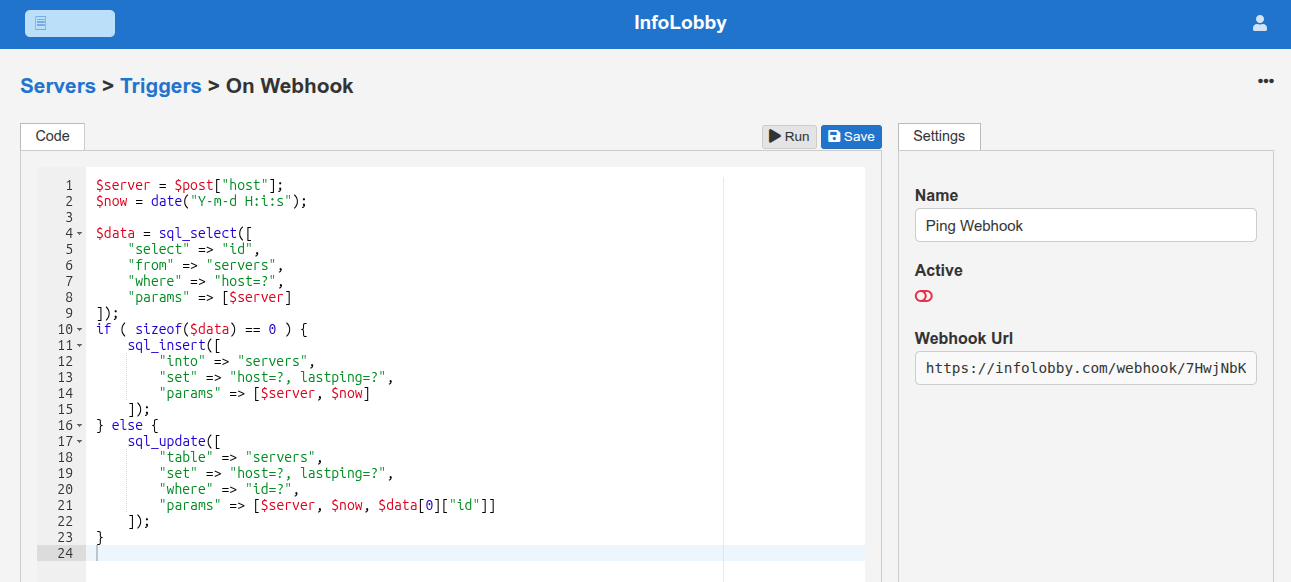
The beauty is that this works with anything that can make an HTTP request. Bash. PHP. Node. Curl at 2 a.m. No SDK required.
Code-based automation: the underrated middle ground
There’s a reason visual workflow builders eventually grow tentacles. They try to replace logic with shapes.
Code-based automation inside a frontend is different. It’s small. Purpose-built. Constrained.
You don’t write an app. You write just enough logic to respond to an event.
That constraint is healthy. It prevents the automation layer from becoming a second application that needs its own onboarding guide and emotional support animal.
In practice, this means:
- Short scripts
- Clear inputs (the record, the event)
- Explicit side effects (emails, updates, HTTP calls)
Think of it like a sous-chef, not a head chef. It chops onions. It doesn’t design the menu.
Where InfoLobby fits into this picture
This is where InfoLobby quietly lives.
At its core, it’s a MySQL frontend. Tables, views, permissions. But layered on top is a simple automation system that can:
- Trigger on create, update, delete, or schedule
- Query and update your tables
- Send emails
- Call external services using pre-authenticated HTTP requests
- Receive incoming webhooks
It’s not trying to be Zapier. It’s not trying to replace your database. It sits next to the data and reacts when the data changes.
That proximity matters. Latency is lower. Mental overhead is lower. Debugging is dramatically less theatrical.
Why this approach scales better than duct tape
The irony is that automation close to the database often reduces complexity.
Fewer moving parts. Fewer servers. Fewer “who owns this script?” conversations.
You still write code. But you write it once, in a place everyone can see, tied directly to the data it affects. That alone eliminates an entire genre of bugs.
It also makes onboarding easier. New developers don’t have to discover automation by accident. It’s visible. Documented by existence.
The quiet advantage: automation that respects your schema
One subtle benefit of a MySQL frontend with automation is that it encourages better schemas.
When automation depends on your fields, you think harder about names, defaults, and relationships. You stop treating the database like a junk drawer and more like a workshop.
That shift pays dividends long after the novelty of automation wears off.
Final thought, without wrapping it in a bow
A MySQL frontend with automation doesn’t need to be flashy. It needs to be close to the data, honest about what it does, and boring in the right ways.
If your database is where truth lives, automation is how truth moves.
Everything else is just spreadsheets wearing a trench coat.
Get your team on InfoLobby today!