TL;DR
- Build a custom CRM when your sales process does not match the pipeline the off-the-shelf tools assume, not because custom sounds better.
- The commonest failure is overbuilding. Too many fields, statuses and automations make a custom CRM harder to use than what it replaced.
- Start with contacts, companies, deals and activity. Add nothing else until someone asks for it twice.
- Per-seat pricing is often the real trigger, because it decides who gets to see the customer at all.
- If your problem is duplicate customer data rather than pipeline shape, fix the source of truth first.
A custom CRM for small business should not mean "buy a standard CRM, then spend months fighting the defaults."
For many small teams, customization is the reason to use a CRM in the first place. The business does not just need contacts and deals. It needs the customer record to match how work actually moves: lead intake, quotes, onboarding, service requests, delivery steps, renewal dates, files, follow-up tasks, and handoffs between sales and operations.
That is where a customizable database workspace is different from a fixed CRM. You start with the tables, fields, views, permissions, forms, and workflows your business needs. Customization is the starting point, not a bolt-on feature.
Quick Answer
Choose a custom CRM when your customer process does not fit a sales-only pipeline.
Choose a standard CRM when your team mainly needs lead tracking, deal stages, sales email, forecasting, and reporting.
Choose a database workspace like InfoLobby when you need a CRM that also handles operations: custom records, related tables, web forms, files, tasks, comments, role-based access, automations, and API access.
When A Small Business Needs A Custom CRM
A custom CRM is worth considering when the customer record has to support more than sales.
Common signs:
- Customers have different service types, terms, assets, locations, or renewal rules
- Delivery work starts before a deal is fully closed
- Sales, support, finance, and operations all need different views of the same customer
- Website forms or internal forms should create customer records directly
- Follow-up rules depend on status, priority, date, location, or account type
- Files, notes, emails, tasks, and history need to stay attached to the record
- The team keeps exporting CRM data into spreadsheets to finish the real work
The problem is rarely "we need more CRM features." The problem is that the CRM does not match the operating model.
The Core Tables To Build First
Do not start by copying every field from an old spreadsheet. Start with the smallest data model that makes the customer process clear.
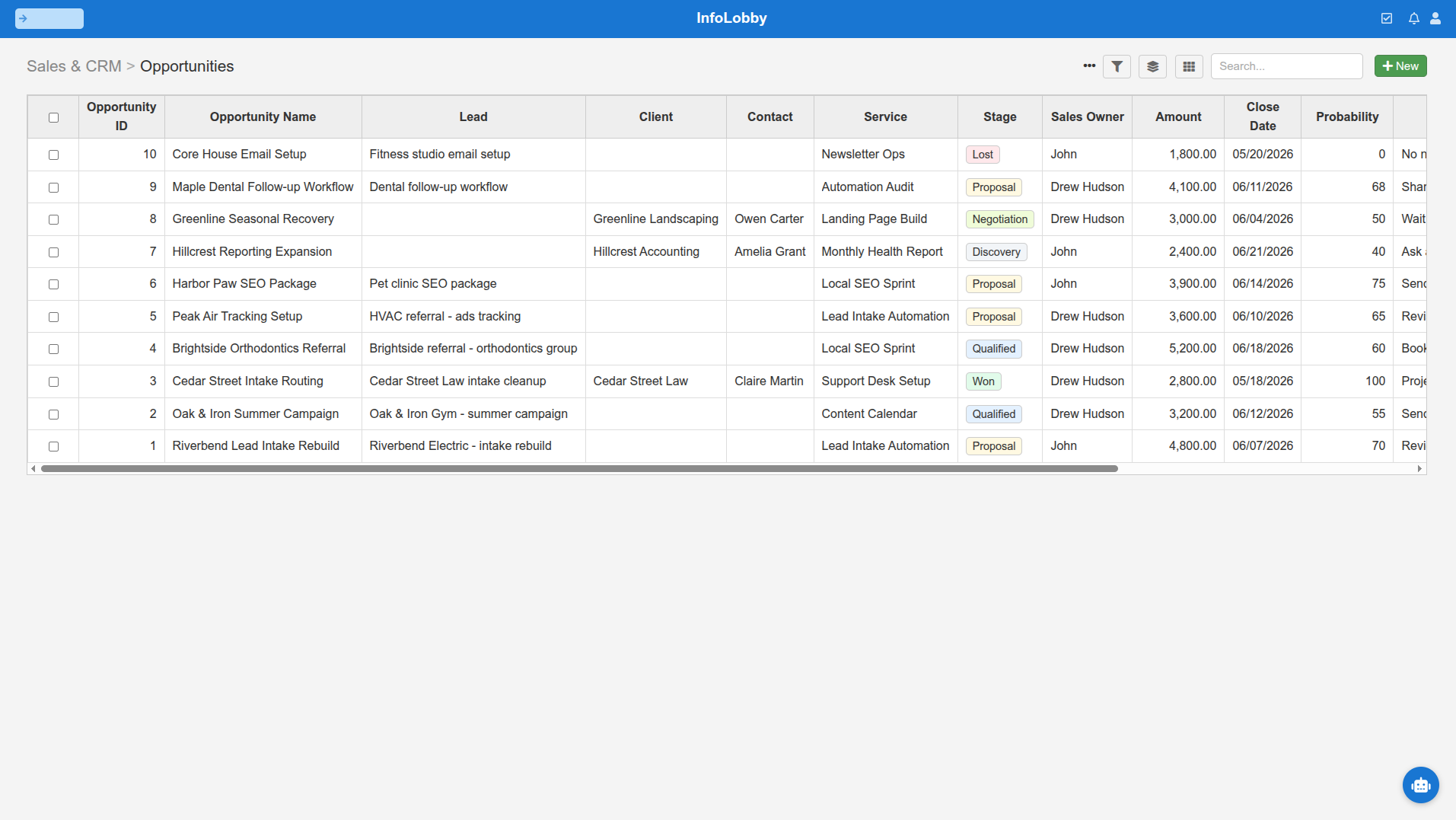
| Table | Purpose | Example fields |
|---|---|---|
| Companies | Accounts, clients, or organizations | Name, website, industry, status, owner, account tier |
| Contacts | People tied to companies | Name, email, phone, role, company, communication preference |
| Opportunities | New sales or requests | Stage, value, source, expected close date, assigned user |
| Projects or Jobs | Work after sale | Status, start date, due date, service type, delivery owner |
| Activities | Calls, meetings, notes, emails | Type, date, related company, related contact, summary |
| Tasks | Follow-up work | Owner, due date, status, priority, related record |
That is enough for many small businesses. Add invoices, assets, renewals, tickets, locations, subscriptions, quote line items, or approvals only when they support a real workflow.
Custom Fields Are Not Enough
Most CRMs can add custom fields. That does not automatically make them good custom CRMs.
A useful custom CRM needs four layers.
Custom Structure
You need tables and relationships that match the business. A contractor might need clients, sites, estimates, jobs, materials, and subcontractors. A professional services firm might need companies, contacts, proposals, projects, retainers, and renewal reviews.
If everything gets forced into one contact record with dozens of fields, the CRM becomes hard to trust.
Custom Views
Different people need different views.
Sales may want open opportunities by stage. Operations may want jobs due this week. Leadership may want stuck accounts. Support may want active customers with unresolved issues.
A custom CRM should let each team see the slice they need without creating separate data silos.
Custom Intake
The best CRM data often starts outside the CRM.
Useful intake examples:
- A website lead form creates a company, contact, and opportunity
- A customer request form creates a service record
- An internal handoff form creates a project after a sale
- A renewal checklist updates account status and creates follow-up tasks
If someone still copies form submissions from email into the CRM, the system is leaking.
Custom Workflows
Workflow is where a custom CRM starts paying for itself.
Examples:
- When a new lead arrives, assign an owner and create a follow-up task
- When a deal moves to won, create an onboarding project
- When a project is overdue, notify the delivery owner
- When a renewal date is 30 days away, create a renewal task
- When a high-priority customer submits a request, alert the account owner
These are not fancy automations. They are the rules that keep customer work from disappearing.
A Practical Custom CRM Build Path
Build the CRM in stages. Small businesses usually get into trouble when they try to design the final system on day one.
- Map the customer lifecycle from first inquiry to repeat work.
- Pick the records that need to exist as separate tables.
- Add only the fields needed for search, ownership, status, dates, and reporting.
- Create views for the people who use the CRM every week.
- Add one intake form.
- Add one workflow that removes repeated manual work.
- Review after two weeks and remove fields nobody uses.
The goal is not to build a giant CRM. The goal is to make customer work visible, assignable, and harder to lose.
Custom CRM Options
| Option | Best for | Watch out for |
|---|---|---|
| Spreadsheet CRM | Tiny teams and very simple contact tracking | Weak permissions, history, automation, and data quality |
| Standard CRM | Sales-led teams with familiar pipeline needs | Can be rigid when customer work moves into operations |
| No-code app builder | Teams that want broad app-building flexibility | May require more setup, governance, and pricing review |
| Database workspace | Small teams that want custom records, forms, files, tasks, workflows, and shared access | Requires clear decisions about fields and process |
| Fully custom software | Businesses with unusual, high-value workflows | Highest cost, longest timeline, ongoing maintenance |
For most small businesses, the first serious alternative to a standard CRM should not be fully custom software. It should be a flexible workspace that lets the team design its CRM around real customer work.
Where InfoLobby Fits
InfoLobby is built for small business teams that need a custom operational workspace.
You can create a workspace, add CRM tables, define the exact fields you need, invite team members, attach files, comment on records, create tasks, collect data with web forms, and automate record-driven work. New accounts start with managed MySQL and managed file storage, so the team does not need to provision infrastructure before building the CRM.
If the business later needs more control, InfoLobby can connect to your own MySQL server, S3 storage, or FTP. That gives you a managed start without making managed storage the only possible future.
InfoLobby is strongest when the CRM is part of daily operations:
- Lead intake from web forms
- Sales-to-delivery handoffs
- Customer onboarding
- Service request tracking
- Renewal follow-up
- Account files and internal notes
- Lightweight email history and comments
- Record-level tasks and reminders
- API-backed reporting or internal tools
It is not the right fit if your main requirement is a large CRM marketplace, built-in dialer, sales commission tooling, enterprise forecasting, or marketing automation suite.
What To Customize First
Customize the parts that reduce confusion first.
Statuses
Statuses should describe how work actually moves. "New, contacted, won, lost" may be enough for sales. It is not enough for onboarding, fulfillment, support, or renewals.
Ownership
Every active customer record should make ownership obvious. If nobody owns the next step, the CRM is just a database of wishes.
Dates
Use dates for promises, renewals, due work, follow-ups, and stale records. Dates are what turn customer history into action.
Required Fields
Be careful. Required fields can improve data quality, but too many required fields make people avoid the CRM. Require only what the next step truly needs.
Forms
Forms should create clean records without manual copying. Start with one external lead or request form, then one internal handoff form.
Automations
Start with assignment, task creation, alerts, or status updates. Avoid building complex workflow chains before the team trusts the basic records.
What Not To Customize
Custom does not mean every preference deserves a field.
Avoid:
- Fields that nobody will search, filter, report on, or act on
- Status lists with twenty options
- Separate tables for data that belongs on one record
- Automations that hide important judgment
- Permissions so complex that nobody can explain who sees what
- Rebuilding a full enterprise CRM when the team only needs five reliable workflows
The best custom CRM is usually simpler than the spreadsheet it replaces.
Decision Rule
Use a standard CRM if your customer process is mostly sales pipeline management.
Use a custom CRM workspace if your customer process spans sales, operations, support, files, tasks, forms, and handoffs.
Use fully custom software only when the workflow is unusual enough, valuable enough, and stable enough to justify design, development, hosting, QA, and maintenance.
For most small businesses, the practical path is a configurable workspace. It gives you the field-level and workflow-level control that makes a custom CRM useful, without starting from a blank codebase.
FAQ
What is the best custom CRM for small business?
The best custom CRM for a small business is the one that matches how customer work actually moves. If you mainly need sales features, use a standard CRM. If customer data also drives operations, use a database workspace with custom tables, forms, tasks, files, permissions, and workflows.
Can a small business build its own CRM without developers?
Yes, if the CRM is built in a configurable workspace or no-code database tool. You still need someone to make good process decisions, but you do not need to start with custom software development.
What fields should a custom CRM include?
Start with company, contact, owner, status, source, priority, next follow-up date, last activity date, and notes. Add service type, renewal date, project status, files, or custom fields only when the workflow needs them.
Is a custom CRM better than HubSpot or Salesforce?
Not always. HubSpot and Salesforce can be better when you need deep sales and marketing features. A custom CRM workspace is better when your process is specific, operational, and hard to fit into a standard sales pipeline.
How long does it take to set up a custom CRM?
A small first version can often be built quickly if the team limits scope to core tables, fields, views, one form, and one workflow. The slower part is deciding the process clearly enough that people will use it.
What is the biggest risk with a custom CRM?
Overbuilding. Too many fields, statuses, permissions, and automations can make a custom CRM harder to use than the system it replaced.
Related reading: small business CRM without per-seat pricing, fix duplicate customer records from SaaS sprawl, creating a real estate CRM, and modular business software building blocks. See also custom CRM.