TL;DR
- Start managed. It removes provisioning, backups, credentials and hosting decisions before the workflow has proven itself.
- Move to bring your own when there is a concrete reason: production data already in MySQL, capacity beyond managed plans, retention or backup control, or a policy that requires it.
- "Owning your database" is only an advantage if somebody is actually going to operate it. Otherwise it is unpaid infrastructure work.
- The decision is reversible if the platform supports both, which is the point worth checking before you commit either way.
- Exportability matters more than ownership for most small teams. Being able to leave is the real protection.
We have argued ourselves out of the ownership-first position over time, so this is a view that changed rather than a pitch we started with.
Managed database vs bring your own database is not a purity contest.
For most small businesses, the best answer is simple: start with a managed database so the team can work immediately. Bring your own MySQL later when existing production data, custom capacity, direct database access, or company-managed credentials become important.
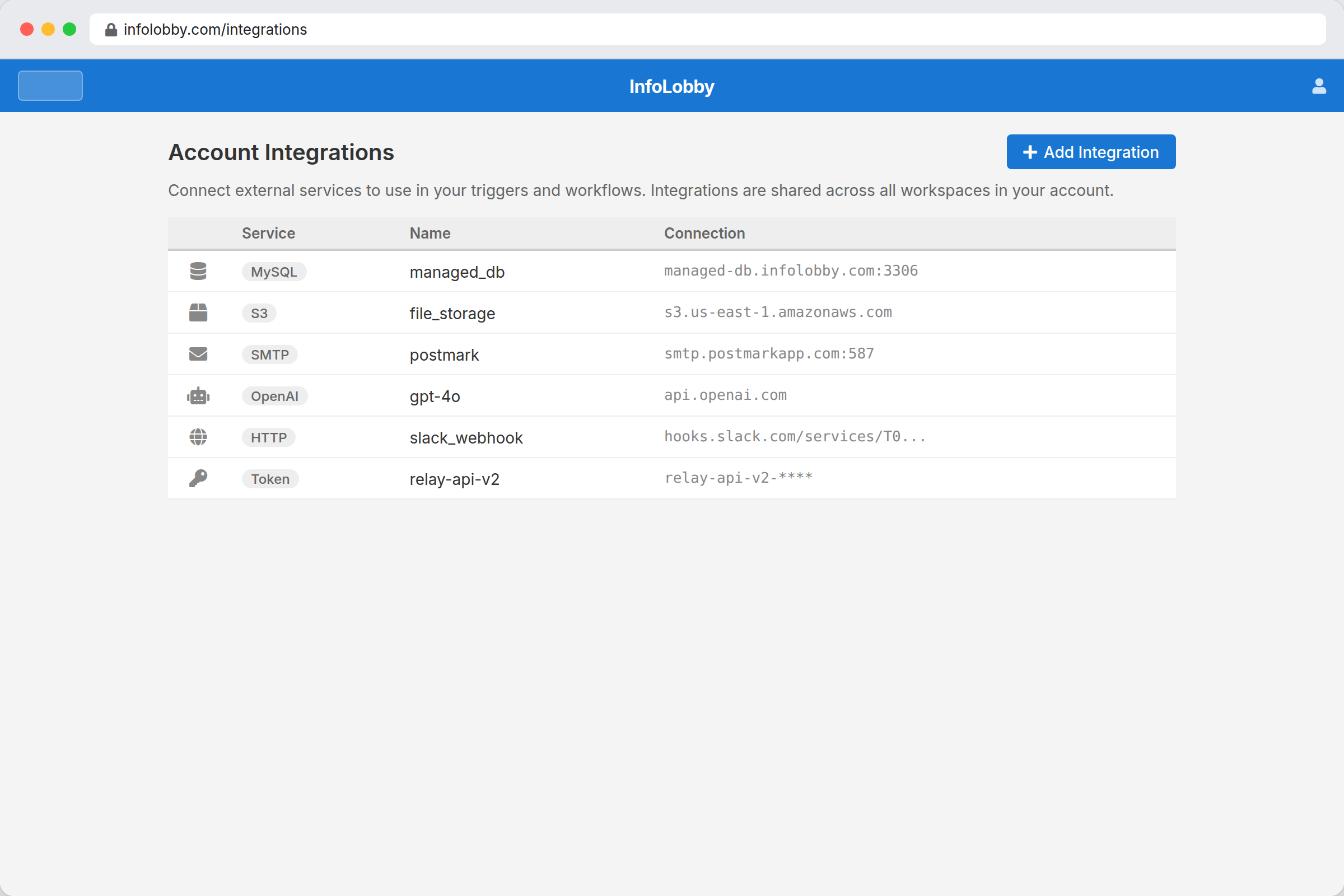
That is how InfoLobby is designed now. Every new account gets a managed MySQL database and managed file storage. You can create workspaces, tables, records, forms, tasks, comments, automations, and API workflows without provisioning infrastructure. If the business later needs its own MySQL, S3, or FTP, it can connect those services.
Quick Answer
Choose a managed database when you want the fastest path to a working operational system.
Choose bring your own database when the data already lives in MySQL, the company needs direct infrastructure control, or the managed plan limits no longer fit.
InfoLobby supports both. That matters because small teams rarely want to become database administrators on day one. They want a usable system now, with an exit path later.
Direct Recommendation
Use InfoLobby's managed database first if you are replacing spreadsheets, starting a new internal tool, collecting data with web forms, or building a shared workspace for operations.
Connect your own MySQL when you already have important business data in a database, need unlimited record capacity outside managed plan limits, or want your own backup, retention, hosting, and access policies.
Do not bring your own database just because it sounds more independent. If nobody on the team wants to manage credentials, backups, uptime, firewall rules, and schema decisions, managed is the more practical start.
Managed Database vs Bring Your Own Database
| Factor | Managed database | Bring your own database |
|---|---|---|
| Setup speed | Fastest. Included at signup | Slower. Needs credentials and access setup |
| Best fit | New workflows, spreadsheet replacements, quick internal tools | Existing production data, custom capacity, strict infrastructure control |
| Maintenance | Vendor manages hosting layer | You manage database availability and backups |
| Record capacity | Limited by plan | Limited by your infrastructure |
| Data access | Through app/API/export paths | Direct database access available |
| Security model | App-managed plus provider infrastructure | Your network, credentials, and database policies |
| Migration risk | Lower at start, because nothing to connect | Lower if the data already lives in your database |
| Team usability | Same InfoLobby interface | Same InfoLobby interface |
The last row is the point. In InfoLobby, the team-facing experience can stay the same either way. The choice is about where the data lives and who manages the infrastructure.
Who This Is For
This guide is for small businesses that need a practical operations system around shared data.
Good fits:
- A service company replacing spreadsheet trackers
- A sales or operations team building a simple CRM
- A back office tracking customers, jobs, vendors, assets, approvals, or service requests
- A team that wants web forms feeding directly into structured records
- A business that may later connect existing MySQL data
- A team that wants unlimited users without turning every collaborator into a seat-cost decision
Not good fits:
- Teams that only need raw database hosting
- Developer teams building a fully custom product backend
- Companies looking for a data warehouse or BI platform
- Teams that need a specialized vertical suite such as ERP, EHR, or warehouse management
- Businesses that want to self-host everything but do not want to operate infrastructure
When Managed Database Is Better
Managed database is usually better at the start.
Small teams often lose weeks trying to design the "right" architecture before anyone has entered one useful record. A managed database removes that delay. You sign up, create a workspace, add tables, invite the team, and start working.
Use managed database when:
- You are starting from spreadsheets or email
- You do not already have a clean production database
- You want a 14-day trial without infrastructure work
- The team needs forms, records, files, tasks, comments, and automations now
- You want InfoLobby to handle the standard database setup
- Your record and storage needs fit a normal plan
The tradeoff is that managed plans have limits. InfoLobby's Starter, Team, and Business plans include managed record and storage limits. That is not a flaw; it is the price of convenience. If your data grows beyond those limits, you can upgrade or connect your own infrastructure.
When Bring Your Own Database Is Better
Bring your own database is better when the database already matters outside InfoLobby.
Examples:
- Your ecommerce, booking, CRM, or internal system already stores operational data in MySQL
- You need direct database access for reporting or integrations
- You have company backup and retention rules
- You want capacity that is not tied to managed plan record limits
- Your IT team controls database hosting and credentials
- You want InfoLobby as the interface and workflow layer, not as the only place data can live
This is the right kind of BYO database use. The database has a job before InfoLobby enters the picture. InfoLobby then adds the human-facing layer: tables, views, forms, tasks, comments, files, permissions, automations, history, and API access.
The tradeoff is responsibility. Your database means your uptime, backups, network access, credentials, and schema discipline. If that sounds like overhead, it is.
Where Traditional SaaS Still Wins
Traditional SaaS tools are often the better choice when the workflow is already solved by a specialized product.
Use a dedicated SaaS app when:
- You need a full accounting system
- You need a mature email marketing suite
- You need a help desk with deep ticketing features
- You need a vertical industry product with built-in compliance
- You want a polished app for one narrow workflow
- Data portability is less important than feature depth
InfoLobby is not trying to replace every specialized SaaS product. It fits best when your business process is custom enough that a rigid SaaS app does not match, but not so custom that you want to build software from scratch.
Where InfoLobby Fits
InfoLobby is the middle path between raw databases and rigid SaaS apps.
It gives you:
- Managed MySQL and file storage by default
- Optional own MySQL, S3, or FTP later
- Workspaces with read-only, read-write, and admin roles
- Visual tables, fields, record pages, and search
- Web forms for external intake
- Tasks, comments, files, notifications, and follows
- Automations from record changes, schedules, webhooks, or manual runs
- Public API access for records, comments, files, tasks, spaces, and tables
That combination works when the team needs to run work around records, not just store rows.
For related product detail, see managed database software, business system integrations, and online database software.
Cost and Limit Reality
Managed database pricing is easier to start with. Bring your own database pricing is easier to control at scale.
InfoLobby plans include unlimited users. Paid plans are based on workload limits such as managed records, storage, workspaces, automation runtime, web forms, and API calls. Current visible plans are Starter at $29/month, Team at $59/month, Business at $129/month, and Enterprise custom. See pricing.
Records on your own MySQL server do not count against the managed database record limit. That is useful for teams with large existing datasets or high-volume operational records.
But "bring your own" is not free. You still pay for hosting, backups, monitoring, and whatever time your team spends managing the database. A cheap server can become expensive if nobody owns it properly.
Migration Path
A practical path looks like this:
- Start with the managed database for a new workflow.
- Build the workspace, tables, fields, forms, and permissions.
- Add automations only where they remove real repeated work.
- Invite the team and watch what they actually use.
- Connect your own MySQL later if capacity, existing data, or governance requires it.
If you already have production MySQL data, reverse the first step:
- Connect your existing MySQL.
- Add the tables your team needs to work with.
- Clean up layouts and permissions.
- Add forms, tasks, comments, files, automations, and API access around the records.
Do not start with an abstract architecture debate. Start with the records the team needs to manage.
Decision Checklist
Choose managed database if:
- You need to start this week
- You do not already have a usable database
- You want InfoLobby to handle setup
- Your plan limits are enough
- Your team cares more about workflow than infrastructure
Choose bring your own database if:
- Your operational data already lives in MySQL
- You need direct database access
- You need capacity beyond managed limits
- Your company requires its own hosting or credentials
- You have someone responsible for database operations
Choose traditional SaaS if:
- A specialized product already solves the workflow
- You want the vendor's exact templates and opinionated process
- You do not need database-level control
- Switching later would not create much risk
FAQ
Is InfoLobby still a bring-your-own-database tool?
Not strictly. InfoLobby includes managed MySQL and file storage by default. Bring your own MySQL, S3, or FTP is an option when you need existing data, custom capacity, or infrastructure control.
Do I need to know SQL to use InfoLobby?
No. Daily users work with tables, records, forms, files, tasks, comments, and automations. SQL knowledge helps for advanced database work, but it is not required for normal team use.
What happens if I outgrow the managed database limits?
You can upgrade your plan or connect your own MySQL server. Own-MySQL records do not count against managed database record limits.
Is bring your own database safer than managed?
Not automatically. It gives you more control, but also more responsibility. A managed database is often safer for teams that do not have someone actively maintaining backups, access rules, and uptime.
Can I mix managed and own infrastructure?
Yes. InfoLobby is designed so teams can start with managed services and connect their own MySQL, S3, or FTP later when the need is real.
Bottom Line
Small businesses do not need database ideology. They need a system the team can use without losing control of the data.
Start managed when speed matters. Bring your own database when control matters. Use InfoLobby when you want both paths available without rebuilding the workflow later.
Start with InfoLobby's managed database
Related reading: avoid vendor lock-in, Airtable record limits, MySQL frontend with automation, and when to move from Google Sheets to a database. For the category comparison, see online database software.