Agency Client Work Tracker
We rebuilt a small agency's broken client tracker into a working operational system, without enterprise PM overhead.
Most small agencies do not need ClickUp or Asana. They need one place where clients, projects, tasks, files, and next actions agree.
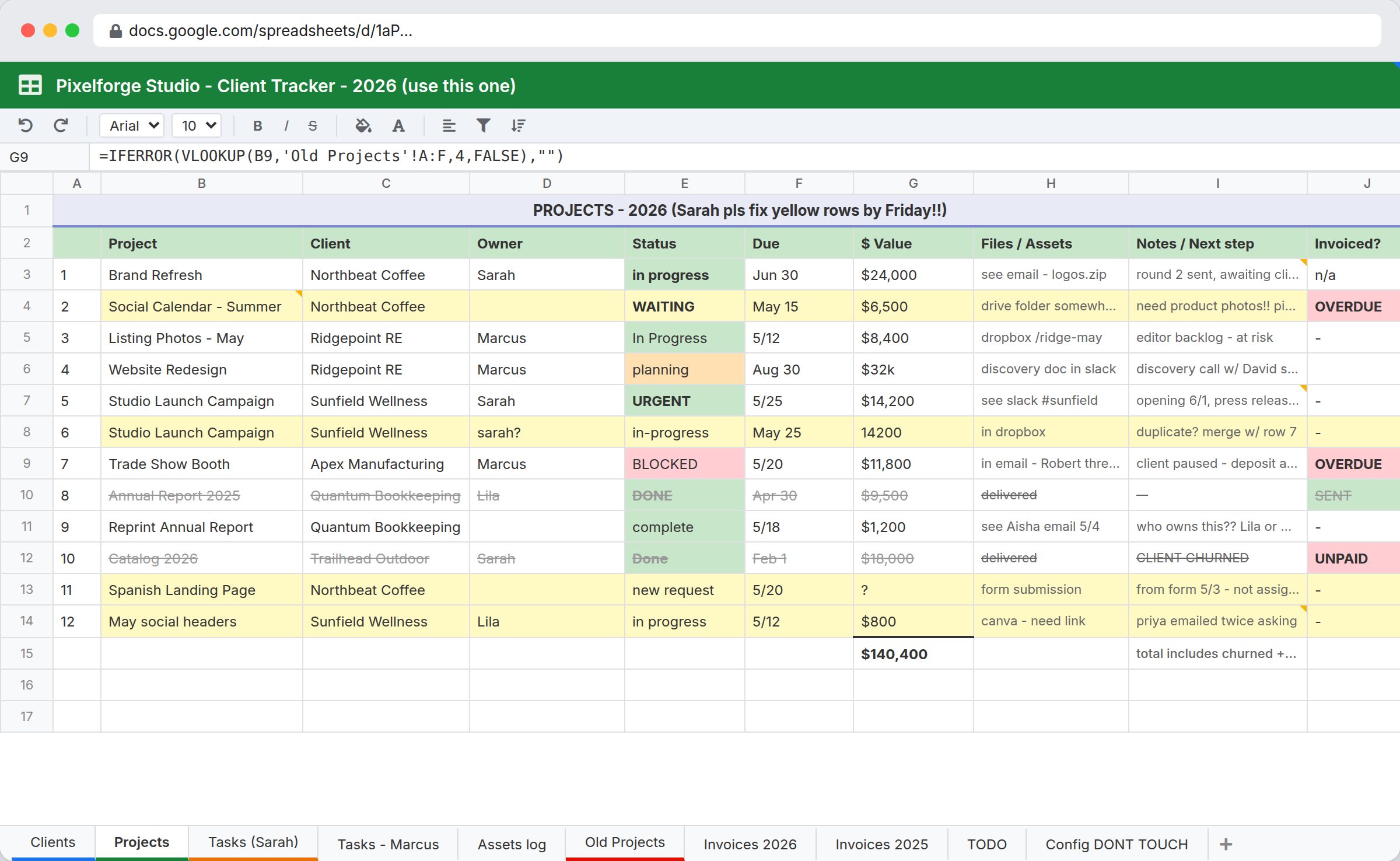
Before: the broken sheet
After: the rebuilt workspace

Why this spreadsheet stops working
An agency tracker spreadsheet usually starts as one tab. Then it becomes ten tabs, three colors, two duplicate rows, and a column called 'Notes' that holds the entire client relationship. This rebuild shows what a small agency operating system looks like when intake, status, ownership, and assets live next to each other instead of scattered across email, drive, and a sheet nobody trusts.
Specific failure points
- Statuses typed inconsistently: 'in progress', 'In Progress', 'in-progress', 'WAITING', 'complete', 'DONE'
- Duplicate project rows nobody noticed (Studio Launch appears twice with conflicting data)
- Owner cells left blank, so nobody knows who has the next action
- Files scattered across email, Drive, Dropbox, Slack, and 'see Aisha email 5/4'
- Client requests show up in the same sheet as live projects, with no intake form
- The dollar total at the bottom is wrong because it includes churned and unpaid work
The rebuilt structure
Tables
- Clientsname, primary contact, industry, status, owner
- Projectsname, client (link), owner, start, due, status, priority
- Tasksname, project (link), assignee, due, status, blockers
- Assetsname, project (link), file, type, version
- Client Requeststitle, client (link), submitted via, status, owner, due
Views
- Active projects
- Waiting on client
- Due this week
- My tasks
- At risk (overdue or stuck high-priority)
Forms
- Public client request intake, embedded on the agency website
- Internal asset upload
- Internal new project brief
Automations
- New client request assigns owner based on the client
- Project status change to 'Waiting on Client' emails the primary contact
- Task due tomorrow notifies assignee
What the workspace actually looks like


Best fit
- Small agencies and freelancers with 5–30 active client projects
- Teams running client work from a shared sheet that has become unreliable
- Agencies that want one operational system without buying ClickUp or Asana
Probably not a fit
- Agencies needing advanced capacity planning or resource forecasting
- Agencies already committed to ClickUp or Asana with deep process built in
- Client-facing portals with full external login requirements
FAQ
Does this replace ClickUp or Asana?
Not for agencies that already run a deep process inside one. This is the operational layer for agencies whose project tracking has become a spreadsheet plus an inbox plus a Drive folder, and where the goal is one place where clients, work, and files agree, not adding another heavyweight PM tool.
Can clients log in to see their projects?
Not directly with a full client portal. The practical pattern is a public intake form for new requests plus automated status emails when a project moves to 'Waiting on Client' or similar. The client gets timely updates without a login, and you keep one internal source of truth.
How long does it take to set this up?
About 30 to 60 minutes for a working version with the five tables, sample data, and one or two automations. Adding the embedded intake form and email notifications takes a little longer. The screenshots above show the finished workspace.
Want this for your spreadsheet?
Send the sheet that runs your work today. We will map the first InfoLobby version, build the workspace, and walk you through it on a 30-minute call. Normally $250free during our launch period in exchange for honest feedback and a public testimonial, credited by first name and last initial only.