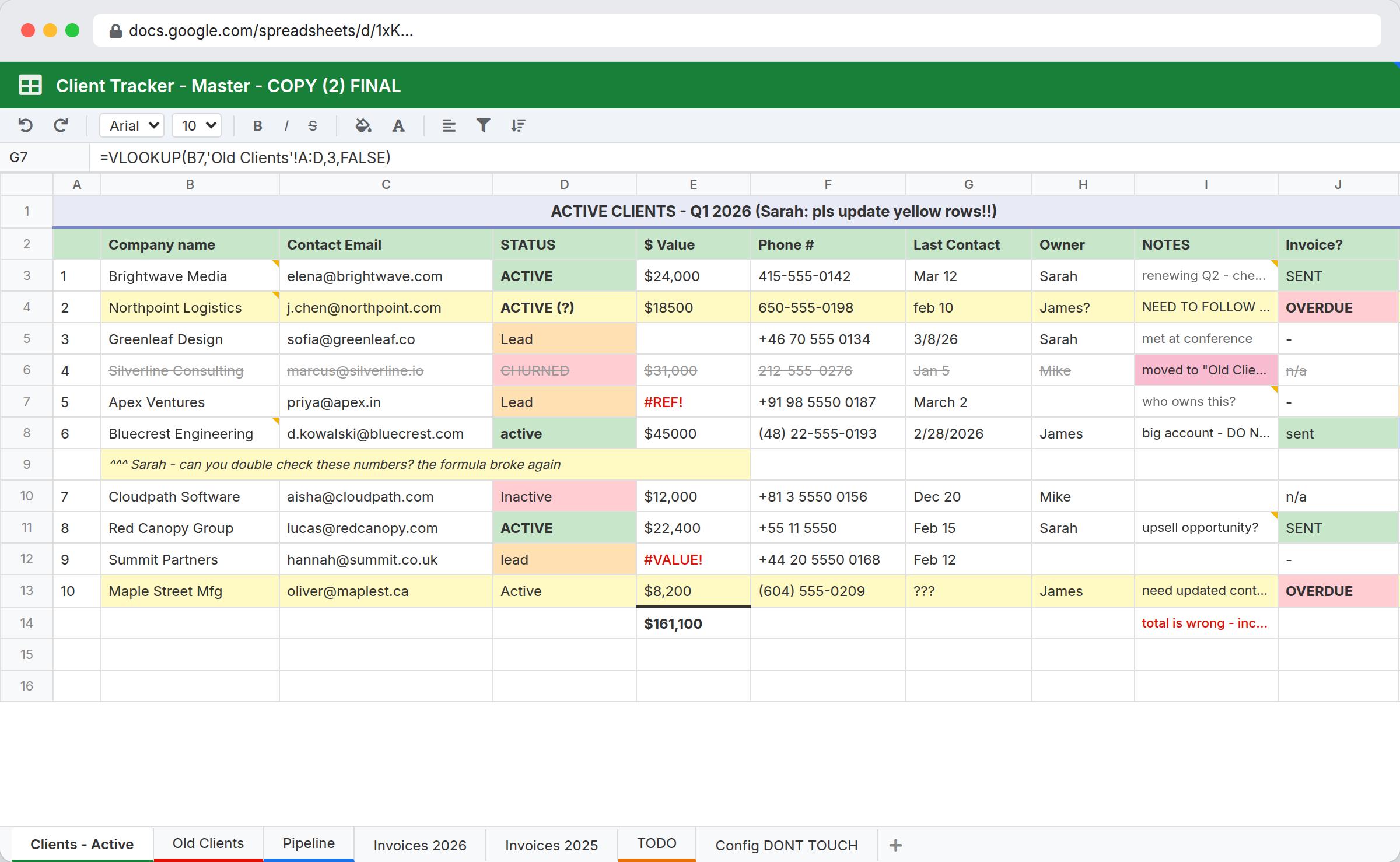
Spreadsheets are the correct first answer to almost every operational problem. They cost nothing, everyone knows them, and you can have something working before a meeting about which software to buy would have finished. Most processes should start in a spreadsheet.
The question is not whether spreadsheets are good. It is knowing when a particular one has stopped working, because that moment is easy to miss. The sheet does not break. It degrades, and the cost shows up as everyone's time rather than as an outage.
The signals that a sheet has outgrown itself
Six specific symptoms, in rough order of how early they appear:
One person maintains it. There is a person who knows why column M is coloured. When they are away, the sheet is frozen. This is the earliest signal and the most ignored.
Copies have appeared. tracker_v4_FINAL_jan.xlsx exists. So does someone's local copy with three extra rows. You no longer know which is true.
Structure encodes meaning. Row order matters. Blank rows separate sections. A cell is red because of something that happened in March. None of this survives a sort.
Nobody can answer "what changed." A number is wrong and there is no way to find out when it became wrong or who did it. Version history tells you a cell changed, not why or in what context.
Lookups are load-bearing. VLOOKUP chains across tabs, and when one breaks it fails quietly. You find out downstream.
Access is all or nothing. Someone needs to update two fields, so they get edit access to everything. Or they do not get access and email their updates to the person who does.
Any two of those together is usually the point at which the sheet is costing more than it saves.
What structure buys you
Moving one process into a database changes four specific things:
Fields have types. A date field holds dates. A single-select holds one of your defined options. Nobody types "Pending " with a trailing space and creates a second category.
Relationships are explicit. An order links to a customer. You do not maintain the customer name in eleven places and hope they match.
Permissions are per workspace and per role. Read Only, Read and Write, or Admin. Someone can update the records they own without being able to restructure everything.
Every change is recorded. Activity history shows what changed, when, and whether a person, a web form, an API call, or a flow made the change. This is the capability with no spreadsheet equivalent, and it is usually the one that settles the argument.
Beyond that, forms replace "email me your updates," tasks replace "remember to chase this," and flows replace "someone checks on Fridays."
Migrating one process, concretely
Do not migrate everything. Pick the one sheet causing the most drag and do it properly.
Split the tabs into tables. A tab per entity usually becomes a table per entity. Where a tab is a filtered view of another tab, that is a view, not a table.
Type every column. This is where the mess surfaces: dates stored three ways, statuses with variants, numbers as text. Clean it during import rather than importing the mess.
Replace lookups with links. Every VLOOKUP is a relationship trying to exist. Make it a linked record.
Rebuild the coloured cells as fields. Colour is data that formatting stole. If red means overdue, that is a date comparison. If red means escalated, that is a field.
Recreate the tabs as views. The daily working list, the review queue, the exceptions. These were separate tabs; now they are filters on one table, always current.
Expect the field list to keep moving for a fortnight after go-live. That is normal and cheap to change.
What to keep in spreadsheets
Being honest about this matters, because the answer is not "everything."
- Analysis. Ad hoc modeling, pivot exploration, one-off calculations. Export and analyze in Excel or Google Sheets. That is what they are good at.
- Financial modeling. Multi-sheet workbooks with dependent formula chains and scenario columns. Excel does this and nothing here replaces it.
- Genuinely one-off work. If you will use it twice and throw it away, use a sheet.
- Solo work where the sheet is the deliverable.
It is also worth naming the middle option. Airtable, Baserow, and Notion databases sit between a spreadsheet and this, and for a small tracker any of them may be enough. The difference shows up at scale and at team size: Airtable caps a base at 125,000 records on its Business plan and charges per collaborator, Notion charges per member, and both make the fifth and tenth editor a budget conversation. Our Airtable and Notion comparisons go through the specifics.
What it costs
Plans are $29, $59, and $129 a month, with unlimited users on every one, which is the whole argument against the per-seat middle ground above.
The limits that decide your plan are workspaces and records. Starter gives 3 workspaces and 250,000 records, Team gives 10 and 1 million, Business gives 25 and 5 million. One migrated spreadsheet is usually one workspace, so Starter covers the first two or three processes and Team covers most small businesses outright. Connecting your own MySQL server makes records unlimited on any plan.
The dividing line is roughly: recurring processes with multiple people and a need for accountability belong in a database. Analysis belongs in a spreadsheet. Many teams need both, and connecting them by export is fine.
What migrating costs you
- Setup time. An afternoon for a simple tracker, longer for something with real complexity. A spreadsheet needs none.
- Formula flexibility. You cannot drop an arbitrary calculation into a cell. Computation happens through fields and flows, which is more structured and less immediate.
- Universality. Everyone knows spreadsheets. A new tool needs a short explanation, even a good one.
- The escape hatch. Part of why sheets are loved is that anyone can bodge anything into a cell. Structure removes that, which is the point and is also occasionally annoying.
Related
- Internal tools for operations teams for building the system the sheet was pretending to be
- Custom CRM for the customer tracker specifically
- Intranet for small business for the reference lists everyone asks about
InfoLobby plan pricing and limits, and the competitor claims on this page, were last checked on 2026-08-20. Competitor pricing changes often and varies by region, so confirm current figures on the vendor's own pricing page before deciding. Our plans are on the pricing page.