Project management software is built around a plan: tasks, dependencies, durations, a critical path. It answers when the work will finish if the plan holds.
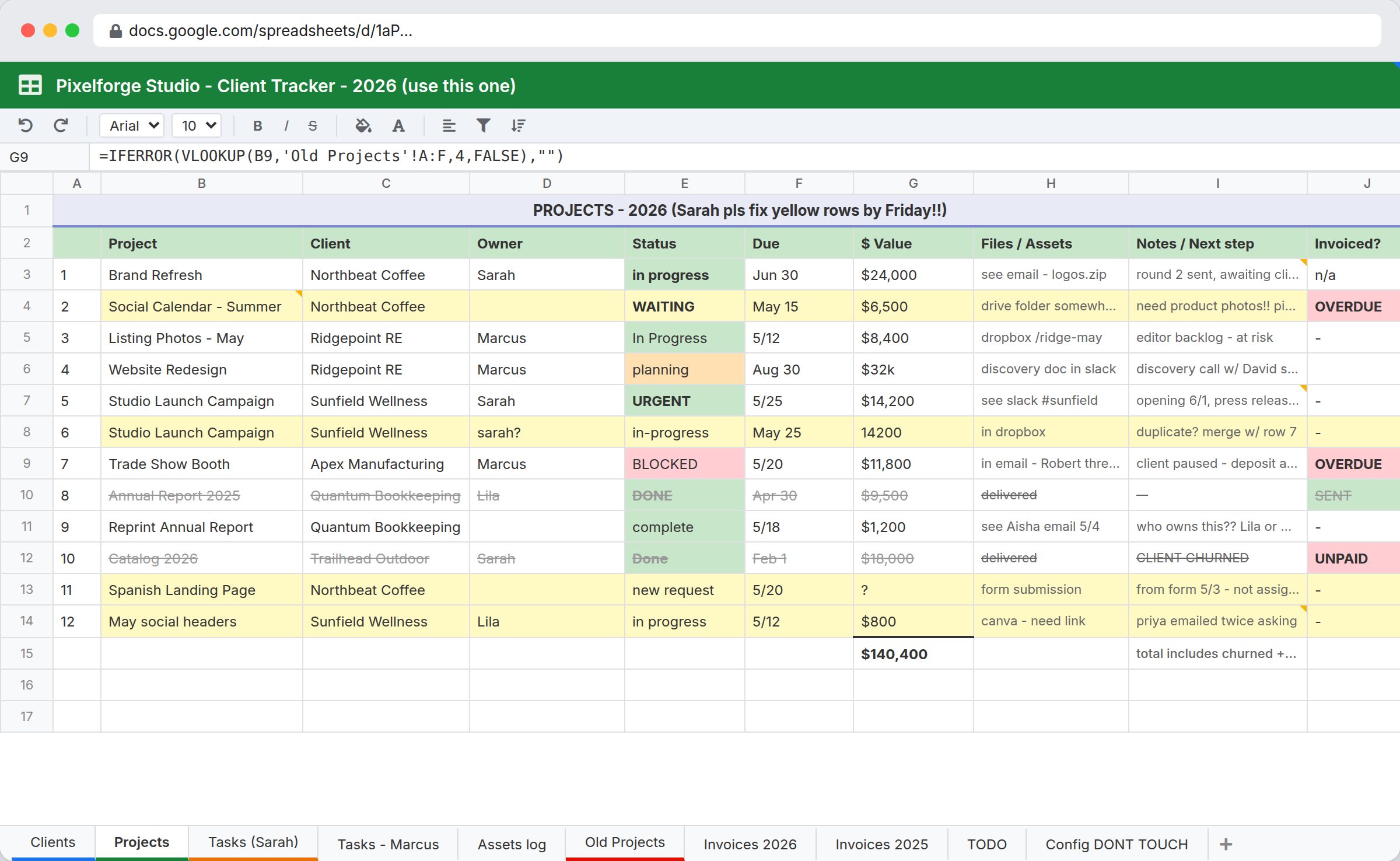
Project operations is a different question. It is the recurring administrative reality around delivery: which client inputs are outstanding, which approvals are pending, which deliverable is waiting on a file somebody promised, what the account manager needs to know before a call tomorrow. That work does not fit a Gantt chart, and teams end up running the plan in a PM tool and the reality in a spreadsheet.
Why delivery teams end up with two systems
The PM tool models tasks. Delivery operations involves things that are not tasks: a client contact who has not sent brand assets, a contract clause affecting scope, an invoice query blocking sign-off, a dependency on a third party. These are records with their own status and owner, and a PM tool has nowhere to put them except as tasks with misleading names.
So a spreadsheet appears. It holds the client list, the real status, the blockers, and the notes that matter. The PM tool holds the plan, which drifts from reality within two weeks because nobody updates a plan they do not use.
The fix is not better discipline about updating the PM tool. It is recognizing that operational reality is structured data and needs a place to live.
Making blockers a first-class record
| Table | Key fields | Links to |
|---|---|---|
| Clients | Name, account manager, contract terms, status | Projects |
| Projects | Name, client, status, start, target date, owner, value | Clients, Deliverables, Blockers |
| Deliverables | Name, project, status, due date, approved date, owner | Projects, Tasks |
| Blockers | Description, project, raised date, owner, waiting on, resolved date | Projects |
| Tasks | Description, assignee, due date, done | Deliverables, Projects |
Blockers as a first-class table is the decision that makes this useful. A blocker has a raised date, an owner, and a "waiting on" field naming who or what it depends on. That last field is the one nobody has and everybody needs, because the most common project failure is nobody knowing whose turn it is.
Age on blockers is the metric worth watching. A blocker open eleven days is a different problem from one open since this morning, and without a raised date you cannot tell them apart.
The views that run the week
- Blockers by age, oldest first. The Monday meeting agenda. Anything over a week gets discussed.
- Deliverables due this week, by owner. The commitment list.
- Projects by status, grouped by account manager. The portfolio view.
- Blockers where "waiting on" is a client. The chase list, which usually turns out to be longer than anyone assumed.
That last view tends to change conversations, because it makes visible how much delivery time is spent waiting on inputs rather than doing work.
Where this fits against PM tools
Use a PM tool if you need dependency chains, critical path, resource levelling, burndown, or sprint planning. Software teams generally want Jira or Linear. Teams wanting timeline views and resource planning want Asana, monday.com, or Smartsheet. Nothing here replaces any of them.
Use this if your delivery risk is mostly about handoffs, approvals, client inputs, and whose turn it is; if the same client and project records need to carry sales context and delivery reality; if your process has enough quirks that packaged PM tools need workarounds.
Use both if you genuinely need scheduling. The public REST API can push status between them. Be honest about whether the plan is load-bearing before committing to maintaining two systems.
On cost, plans are $29, $59, and $129 a month with unlimited users. PM tools price per seat, typically $9 to $25 a user a month, which is why account managers and finance people who need to see project status often do not have logins. Workspaces are the limit worth checking: 3 on Starter, 10 on Team, 25 on Business.
What this does not do
- No dependency management or critical path. Tasks have due dates and owners. They do not have predecessors, lag, or automatic rescheduling.
- No Gantt chart. Calendar and kanban views exist. Timeline visualization with dependency arrows does not.
- No resource levelling or capacity planning. You can see who has what assigned. Nothing calculates utilization or flags overallocation.
- No time tracking or billing. You can record time as a field, but there is no timer, no timesheet approval, and no invoicing.
- No sprint or agile tooling. No backlogs, points, velocity, or burndown.
If three or more of those matter, buy project management software.
Related
- Client portal software for giving clients visibility into their own projects
- Approval workflow software for sign-off steps inside delivery
- Custom CRM for the sales side of the same client records
InfoLobby plan pricing and limits, and the competitor claims on this page, were last checked on 2026-08-20. Competitor pricing changes often and varies by region, so confirm current figures on the vendor's own pricing page before deciding. Our plans are on the pricing page.