TL;DR
- Record Lock ties each record to one User field, so it cannot name both an Owner and a Manager.
- A table validation rule of about ten lines can limit updates and deletes to those two people, and it runs before the write is saved.
- Check the people on
$before, not$record, so nobody can add themselves in the same save that gets checked. - Let automations through at the top of the rule, or it will block your own flows.
- Validation guards writes. It cannot hide records. If a non-admin Manager has to see records that other users cannot, InfoLobby does not support that today.
A vendor submits an invoice. Someone on your team is responsible for processing it, but their manager also needs to review it, make changes, or approve it.
Both people should be able to update the invoice. Other employees should not.
This is where single-owner record permissions become limiting.
Many systems let you assign a record to one user and restrict access based on that assignment. That works until another person needs access to the same record.
InfoLobby's Record Lock provides single-user record ownership. It can restrict which records users see or edit based on one User field.
But what if you need two people to have editing rights?
We can use table-level validation to enforce that rule.
In this example, we'll use a vendor invoice management system with two user fields, Owner and Manager, and a validation rule that permits either person to modify the invoice.
The setup
I already have a vendor management system in InfoLobby with an Invoices table.
Vendors submit invoices, which are then reviewed, approved, and eventually marked as paid.
For this demonstration, I added two single-user fields:
- Owner: The person responsible for processing the invoice.
- Manager: The person supervising the Owner.
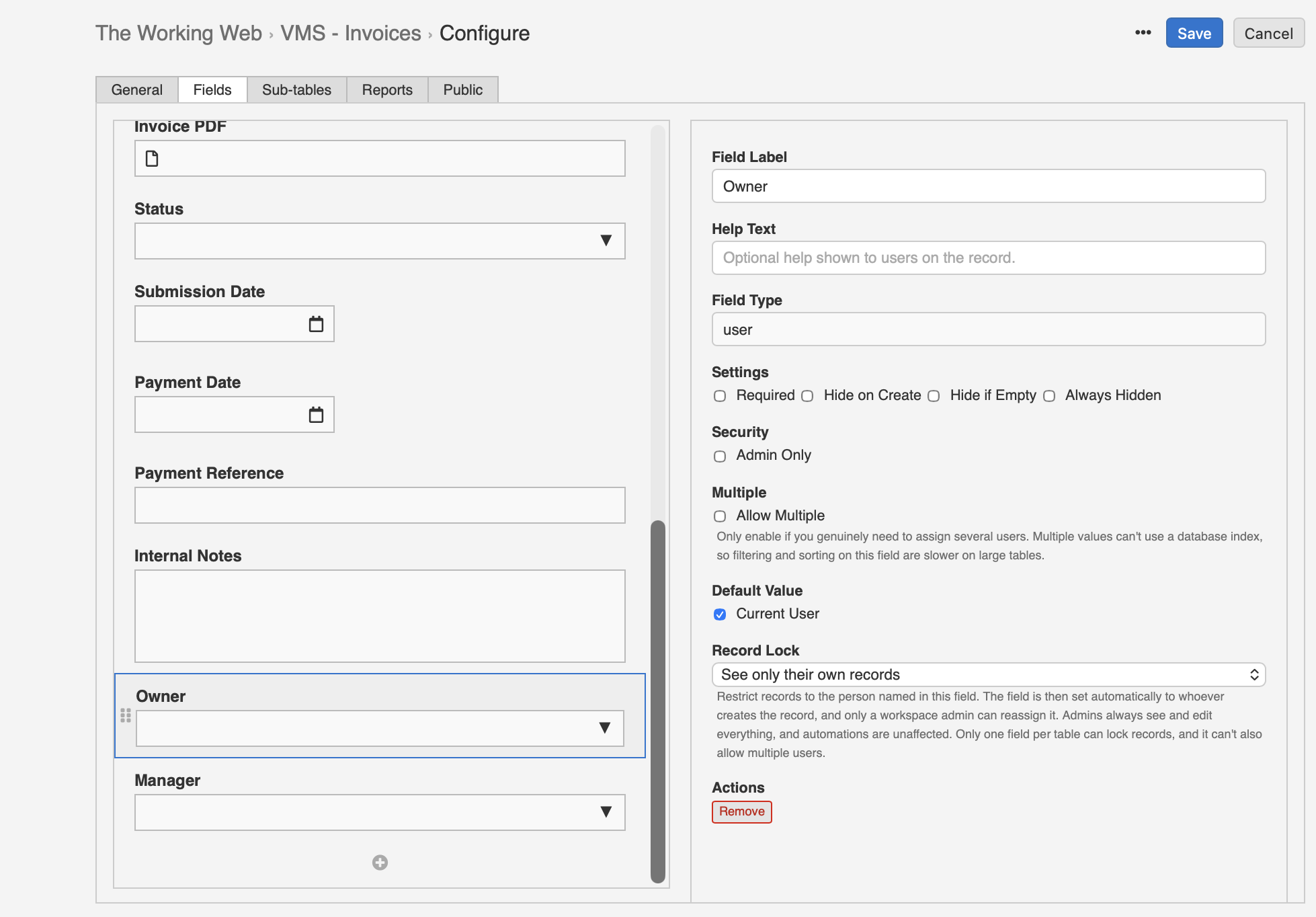
The Owner field defaults to the current user when a record is created.
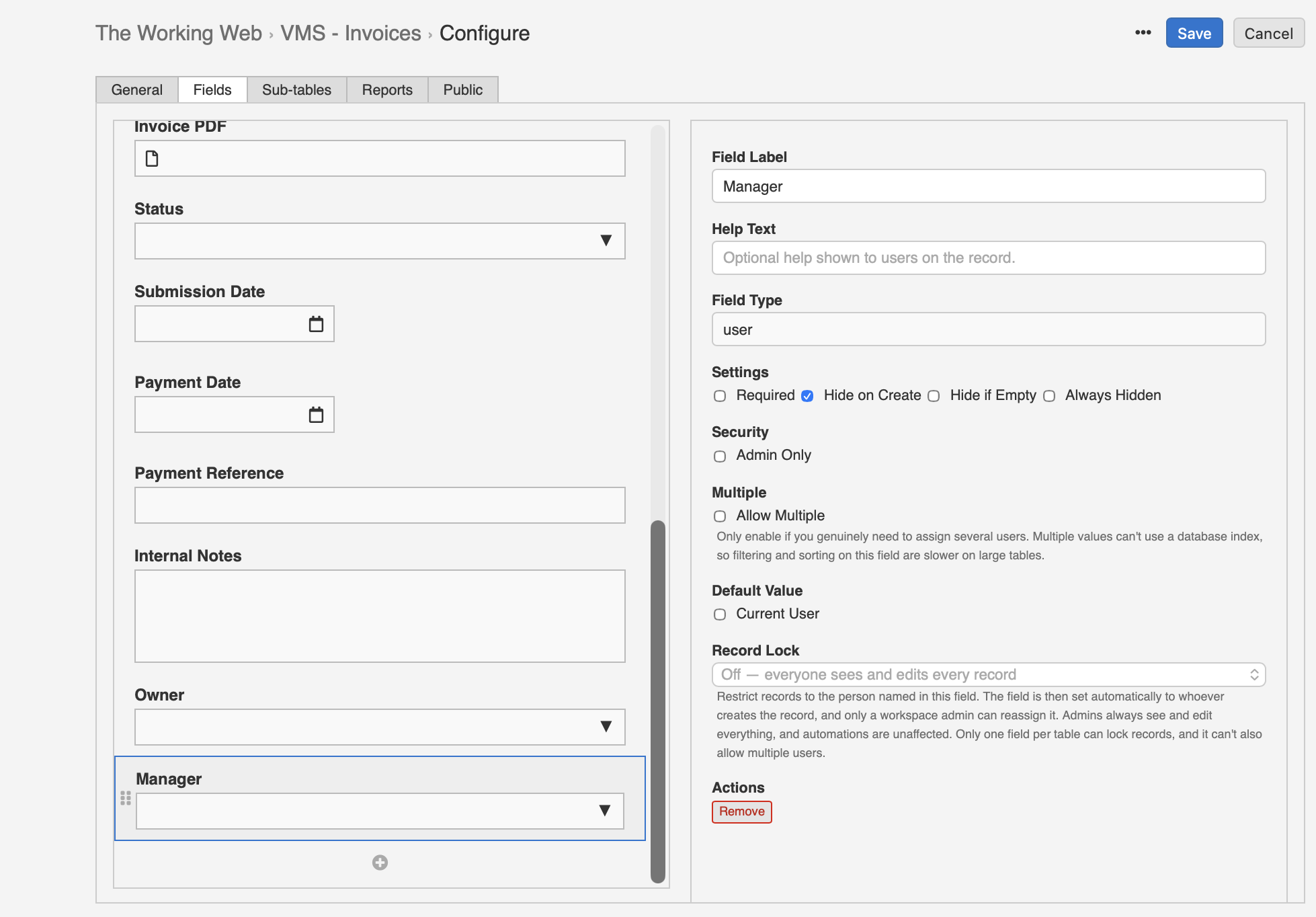
The Manager field is populated through an automation after the invoice is created. This could be based on the Owner's assigned manager or another business rule.
Both fields are ordinary single-user fields. We don't need to enable multiple users on either one.
To restrict visibility, I enabled See only their own records on the Owner field.
Now each user sees only the invoices assigned to them as Owner.
Even if another user tries to access an invoice directly by changing the record ID in the URL, InfoLobby prevents access and redirects them back to the main table view without displaying the record.
With Record Lock on the Owner field, permissions work out like this:
| Action | Owner | Manager (Admin) | Manager (Non-admin) | Other user |
|---|---|---|---|---|
| Create invoice | Allowed | Allowed | Allowed | Allowed |
| View invoice | Allowed | Allowed | Blocked | Blocked |
| Update invoice | Allowed | Allowed* | Blocked | Blocked |
| Delete invoice | Allowed | Allowed* | Blocked | Blocked |
*Workspace administrators bypass Record Lock, but the validation script shown does not automatically exempt them. An administrator must also be the Owner or Manager to pass this validation rule.
Record Lock controls which invoices users can access. Although our validation rule authorises both Owner and Manager to make changes, a Manager without administrator privileges cannot access another user's invoice when Record Lock is enabled on Owner. Administrators can access those records, but still need to satisfy the custom validation rule.
Enforcing the rule with table-level validation
InfoLobby allows you to define a PHPScript validation rule at the table level.
The rule runs synchronously before a record is created, updated, or deleted.
It receives several variables, including:
$record: The proposed record values.$before: The existing record values on updates and deletes.$user: The user performing the operation.$via: How the write was initiated.
If the script returns a non-empty message, the operation is rejected. If it returns nothing, the write continues.
This means we can check who is attempting to modify an invoice before the change is saved.
Open the Invoices table configuration, find the Validation editor under General, and add the following PHPScript:
// AUTOMATIONS
if ($via == "flow" || $user["system"]) {
    return "";
}

// UPDATE
if (!empty($record) && !empty($before)) {
    if (
        ($before["manager"]["id"] ?? null) != $user["id"] &&
        ($before["owner"]["id"] ?? null) != $user["id"]
    ) {
        return "Only the record owner or manager can update.";
    }
}

// DELETE
if (empty($record) && !empty($before)) {
    if (
        ($before["manager"]["id"] ?? null) != $user["id"] &&
        ($before["owner"]["id"] ?? null) != $user["id"]
    ) {
        return "Only the record owner or manager can delete.";
    }
}
There are three important details here.
First, the opening check lets automations through. Validation runs on every write, including the ones your flows make. Without this check, the rule would reject any flow write unless the flow's user happened to be the Owner or Manager, and that includes scheduled flows, which have no user at all.
Second, the conditions use &&, not ||. We only reject the operation when the current user is neither the Owner nor the Manager. Matching either field is sufficient.
Third, we compare the user against $before, which contains the existing record values.
This matters because someone could otherwise attempt to change the Owner or Manager field in the same update to grant themselves permission.
By checking the existing assignments, we make the decision based on who was authorised before the update was submitted.
The script also distinguishes updates from deletes. On deletion, $record is empty, while $before contains the record being deleted.
We haven't added a restriction on creating invoices. The validation rule only enforces ownership when an existing record is modified or deleted.
Testing with different users
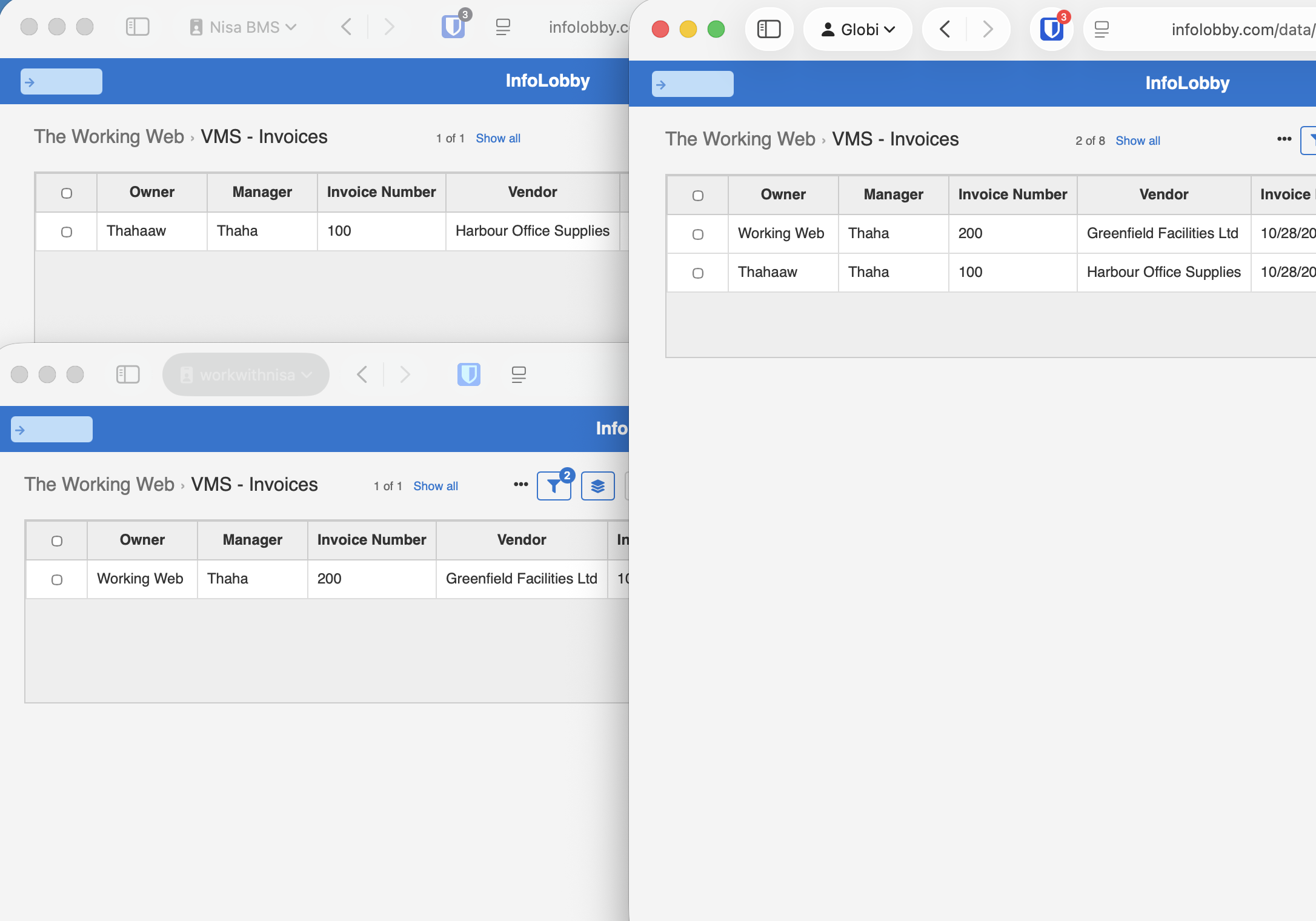
To test the behaviour, I created two invoices using separate user accounts.
Invoice 100 belongs to Thahaaw and invoice 200 belongs to Working Web. The automation assigned Thaha as Manager on both.
Each user can see their own invoice when Record Lock is enabled. A workspace administrator sees both.
An unauthorised update
Next, Thahaaw changed the Manager on invoice 100 to Working Web. That save went through, because Thahaaw is the Owner.
I then attempted to update the same invoice using a workspace administrator account that was now neither its Owner nor its Manager. It has to be an administrator, because Record Lock hides the invoice from everyone else.
The validation hook rejected the save and displayed the message:
"Only the record owner or manager can update."
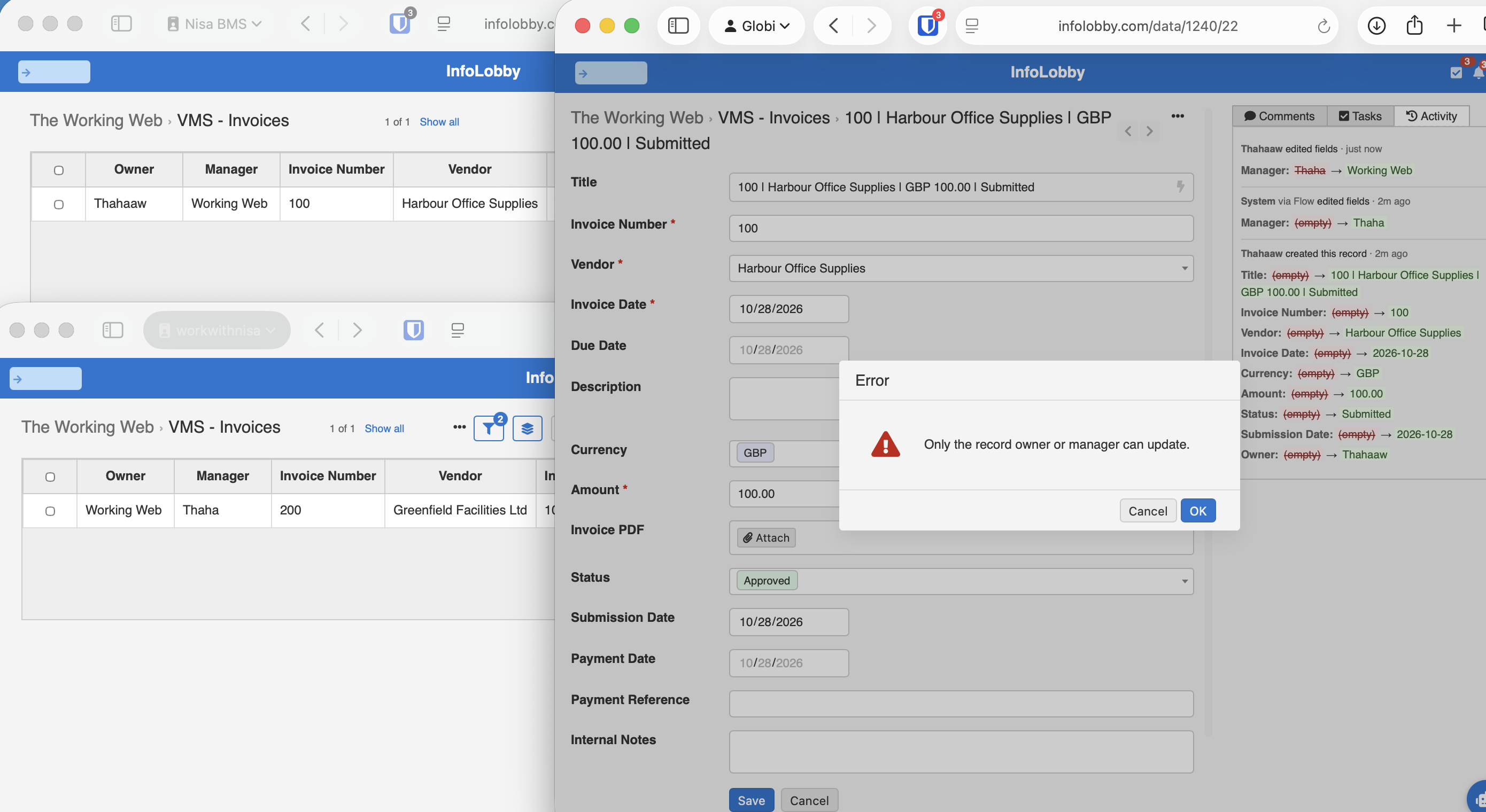
The attempted change was not committed.
This is different from running an automation after the record has already been updated. The validation happens before the write is accepted.
An unauthorised deletion
I repeated the test by attempting to delete the invoice from the same account.
The deletion was also rejected, with the message:
"Only the record owner or manager can delete."
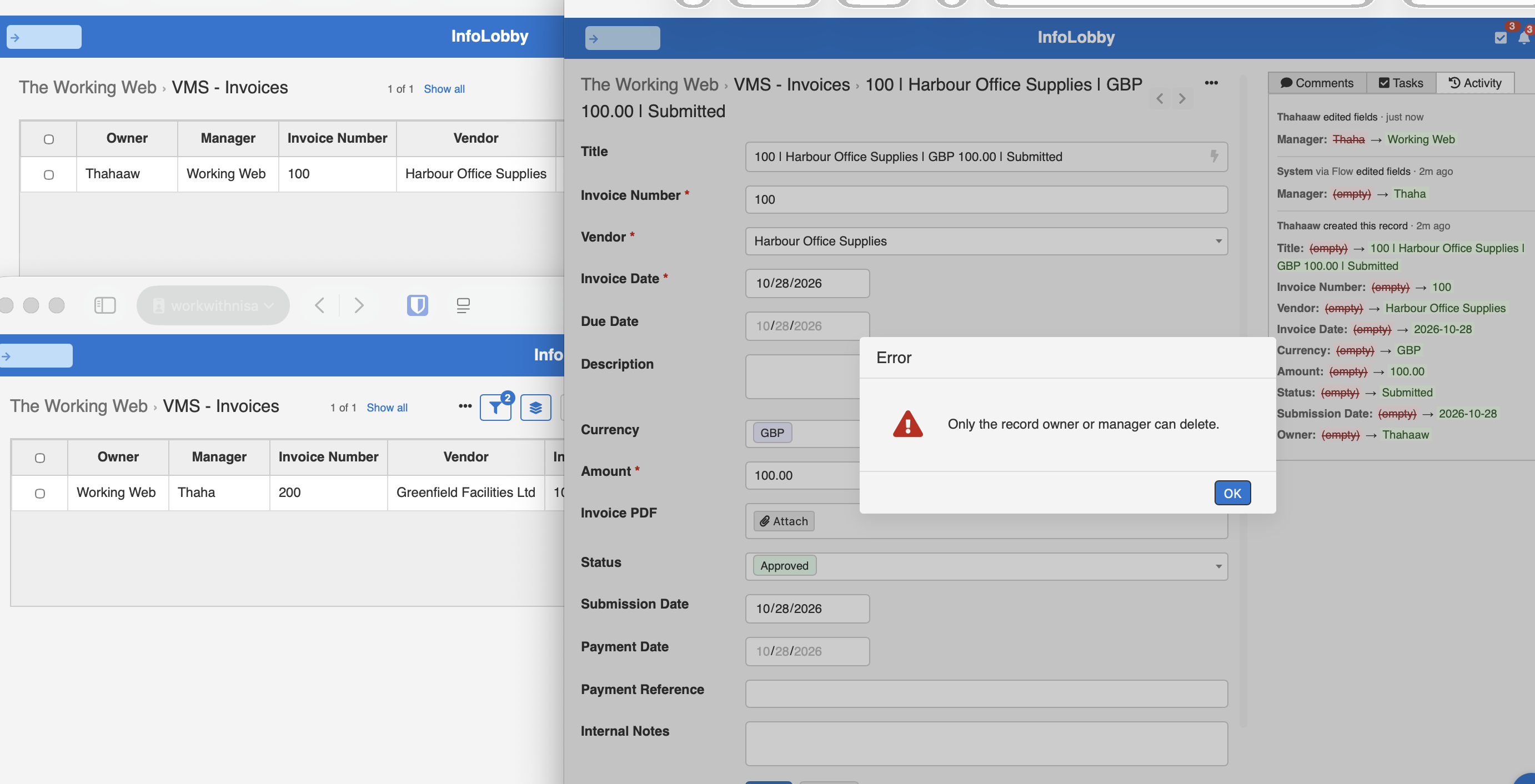
The invoice remained in the table.
The same validation rule therefore protects both updates and deletions, without requiring separate automation workflows.
What about Record Lock?
We've used table-level validation to control who can update or delete an invoice, and we've used Record Lock to control who can see the invoice.
This means that while our validation rule allows both Owner and Manager to update an invoice, a Manager who is not the Owner cannot see that invoice when Record Lock is enabled, unless they are a workspace administrator.
The distinction is simple:
- Validation Hook: Controls who can update or delete a record.
- Record Lock: Controls which records a user can see or edit, based on one User field.
For now, if a non-admin Owner and Manager both need to edit records, leave Record Lock off and let the validation rule do the work. A read lock hides the invoice from the Manager, and a write lock shows it but still refuses their save. The cost is that everyone with access to the table can see every invoice.
If you also need to restrict visibility so managers can see their team's records and nobody else can, the current Record Lock functionality does not support that arrangement.
When should you use this approach?
Table-level validation is useful when your requirement is about who can change a record, rather than who can see it.
You might use the same pattern for purchase requests, support tickets, customer accounts, project tasks, or other records that have both a responsible person and a supervisor.
The rule can also be extended to check additional users, roles, statuses, or other conditions.
The advantage is that the restriction is enforced before the record is saved, regardless of which editable field the user changes.
But validation should not be confused with a complete row-level permission system.
Use Record Lock for supported single-user record visibility restrictions. Use Validation Hooks for business rules that determine whether a write is allowed.
They solve different problems, and understanding that distinction is important when designing access controls.
For a separate example of Record Lock in practice, see Row-level permissions for a cleaning company.
You can also explore the Record Lock and Validation documentation for the configuration options available in InfoLobby.