Know What Changed Without Reconstructing It Later
See who changed what and when, whether it was a person, a form, a flow, an API key, or an AI.
When somebody asks who changed this, the record already knows.
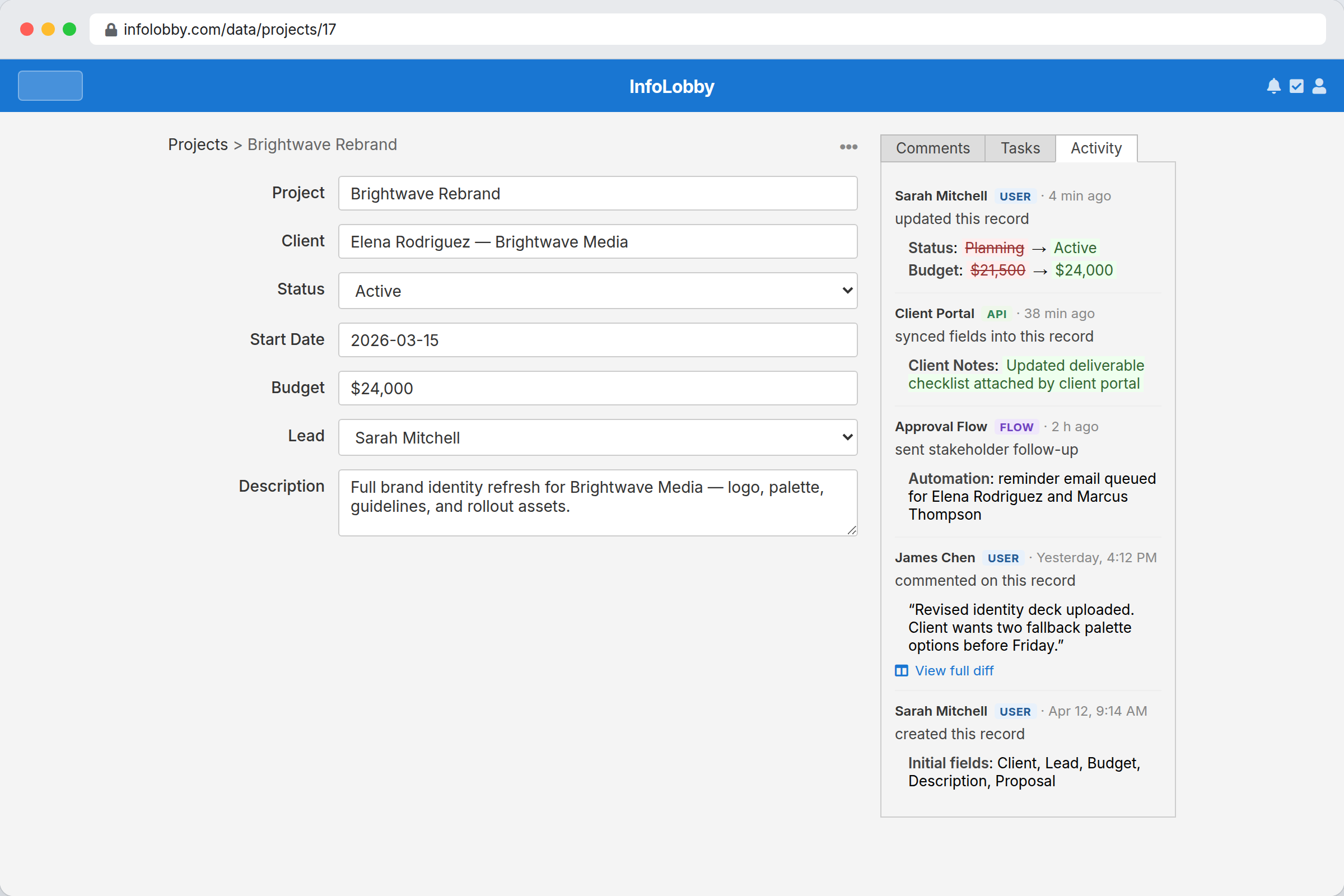
Six months later, somebody will ask why
Why this order shipped to the old address. Who moved the close date. When the budget went up. If several people and a few automations all touch the same records, those questions have no answer unless something was writing it down at the time.
InfoLobby records the history as it happens, on every record and across the workspace. You get the field, the old value, the new one, the timestamp, and who did it. A person, a web form, a flow, an API key and an AI assistant are each named, so the system changed it is never the answer.
History is most useful when it is ordinary, not emergency-only.
Teams usually want an audit trail after the confusing change has already happened. InfoLobby keeps history attached to normal work, so review and debugging do not require digging through private messages, exports, and raw logs.
- See user, API, flow, web form, and system actor sources
- Inspect record-level diffs where the question starts
- Use history for accountability, debugging, and process cleanup
What the history shows you
- Browse workspace-wide activity feeds
- Open a record and inspect field-level changes
- Understand whether a human or automation made the edit
- Keep accountability without external audit tooling
Using the history
- Run sensitive work through structured records so important changes are captured automatically.
- Use record activity when a single customer, request, asset, or approval needs explanation.
- Use workspace activity to review broader process changes, imports, API calls, forms, and automations.
Where it fits
Use it for
- Teams that need readable accountability around data changes and workflow events
- Operations where API, web form, automation, and user edits all touch shared records
- Debugging, review, and compliance-support workflows that need change context
Reach for something else when
- Organizations needing a standalone certified compliance or GRC platform
- A compliance archive. History is kept for a year on a managed database, and nothing ships it out to an external audit system on a schedule
- Low-risk workflows where history would add noise rather than value
Questions people ask
Does InfoLobby track API and automation changes too?
Yes. History can identify whether a change came from a user, API call, flow, web form, or system action.
Can I inspect changes on a single record?
Yes. Each record has its own activity view with diffs and timestamps.
How long is the history kept?
On an InfoLobby managed database, a year. If you connect your own MySQL server, the history lives in your database and stays there until you remove it, so retention becomes your decision rather than ours.
How is this different from the activity overview?
The overview is the catch-up feed: one row per thing that happened, across every workspace you are in. This is the detail underneath it, on one record, with the old and new value of every field that moved.
Try it on your own data
Start free and build one working process around this feature, then add the records, views, tasks and automations around it.