Automate the Repetitive Work Around Your Records
Build a flow that runs when a record changes, on a schedule, or when another system calls in.
Branches, loops, API calls, generated PDFs, and real code for when the visual builder runs out.
Most automation tools stop at “send an email”
Which is fine until the rule has an exception. Send the email, unless the account is on hold. Then check the balance, and if it is over the limit, loop through the open invoices, total them, call the accounting system and generate the PDF. That is where a trigger-and-action tool runs out and you start writing scripts on a server somewhere.
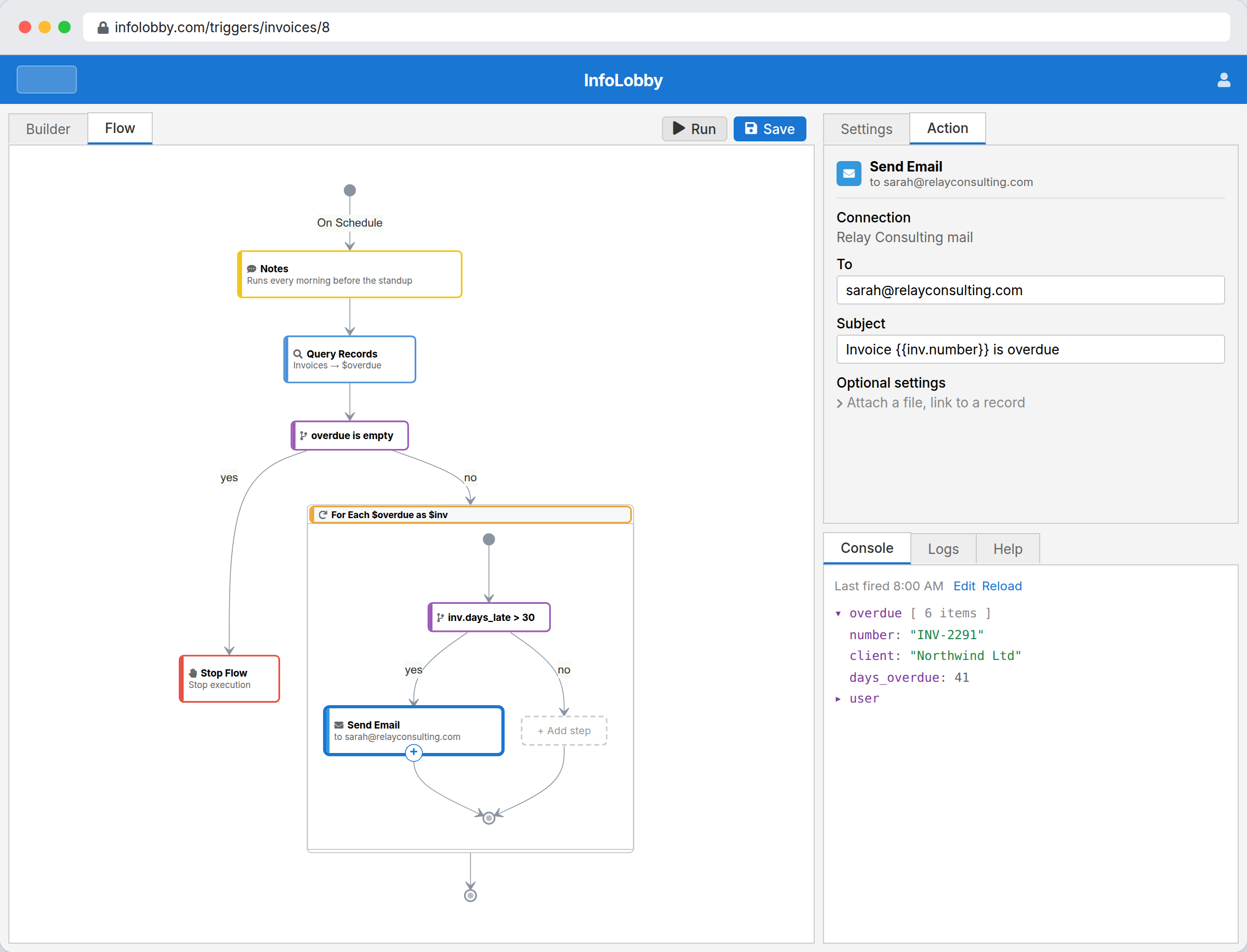
An InfoLobby flow is a canvas. It starts from a record change, a schedule or an inbound webhook, and from there it can branch, loop, query your tables, call any API, and drop into real code for the steps where the visual bricks are not enough. It runs next to the data it acts on, so there is no separate service holding your credentials.
Useful automation starts where the work already lives.
The strongest flows are usually not grand process maps. They are simple bits of operational memory: route this lead, remind that owner, update this status, call that API, summarize this record. InfoLobby keeps those actions close to the data they change.
- Trigger from record events, schedules, or webhooks
- Use visual logic for normal handoffs
- Drop into PHPScript when the edge case is genuinely custom
What a flow can do
- Branch, loop, query, create, update, and delete records inside flows
- Count, total, or average records by group inside a flow (pipeline by stage, revenue by month) without writing a loop
- Run time-based jobs for reminders, follow-ups, and cleanup: daily, hourly, on chosen weekdays, or on chosen days of the month
- Serve dynamic public web pages straight from a flow, backed by your tables
- Generate PDF documents from record data and save them onto records
- Mix no-code bricks with code when visual logic hits a ceiling
- Keep automation near the data it acts on
When the visual steps run out, write the step
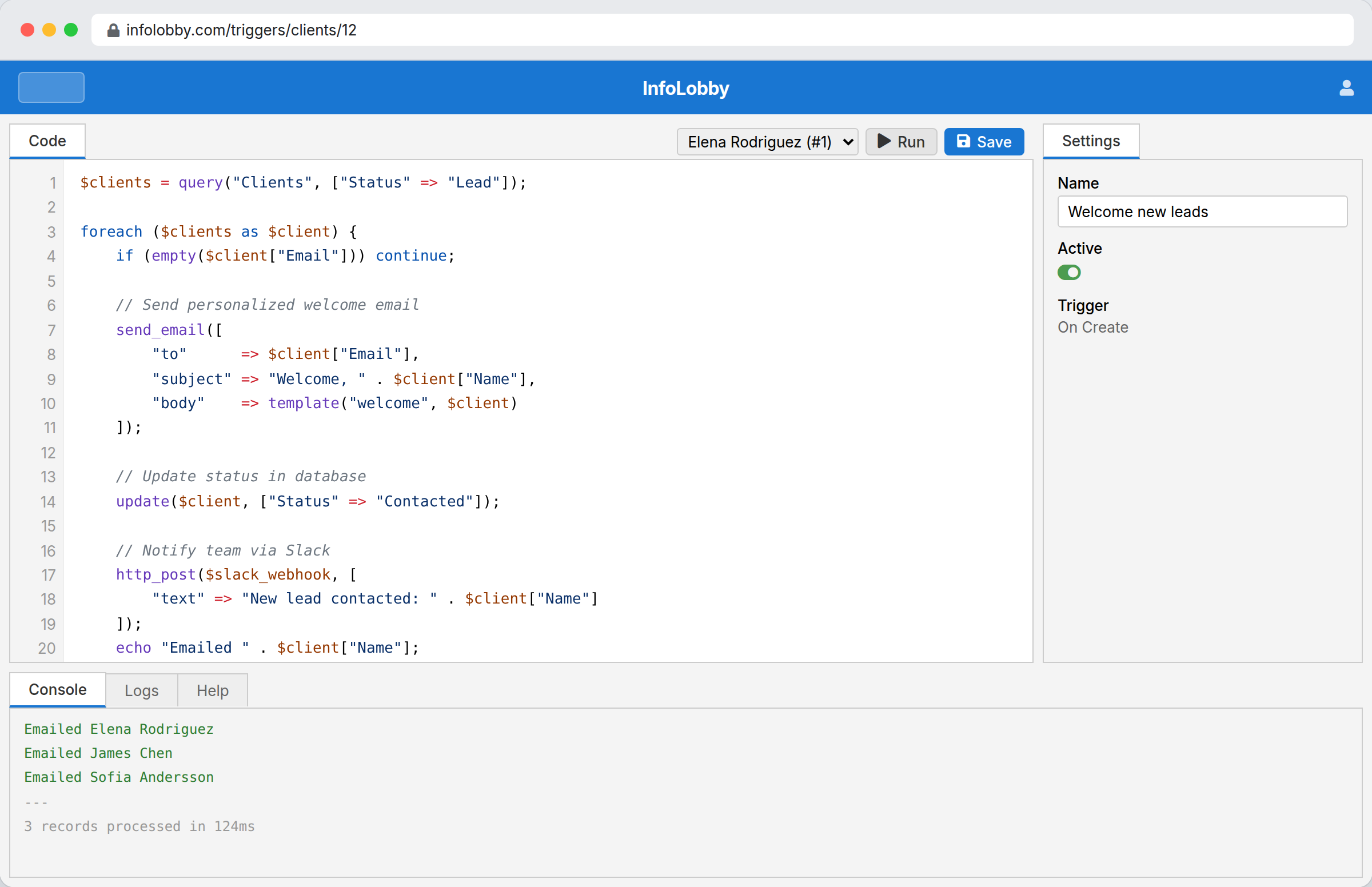
Most automations never need this. The ones that do usually need it in exactly one place: a transform no brick expresses, an API response that has to be picked apart, a rule with more exceptions than it has branches. A trigger can be written as PHPScript instead of drawn, and a step's value inside the builder can be a PHPScript expression when only that one step is awkward. It looks and behaves like PHP, your tables are there as functions, and the console tells you what the last run actually did.
Building your first flow
- Pick one repetitive handoff: routing, reminders, cleanup, enrichment, or approval follow-up.
- Trigger from record changes, schedules, or webhooks, then keep the logic readable in the visual builder.
- Use PHPScript only for edge cases that need custom branching, API handling, or data transforms.
Where it fits
Use it for
- Operational automations that need direct access to business records
- Teams replacing spreadsheet reminders, manual routing, and small glue scripts
- Workflows that combine data updates, email, HTTP APIs, and OpenAI calls
Reach for something else when
- Standalone marketing automation campaigns with deep audience tooling
- Enterprise orchestration that requires dedicated BPM governance suites
Questions people ask
Can non-developers build automations in InfoLobby?
Yes. The visual builder covers common logic, API calls, email, conditions, and loops without code.
What if the visual builder is not enough?
You can switch to PHPScript for custom logic while staying inside the same platform and data model.
Try it on your own data
Start free and build one working process around this feature, then add the records, views, tasks and automations around it.