Atomic Master-Detail: A Record and All Its Line Items, Saved as One
Enter an invoice and its line items on one screen. They save together, and the total adds itself up.
No second table, no manual links, and no spreadsheet formula holding the total.
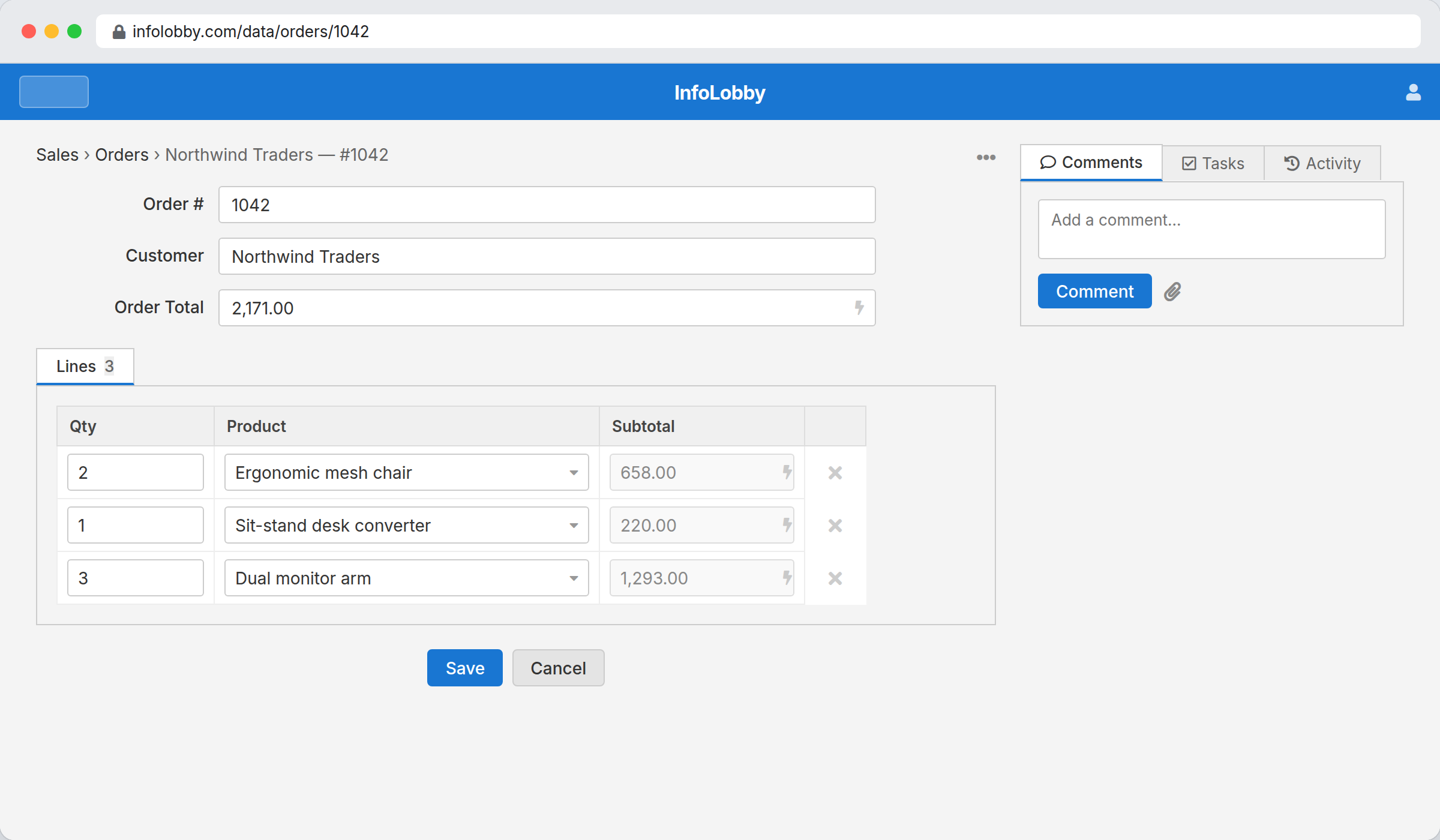
An invoice is a header plus a list
So is an order, an expense report, a timesheet, and a packing slip. The record carries the who and the when. The list underneath it carries the actual work: four line items, eleven days, twenty parts. On its own, the header is half the story.
The usual way to build that is a second table, a link field pointing back at the first one, and a total somebody has to keep correct. It holds up until a line gets edited on its own, or a parent gets deleted and leaves its rows orphaned, or the total quietly stops matching. A sub-table removes all three, because the lines are part of the record instead of neighbours of it.
Line items belong to their record, so treat them that way.
A sub-table row is a weak entity: it has no life outside its parent. InfoLobby enforces that. There is no separate grid to edit lines loose, no way to create an orphan, and deleting the parent removes its lines. The result is data you can trust the totals of.
- Use a sub-table when the detail rows belong only to their parent
- Use a lookup and a related tab when the rows are shared records
- Let rollups do the arithmetic instead of a manual total field
What the lines can do
- Define a sub-table's own typed columns (text, long text, number, date, select, lookup, calculation)
- Add rows inline: a fresh blank row appears as you fill the last one
- Roll up line totals onto the parent (sum, count, average, min, max)
- Report across the relationship: aggregate every line on the parent's report rail
- Per-line calculations for values like quantity times price
Adding line items to a table
- Open the parent table's Configure screen and add a sub-table in the Sub-tables (line items) section.
- Give the sub-table its columns: description, quantity, price, or whatever the line needs.
- Add a rollup field on the parent to total the lines, then enter records with their line items on the grid.
Where it fits
Use it for
- Invoices, quotes, and orders with line items
- Timesheets, expense reports, and journals with detail rows
- Any record that is a header plus a repeating list
Reach for something else when
- Rows that are meaningful on their own and shared across records: use a lookup instead
- Detail records that need their own page, permissions, or independent workflow
Questions people ask
How is a sub-table different from a related record tab?
A related tab shows independent records from another table that link back. Sub-table rows have no life of their own. They are entered on the parent, save with it, and can't be edited anywhere else.
How do I total the line items?
Add a rollup field on the parent table. It aggregates the lines (sum, count, average, min, or max) and recomputes every time the record is saved, so the total always matches the current lines.
Can I report on the line items?
Yes. A report on the parent can be pointed at the sub-table with the Report on selector, so it aggregates every line across all records on the parent's report rail.
Try it on your own data
Start free and build one working process around this feature, then add the records, views, tasks and automations around it.