Collaboration That Stays Attached to the Work
Comment on a record, follow it, and get notified when it moves. The discussion stays on the thing being discussed.
The decision about a job should still be readable on that job six months later.
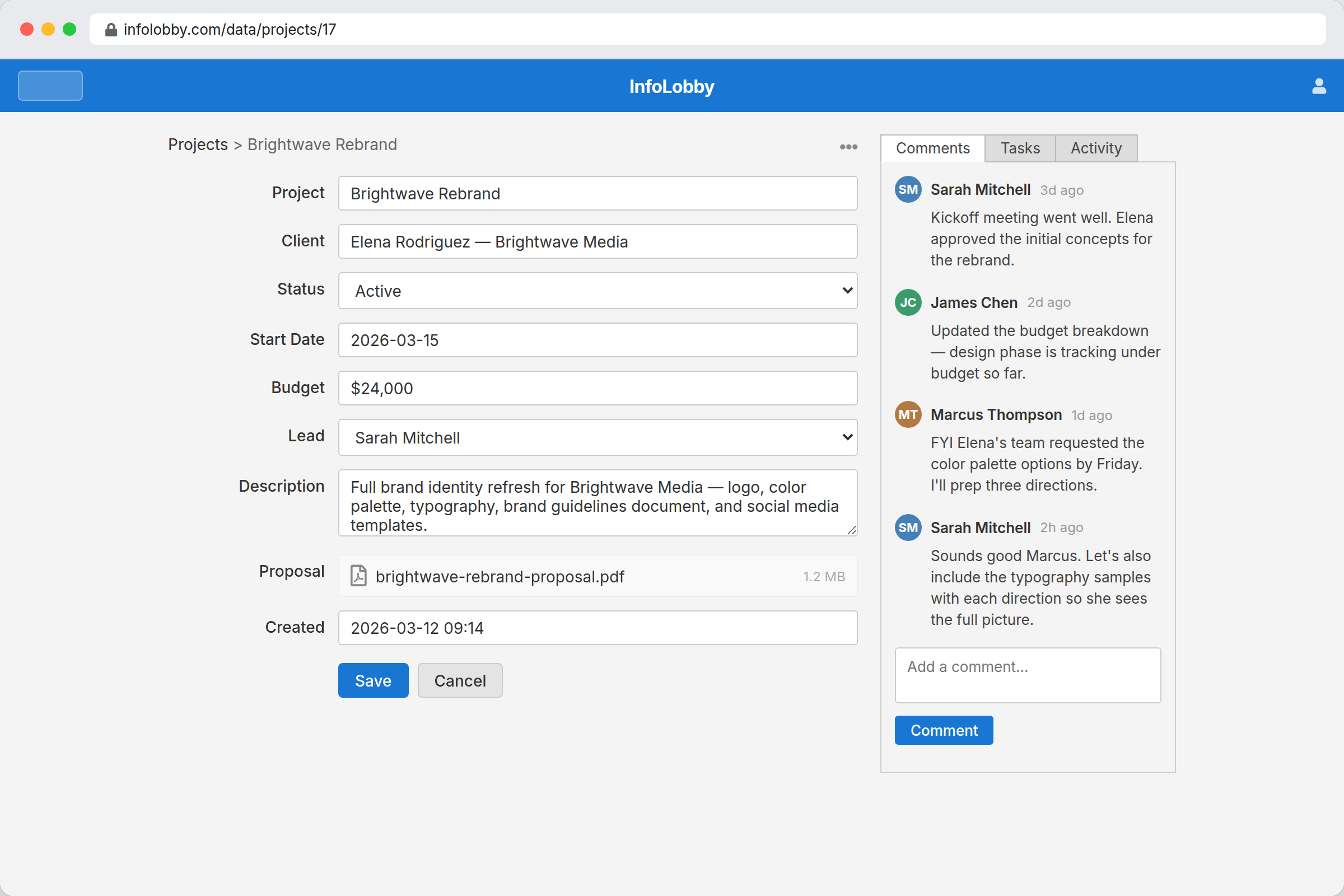
The conversation belongs on the record
Most of the friction in a process is not the data entry. It is the chatter around it: who owns this, why the price changed, what everyone is waiting on. That conversation normally happens in chat, where it is unfindable a week later, or in email, where only the people on the thread can see it.
Put the comment on the record instead and six months later the answer to why you agreed to something is sitting on the thing you agreed about. Follow that record and you are told when it moves, in the bell, on your phone, or in an hourly catch-up email. Read Only teammates can take part in the discussion without being able to change anything.
Context is the collaboration feature.
A chat message can ask who owns the request. A record can show the request, owner, status, files, comments, tasks, history, and next step. InfoLobby keeps collaboration where future teammates can still understand it.
- Discuss the record instead of linking back to it
- Assign follow-up without splitting context into another app
- Let people follow the work that matters to them
What happens on a record
- Assign work to teammates in the same workspace
- Follow a table to hear about new records, or a single record for everything that happens to it
- Get told when someone mentions you in a comment or drops you into a user field, whether or not you follow anything
- Browser and mobile push notifications, even when InfoLobby is closed
- One email digest an hour, and only when you have not already read the bell
- Mark a bulk or automated change silent so it updates the record without notifying the room
- Let read-only users stay informed without edit risk
- Keep collaboration tied to actual business objects
The bell tells you which record, not which channel
Every notification names the person, what they did, and the record it happened on, so one click puts you on the thing itself rather than in a feed you have to decode. Follow a table and you hear about new records in it. Follow a single record and you hear about its edits, deletes and comments. Being mentioned in a comment, or dropped into a user field, subscribes you on its own, because those are addressed to you. Your own changes never notify you, an import is one notification rather than one per row, and an automation or API write can be marked silent when a bulk update should not wake the whole team.
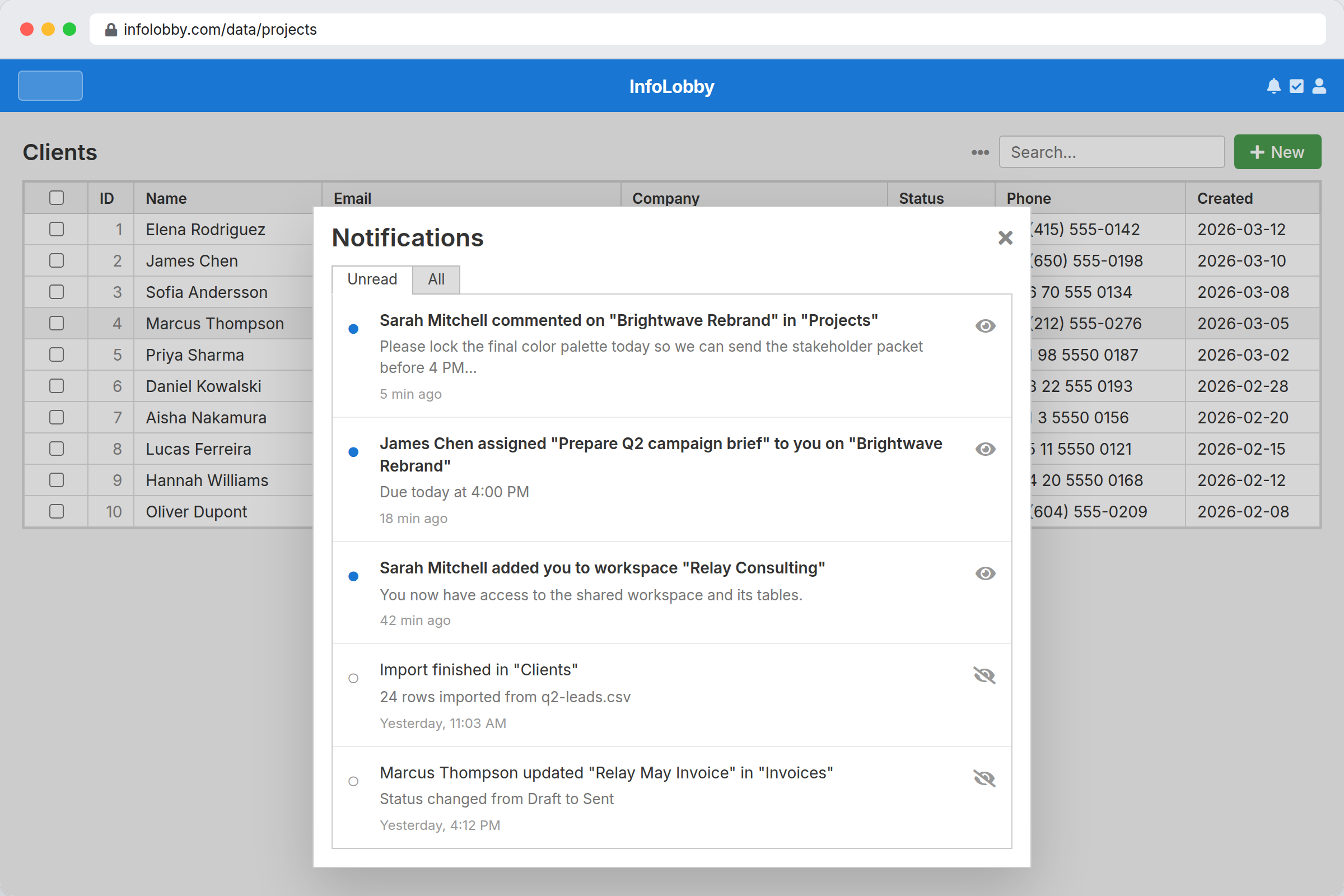
Getting the conversation onto the data
- Invite teammates into the workspace with read-only, read-write, or admin roles.
- Move comments, ownership, and follow-up tasks onto the records where the work happens.
- Use notifications and follows for the records or tables people actually need to watch.
Where it fits
Use it for
- Operational teams where context belongs on records, not in chat scrollback
- Handoffs involving comments, tasks, ownership, permissions, and status changes
- Teams that need read-only collaborators to stay informed without edit access
Reach for something else when
- Teams looking for a chat replacement or video collaboration suite
- Simple document collaboration where structured records are unnecessary
Questions people ask
How is this different from a chat app?
The collaboration happens on records, tasks, and tables, so context stays attached to the work instead of disappearing into channels.
Can read-only users still follow updates?
Yes. Read-only members can still use follow and notification features to stay informed.
What exactly am I notified about?
Following a table tells you when someone creates a record in it. Following a single record tells you about its updates, deletes and comments. On top of that you are subscribed automatically to records you create or edit, comment on, are mentioned in, or are named on in a user field.
Where do notifications arrive?
In the bell menu on every page, with an unread badge. If you have not read them, they are gathered into one email an hour at most, which you can switch off in your profile. Browser and phone push is separate and off until you enable it per device, and you choose which kinds of event are worth a buzz.
Will a bulk update flood everyone?
Only if you want it to. An automation step or an API write can be marked silent, which makes the change and records it in history without notifying followers. Mentions and new user-field assignments still go out, since those name a specific person. An import notifies followers once for the whole file, not once per row.
Do I get notified about my own changes?
No. Other followers do, you do not. The exceptions are a change an automation made, which is the automation acting rather than you, and an import of yours that failed, which nobody else needs to hear about.
Try it on your own data
Start free and build one working process around this feature, then add the records, views, tasks and automations around it.