TL;DR
- The AI assistant is a chat panel inside InfoLobby. It can add fields, build automations and, with your own OpenAI key, answer questions about your records.
- Building is included for workspace admins, with no key and nothing to set up. Reading and changing records needs your own OpenAI key, connected once for the whole account.
- Nothing lands without you. Table and flow changes are staged in the editor and wait for you to click Save.
- The example below closes a billing gap at an 11-person electrical contractor in three requests: two fields, two flows and one question.
Most small trade businesses do not lose money on bad jobs. They lose it on good jobs nobody invoiced.
The crew finishes on a Thursday, marks the job Complete on their phone and drives to the next site. The office means to bill it. Then the phones ring, a supplier calls about a backorder, and three weeks later the job is still sitting there, done and unpaid.
The Friday spreadsheet
Take a fictional contractor, Hartley Electric: three two-person crews, an owner who still quotes every job, and Priya, who runs the office. Jobs already live in an InfoLobby table with a title, a crew, a quoted amount and a Status field that runs Quoted, Scheduled, In Progress, Complete.
Priya's system for catching unbilled work was a Friday ritual. Export the Jobs table. Open it in a spreadsheet. Filter Status to Complete. Cross-check each row against the accounting software to see whether an invoice went out.
It took about forty minutes and it worked when she did it. The weeks she was busy were the weeks it mattered most. When she finally did a full pass in November, five finished jobs worth $21,390 had no invoice. One had been done for 19 days.
The table had no way to say "invoiced". It had no date for when work finished. And nothing watched the gap between the two.
The usual fix is a Zapier chain or a recurring calendar reminder. A reminder only nags Priya to do the same forty minutes. A Zapier chain needs field IDs, a trigger that understands dates and someone to maintain it. Hartley has nobody whose job that is.
Request one: give the table somewhere to record it
The owner is a workspace admin, which is all the assistant needs for building. There is no key to set up for this part.
He opened the Jobs table's configure screen, clicked the robot button in the bottom right corner and typed:
Add a date field called Completed On and a text field called Invoice #. Hide both when someone creates a new job.
The assistant read the current table and proposed the two fields. Table changes do not go through a confirmation box. They are staged straight into the field designer, and the panel says so: Changes staged in the table editor. Review in the page and click Save to persist. He checked the two new fields in the designer and clicked Save.
The existing fields kept their settings. The assistant works from the live editor, so it adds to what is there instead of rebuilding it.
Request two: let the table watch itself
Now the table can hold the facts. Two automations make them fill in and act.
The first stamps the date. On a new On Update flow for Jobs, he asked:
When Status changes to Complete, set Completed On to today.
That produced an If brick using the changed to comparison, so it fires on the change itself and not on every later edit, with an Update Record brick inside it that writes today's date into Completed On.
The second flow is the one that does the work. InfoLobby has an On Date Field trigger: it fires once per record when a date field reaches a chosen day. He created a new flow with that trigger and set it in the Settings panel himself:
- Date Field: Completed On
- Day Offset: 3 day(s) after the date
- Trigger Hour: 08:00
Then he described the rest in plain words:
Three days after a job is completed, if Invoice # is still empty, give Priya a task to invoice it and leave a note on the job.
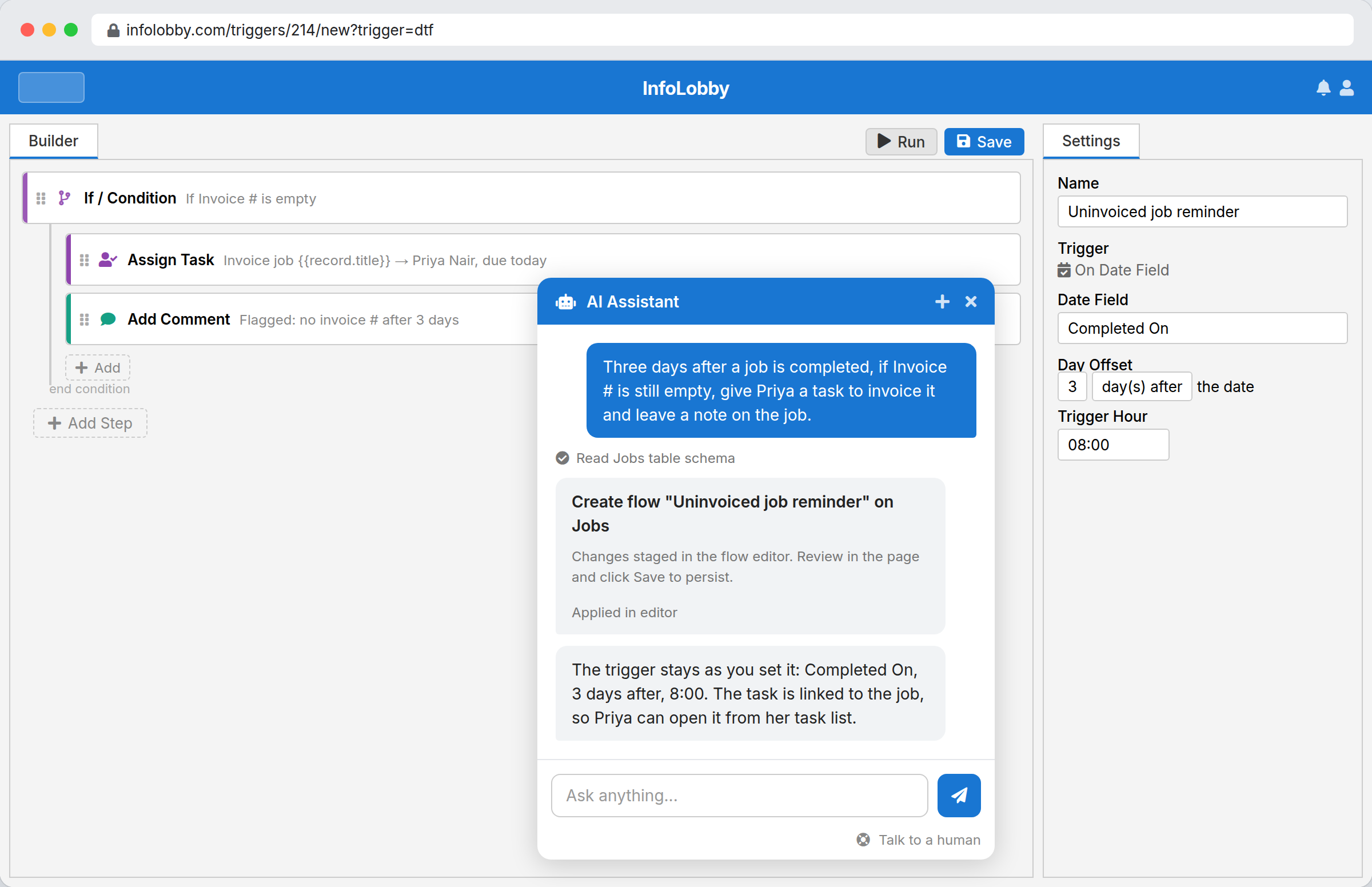
The assistant looked up the Jobs schema, found the Invoice # field and staged three bricks into the builder:
- If / Condition: Invoice # is empty
- Assign Task, inside the If: "Invoice job" plus the job title, assigned to Priya and linked to the job record
- Add Comment, inside the If: a note on the job saying it was flagged
He read the bricks, ran the flow once against a test job, and saved it.
Two things make this safer than it sounds. First, the assistant cannot invent a brick. The builder accepts a fixed set of brick types, and an AI-written flow is checked harder than a hand-built one: a brick missing the settings it needs, or a token pointing at a field that does not exist, is rejected before it reaches your editor. Second, it is still an ordinary flow. If he wants to change the wording of the task next month, he edits the brick himself or switches the flow to PHPScript. No hidden AI logic runs it.
Request three: ask the table a question
The flows catch every job from now on. They do nothing for the five that were already stuck.
This part needs data access. An account owner connects it once: Integrations, add OpenAI, paste the API key, tick Allow all users in this account to use AI Assistant with data access, save. Usage is billed by OpenAI to Hartley's own account, at cost. It also makes the assistant available to Priya, who is not an admin.
On the Jobs grid, Priya asked:
Which completed jobs still have no invoice number, and what are they worth?
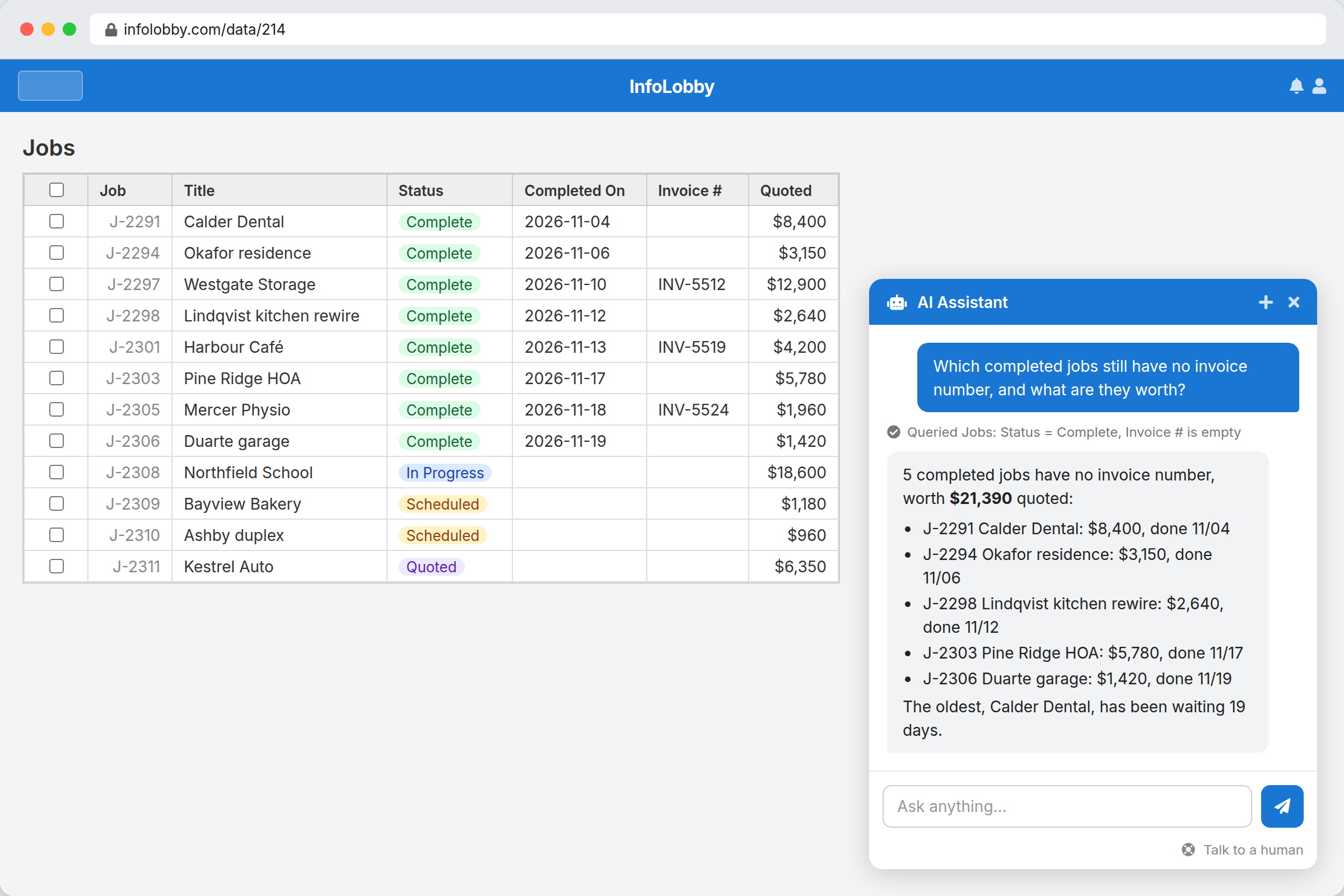
The assistant queried the table with two filters, Status equal to Complete and Invoice # empty, and answered with the list: five jobs, $21,390 quoted, Calder Dental the oldest at 19 days. The Friday export took forty minutes. This took one message.
She can close them out from the same panel. On a job, she types "Invoice # is INV-5530" and the assistant proposes the update. Record changes apply when she approves them, and Undo reverses the last one.
What changed
Hartley did not buy a billing tool or hire anyone to wire up integrations. It added two fields and two flows to a table it already had, by describing them, in about fifteen minutes. The owner still reviewed every change before it was saved.
Priya no longer does the Friday export. A job finished on Monday that is still unbilled on Thursday morning puts a task in her list at 8:00, with a link to the job. When she wants the whole picture, she asks.
The pattern is not specific to electricians. Any table with a "done" state and a "followed up" state has the same gap: signed quotes with no deposit, closed tickets with no survey, delivered orders with no review request. The fields and flows are the same shape.
Try it
The assistant is in every InfoLobby workspace. Admins can build with it from the first day, with nothing to configure. Connect your own OpenAI key when you want it reading your records too.
Start a free InfoLobby account and click the robot in the corner. The AI Assistant help page lists everything it can and cannot do.