TL;DR
- Every record in InfoLobby has an Activity tab. It lists each change with the field, the old value, the new value, when, and who made it.
- "Who" includes the things that aren't people. Writes from an automation, an API key, a web form, a portal or inbound email carry a badge (via Flow, via API, via Webform) and hovering the badge shows the flow, key or form by name.
- There is nothing to switch on. The example below is a rental company that spent a week blaming a customer for a bug in its own website sync.
The tent arrived on Friday morning. The party was Friday evening, and the customer had asked for Thursday so her crew could decorate.
"I changed it on your form," she said. The dispatcher pulled up the booking. It said Friday.
Who moved the date?
Northfield Event Rentals is a fictional nine-person company: two delivery crews, a warehouse, and an office of three who quote, book and dispatch. Bookings live in an InfoLobby table with Customer, Event Date, Delivery Date, Tent, Quote Total and Status.
Three things can write to a booking.
- Dana in the office, who quotes and edits by hand.
- The customer, through a confirmation link. When a quote is accepted, a flow emails the customer an edit form showing the booking. Delivery Date and Setup Notes are editable. Everything else is read-only.
- The website, whose booking plugin pushes new bookings into InfoLobby through an account API key. It was also set to push updates whenever a booking was saved on the website side.
The office's first theory was that the customer never pressed Submit. The second was that Dana had fat-fingered it while fixing the tent size. Both theories came with a short, tense conversation.
If bookings had still lived in a shared spreadsheet, that is where it would have ended. Sheets will show a cell's edit history, but a sync plugin usually writes as whichever Google account connected it, which at most small firms is the owner's. The history would have said the owner changed the date. The owner hadn't been near it.
What the record said
Opening the booking and clicking Activity (next to Comments) showed the whole sequence, newest first.
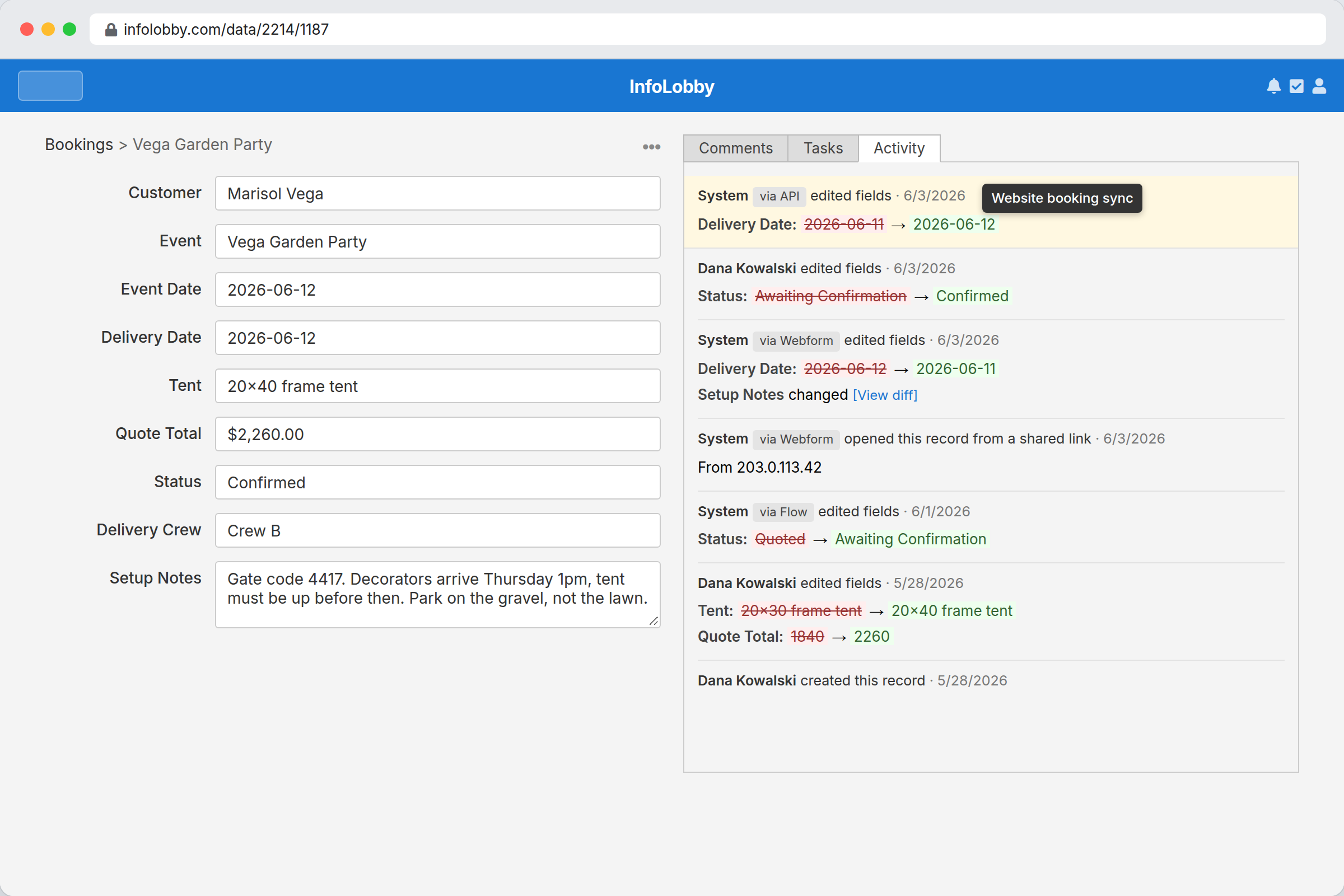
Older entries show the date. Hover it for the exact time. Read from the bottom up:
- Dana created the booking, then changed the tent from a 20x30 to a 20x40 frame tent and the quote from $1,840 to $2,260.
- The confirmation flow set Status to Awaiting Confirmation. The row says System via Flow, and hovering the badge shows the flow's name, Send confirmation link.
- On June 3 at 9:14, someone opened this record from a shared link, with the IP address it came from. That is the customer reading her booking through the edit form.
- At 9:16, System via Webform changed Delivery Date from 2026-06-12 to 2026-06-11 and edited Setup Notes. Setup Notes is a long text field, so instead of cramming both versions inline the row has a View diff link that opens them side by side.
- At 10:05, Dana set Status to Confirmed after reading the notes.
- At 11:40, System via API changed Delivery Date back to 2026-06-12. Hovering the badge showed the key's name: Website booking sync.
The customer had done exactly what she said. Two and a half hours later, the website re-sent its own stale copy of the booking and overwrote her change. Nobody in the office touched it.
Finding the rest of the damage
One bad sync rarely hits one record. From the Workspaces page, the ellipsis menu next to the workspace opens Activity: the same history, across every table in the workspace, one row per change with the fields touched named.
Scrolling back through the morning of June 3 showed Website booking sync rewriting Delivery Date on four other confirmed bookings. Two were already on the dispatch board for the wrong day. The office fixed them by phone that afternoon instead of finding out from the crews.
The fix itself was on the website side: the plugin now sends a booking once, on create, and never pushes updates. Changes after that happen in InfoLobby, where the edit form and the office can see them.
Three habits that make the history worth reading
The Activity tab is only as specific as the names you give things.
Name API keys after the integration, not the person. A key called Dana's key tells you nothing six months later. Website booking sync told Northfield exactly where to look. If you run three integrations, make three keys.
Name flows by what they do. The hover label is the flow's name. Send confirmation link reads at a glance. Flow 4 does not.
Send an edit form instead of taking changes by phone. When the customer changes her own delivery date through the form, the record shows the change, the form it came through and the visit before it. When she phones it in and someone retypes it, the history shows the retyping and nothing else.
What is tracked, and for how long
- Records: create, update (field by field, old and new value), delete.
- Comments: create, edit, delete.
- Tables: create, update (fields added, removed or renamed), delete.
- Imports: start, finish, failure.
Changes made by flows, API calls and silent bulk updates are all recorded. A silent write skips notifications, not history.
Any member of the workspace can read the Activity tab, including Read Only members. On an InfoLobby managed database the history is kept for a year, and it does not count toward your plan's record or storage limits. If the workspace runs on your own MySQL, the history lives in your database until you delete it.
It is a working history, not a compliance archive. Nothing exports it to an external audit system on a schedule.
Try it on your own data
Open any record you've edited this week and click Activity. If more than one person, form or integration touches your records, the next "who changed this?" is already answered.
Start a free InfoLobby account, or read how the audit trail and Activity help page describe what is tracked.