TL;DR
- The expensive part of switching platforms was never copying rows. It was reading two APIs, mapping fields that do not line up, and writing the glue code. An AI coding agent like Claude now does that part in an afternoon.
- If both systems have documented APIs, you can point the agent at both sets of docs and have it write a migration script. That works from almost any system to almost any other system, including out of InfoLobby.
- Records are the easy 20%. Relationships, files, users, history and automations are where the time goes, so plan for them first.
- Have the agent write a script, not move records one by one in a chat. Scripts are repeatable, reviewable and respect rate limits.
- Back up first, store the old ID on every new record, pilot with 20 rows, then verify with counts and totals before you cancel anything.
For most of the history of business software, switching platforms was expensive enough that people simply did not do it. You stayed on the tool you outgrew because the alternative was a consultant, a mapping spreadsheet with four hundred rows, and three months of "nearly done".
That cost has collapsed. Not to zero, but close enough that it changes the decision.
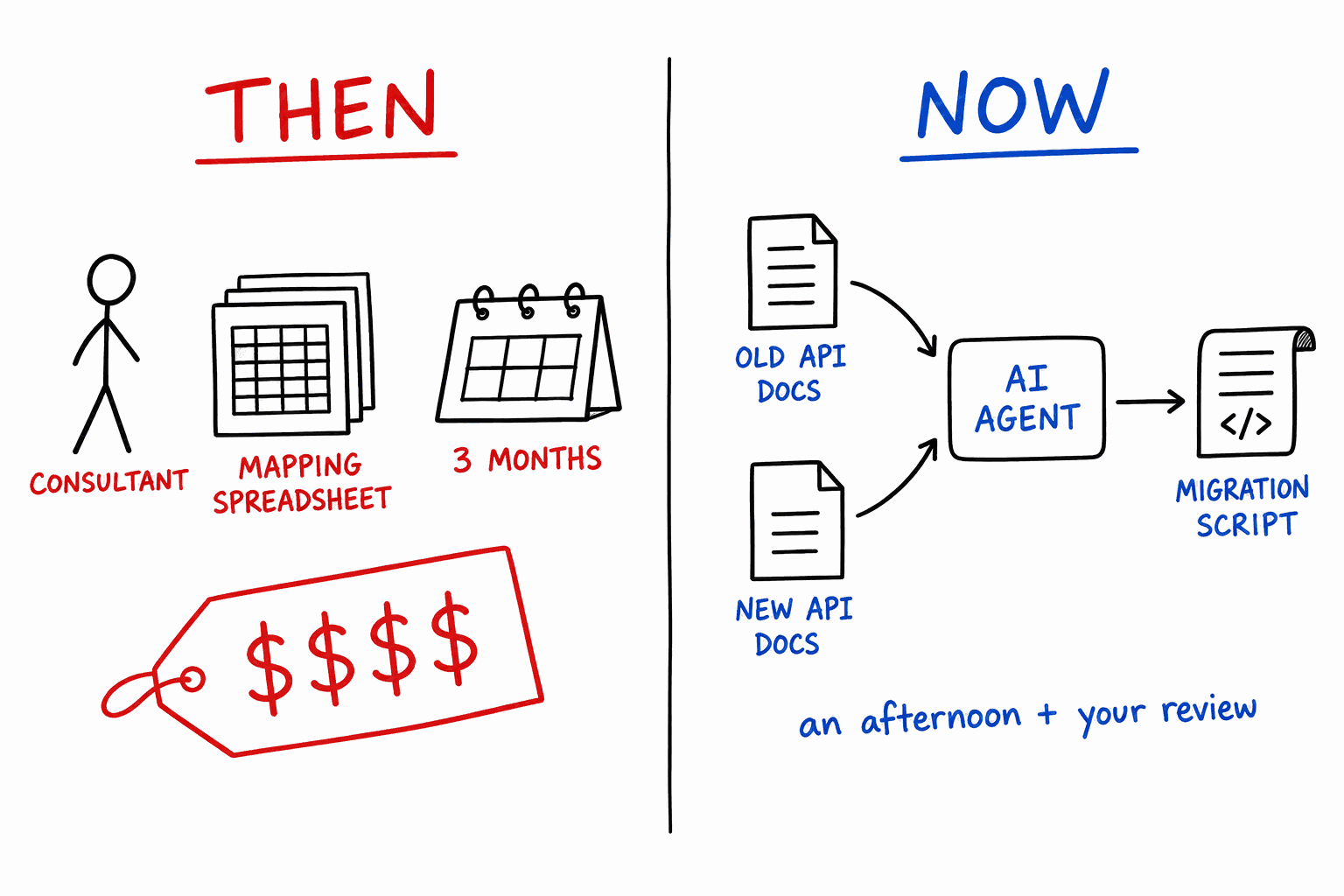
Why switching used to cost so much
Look at where the money went on a traditional migration and very little of it was data transfer. It went on three things:
- Learning two APIs. Someone had to read the old system's API docs, then the new one's, and work out authentication, pagination, field formats and error handling for both.
- Mapping. The old system calls it "Company", the new one calls it "Organization". One stores a date as text, the other wants ISO 8601. A multi-select in one is a linked table in the other. Every one of those is a decision and a few lines of code.
- Glue code and reruns. The first run always fails somewhere around record 3,000. Then you fix it and work out how to rerun without creating duplicates.
All three are reading and writing code against documentation. That is exactly what current AI coding agents are good at.
What changed
You can now open Claude Code (or any capable coding agent), give it the API documentation for the system you are leaving and the system you are moving to, and say: "Write a script that moves my customers, contacts and orders from A to B."
It will read both docs, ask you for keys, inspect the actual schemas on both sides, propose a field mapping, and write the script. When it fails on record 3,000, it reads the error and fixes it. The work that used to be a consultant's billable month becomes a conversation and a review.
This is generic. It does not depend on either vendor building an importer for the other. If the old system has an API that can read your data and the new system has an API that can write it, the agent can bridge them. Our own public API docs are written to be read by exactly this kind of agent, and if you work in Claude Code there is an InfoLobby agent skill that teaches it the endpoints up front.
The same is true in the other direction. If you ever leave InfoLobby, the API reads everything back out, and workspace export includes an optional raw SQL dump. We would rather you stayed because the product is good than because leaving is hard.
What still breaks
The honest version: an agent removes the cost of the glue code. It does not remove the cost of the parts of your system that were never really data.
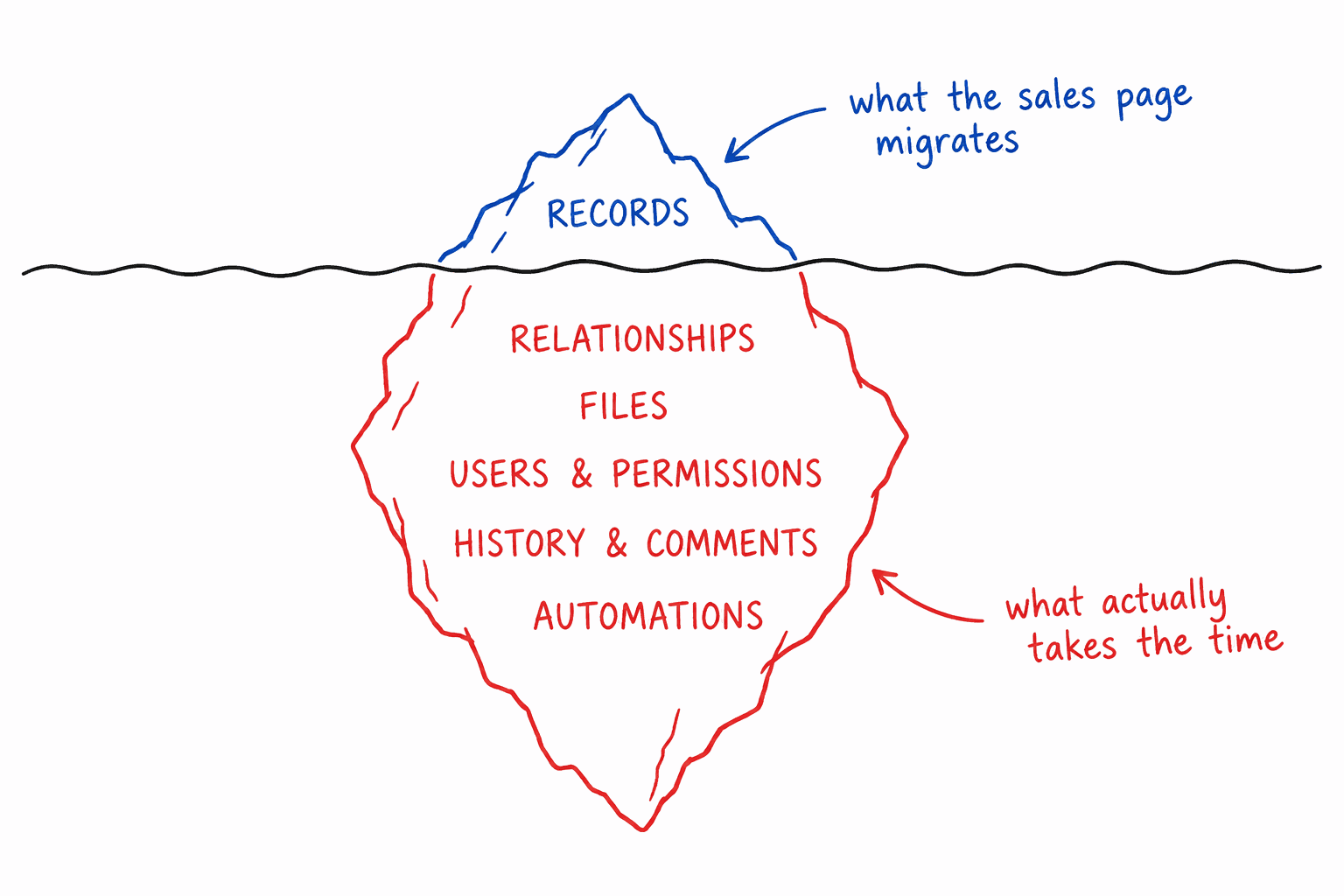
- Relationships. An order links to a customer by the old system's ID. The new system will issue new IDs, so links have to be rewritten after both sides exist.
- Files. Attachments have to be downloaded and re-uploaded, usually one by one, and they eat rate limits.
- Users and permissions. "Assigned to: Sam" only works if Sam already exists in the new system with a matching identity. Permission models rarely translate one to one.
- History and comments. Many APIs let you read comments but not write them with an original author and date. Decide early whether you need history in the new system or just an archive of the old one.
- Automations. No API exports "the logic" in a form another platform can run. The agent can read your old automation definitions and help rebuild them, but that is a rebuild, not a transfer. Budget for it separately.
- Systems with no real API. Some tools only offer CSV export, or an API that hides half the data. The agent can still help, working from export files instead, but you lose the ability to rerun cleanly against the live source.
None of this is new. What is new is that the record copying, which used to swallow the budget, no longer does, so these become the whole project.
Best practices if you are going to do this
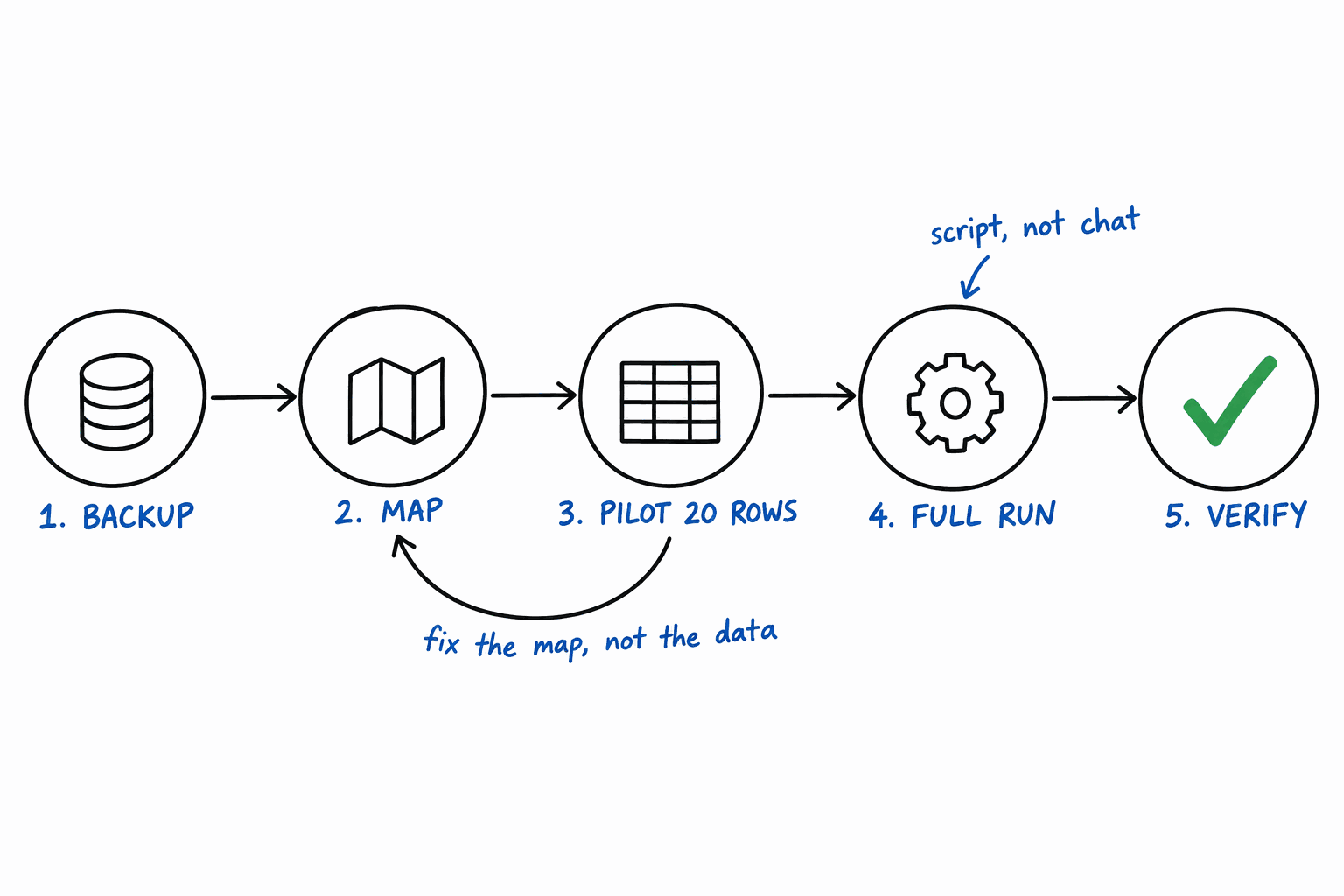
1. Back up the old system before the agent touches anything
Take a full export from the source, in whatever format it offers, and put it somewhere the agent cannot write to. Keep the old subscription active and the old system read-only until you have verified the new one. Cancelling is the last step, not the first.
2. Give the agent the least access that works
Use a read-only API key on the source system. The agent only needs to read from it, and a read-only key means a confused script cannot damage the thing you are migrating away from. On the destination, use a key scoped to the workspaces you are migrating into. InfoLobby API keys support both a read-only flag and per-workspace scoping.
Put keys in environment variables, not in the chat. Tell the agent the variable names.
3. Get the mapping in writing before any code runs
Ask the agent to inspect both schemas and produce a mapping document first: every source field, what it becomes, and what gets dropped. Read it. This is the one place where your knowledge of the business matters more than the agent's knowledge of the APIs. "Status = Closed Won" might need to become two fields, or a related record, and only you know that.
Build the destination tables before moving records. Moving data into a schema that is still changing is how you end up running the migration four times.
4. Have the agent write a script, not drive the migration from chat
An agent connected over MCP, like the Claude and ChatGPT connector, is great for moving 30 records or fixing a few by hand. For 30,000 it is the wrong tool. Each record becomes a tool call, nothing is repeatable, and you cannot review what happened.
Ask for a script instead. A script can be read before it runs, rerun after a fix, paused and resumed, and it can respect the destination's rate limits by reading the rate-limit headers and backing off.
5. Store the old ID on every new record
Add a "Source ID" field to every destination table and have the script fill it in. This one field does three jobs:
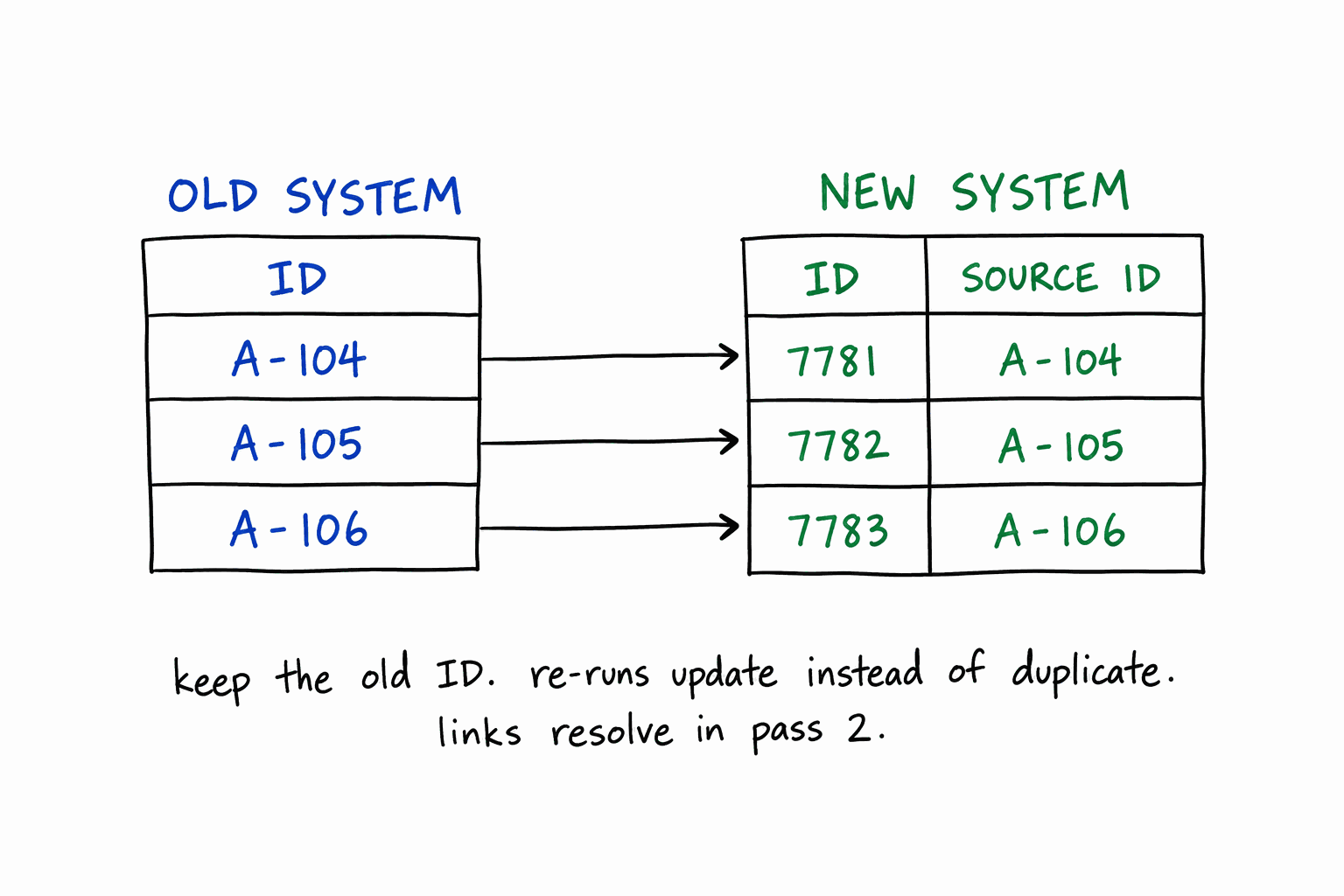
- Reruns become safe. The script looks up the Source ID first and updates instead of creating a duplicate.
- Relationships become solvable. Run once to create every record, then a second pass rewrites links by looking up each old ID's new record.
- Verification becomes possible. Any record in the new system can be traced to exactly one record in the old one.
6. Pilot with 20 records and look at them
Not 20 records and a green "success" message. Open them in the new system and read them. Dates in the right time zone? Currency with the right decimals? Multi-selects split correctly? Accented names intact?
When something is wrong, fix the mapping and rerun. Do not hand-edit migrated records, or the next rerun will undo your fix.
7. Turn off side effects in the destination
A migration that creates 10,000 records can also send 10,000 notifications, fire 10,000 "new customer" emails and trigger every automation you have already rebuilt. Pause automations on the destination tables during the load. In InfoLobby, pass "silent": true on writes to suppress follower notifications (it does not stop automations, so pause those separately). See silent writes.
8. Verify with numbers, not vibes
Ask the agent for a verification script that compares the two systems: record counts per table, sums of every money field, counts per status, and a random sample of 50 records compared field by field. If the order totals match to the cent, the migration is very likely right. If they do not, you will know before your customers do.
9. Run the old and new systems side by side for a short period
Freeze changes in the old system, do a final delta run using the Source ID to update anything that changed since the pilot, then switch people over. Keep the old system readable for a few weeks. Someone will need to look something up.
Where InfoLobby fits
If you are moving into a structured database for business data, InfoLobby gives the agent what it needs on the receiving end: a documented REST API, scoped and read-only keys, silent writes for bulk loads, and master-detail records that can be created with their line items in one transaction. If you are coming from spreadsheets rather than another platform, there is a simpler path in moving from a spreadsheet to a database.
What it does not do: there is no one-click importer for every other platform, and we are not going to pretend there is. The approach in this post is the importer.
FAQ
Can AI really migrate data between any two platforms?
Between any two platforms that both have usable APIs, the agent can write the migration. The quality depends on how complete each API is. If the source hides data from its API, no agent can migrate what it cannot read.
Should I let the AI run the migration unattended?
No. Let it write the mapping and the script, then review both. Run the pilot yourself and check the result. Unattended is fine for the final full run once the pilot is right, because the script is the thing you reviewed.
Will my automations move over?
Not automatically. Automation logic is not data in a portable format. The agent can read your old automation definitions and help you rebuild them in the new platform, which is much faster than starting from a blank page, but treat it as a separate project.
What about rate limits on large migrations?
Have the script read the destination's rate-limit headers and pause when it gets close. A migration of tens of thousands of records may take hours rather than minutes. That is fine: it runs unattended once the pilot is verified.
Is it safe to give an AI agent my API keys?
Give it the narrowest keys that work: read-only on the source, scoped to specific workspaces on the destination. Keep keys in environment variables rather than pasting them into the chat, and rotate them after the migration.