Put a Live View of Your Data on Any Web Page
Paste two lines of script into a web page and a live, read-only view of your table appears on it.
No export, no copy and paste, and no page that quietly goes out of date.
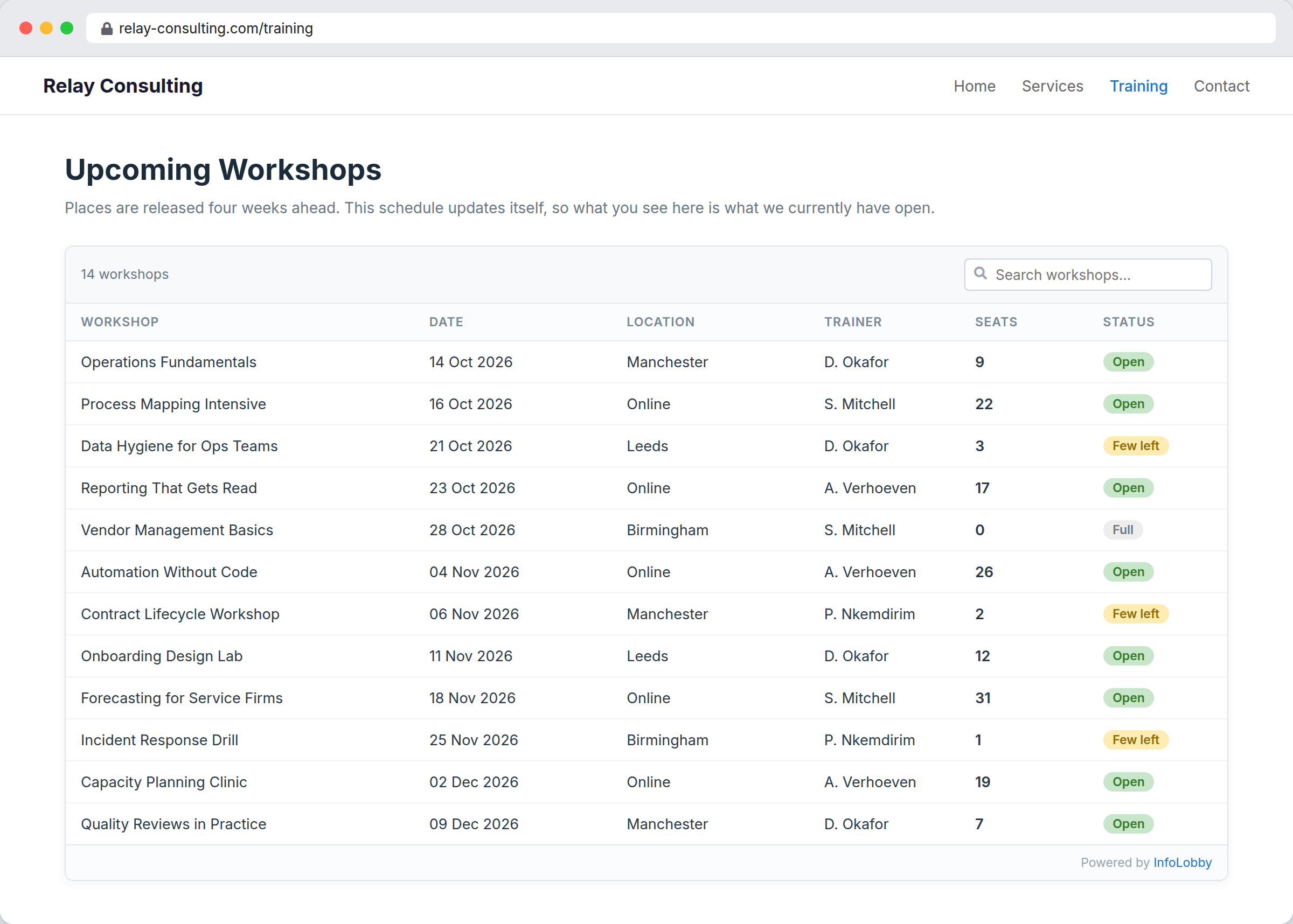
A published page goes stale the moment you publish it
Price lists, class schedules, staff directories, availability boards. Someone exports the table, pastes it into the website, and it is correct for about a week. Nobody notices it has gone wrong until a customer books something that was never available.
An embed publishes one saved view as a read-only widget. Two lines of script in the page and visitors see whatever the table holds right now. They cannot write anything back, the grid view's columns decide what is published, and key fields, script fields and password fields are withheld whatever the view says. You also set which domains are allowed to frame it.
The view decides what the public sees.
An embed is bound to one saved view, and that view's filters are what scope the rows. On a grid view, the columns you put on the view are the fields that get published. Build the view for the audience first, then publish it.
- Filter the view before you embed it, not after
- Set your allowed domains or the embed will not frame on your site
- Signature fields publish a name, a date and a status, never the audit detail
What you control on an embed
- Publish as many embeds as you need from one table, each bound to its own view
- Turn the search box on or off per embed
- Allow or block click-through to a record's detail page
- Set the domains that may frame the embed
- Key fields, script fields and password fields are withheld whatever the view says
Publishing an embed
- Build a saved view holding exactly the rows and columns you are happy to make public.
- Open Configure, Public tab, and publish a new embed against that view.
- Add your website's domain to the allowed list, then paste the script snippet into the page.
Where it fits
Use it for
- Public price lists, directories and catalogues
- Event schedules and class timetables on a marketing site
- Availability and status boards shown to customers
- Intranet pages that need a live slice of operational data
Reach for something else when
- Anything a visitor needs to fill in. Use a web form instead
- Reports and charts, which cannot be embedded
- Data you would not publish. An embed is visible to anyone who can open the page
Questions people ask
Can visitors edit the data in an embed?
No. An embed is read-only. The public endpoint permits a short list of read calls and nothing else, so there is no route from the page to a write.
Which views can I embed?
Grid, kanban, gallery and calendar views. Reports cannot be embedded.
How do I control which fields are published?
Through the view. On a grid view the columns on that view are what gets published, so build the view for your audience before you embed it. Key fields, script fields and password fields are always withheld.
Can I stop other sites from framing it?
Yes. Each embed carries an allowed domains list and the page is served with a matching frame-ancestors policy. Set your own domain or the embed will not display on your site.
Try it on your own data
Start free and build one working process around this feature, then add the records, views, tasks and automations around it.