TL;DR
- Most business software arrives shaped like somebody else's company, so the first month goes on deleting fields you will never use.
- The alternative is assembly: tables, fields, views, forms, automations and integrations as reusable pieces you combine into the thing you actually need.
- Modular does not mean starting from nothing. It means the starting point is changeable after you have learned what the process really is.
- The test of a modular system is whether a process change costs an afternoon or a migration project.
- The trade-off is real: assembly asks more of you up front than a finished product does.
Most business software comes shaped like someone else's business.
You buy a CRM built for a sales team that looks nothing like yours. You buy a project tool that assumes your work moves in stages it doesn't. You spend the first month deleting fields you'll never use and the next six working around the ones you can't add. The software was finished before it ever met your business.
Modular business software flips that. Instead of buying a finished box, you get a set of building blocks and assemble the app your team actually needs. Same idea as snapping bricks together: a small number of piece types, connected in the order that fits your work, producing something no template could have shipped.
Quick Answer
Modular business software is software you build from reusable pieces instead of buying pre-configured. The pieces are generic (a table, a field, a form, an automation, a report, an integration) but the thing you build from them is specific to how your business runs.
Choose it when your process doesn't fit a category tool cleanly, when you'd otherwise stitch together three or four SaaS products, or when you keep exporting data into spreadsheets to finish the real work.
Skip it when a category tool already fits you well and you value zero-setup defaults over control.
Why "Shaped Like Someone Else's Business" Is The Real Problem
A category tool makes one bet: that your business looks like the average business it was built for. When it's right, you get value on day one. When it's wrong, you get a slow tax: workarounds, exports, duplicate data entry, and a growing folder of spreadsheets that hold the parts the tool couldn't.
The tax is quiet because each workaround feels small. But add them up and the tool you bought to save time is where time goes to hide.
Modular software makes a different bet: that no two businesses are shaped the same, so the software shouldn't be either. You don't inherit someone else's structure. You build your own from parts that are designed to fit together.
The Six Building Blocks
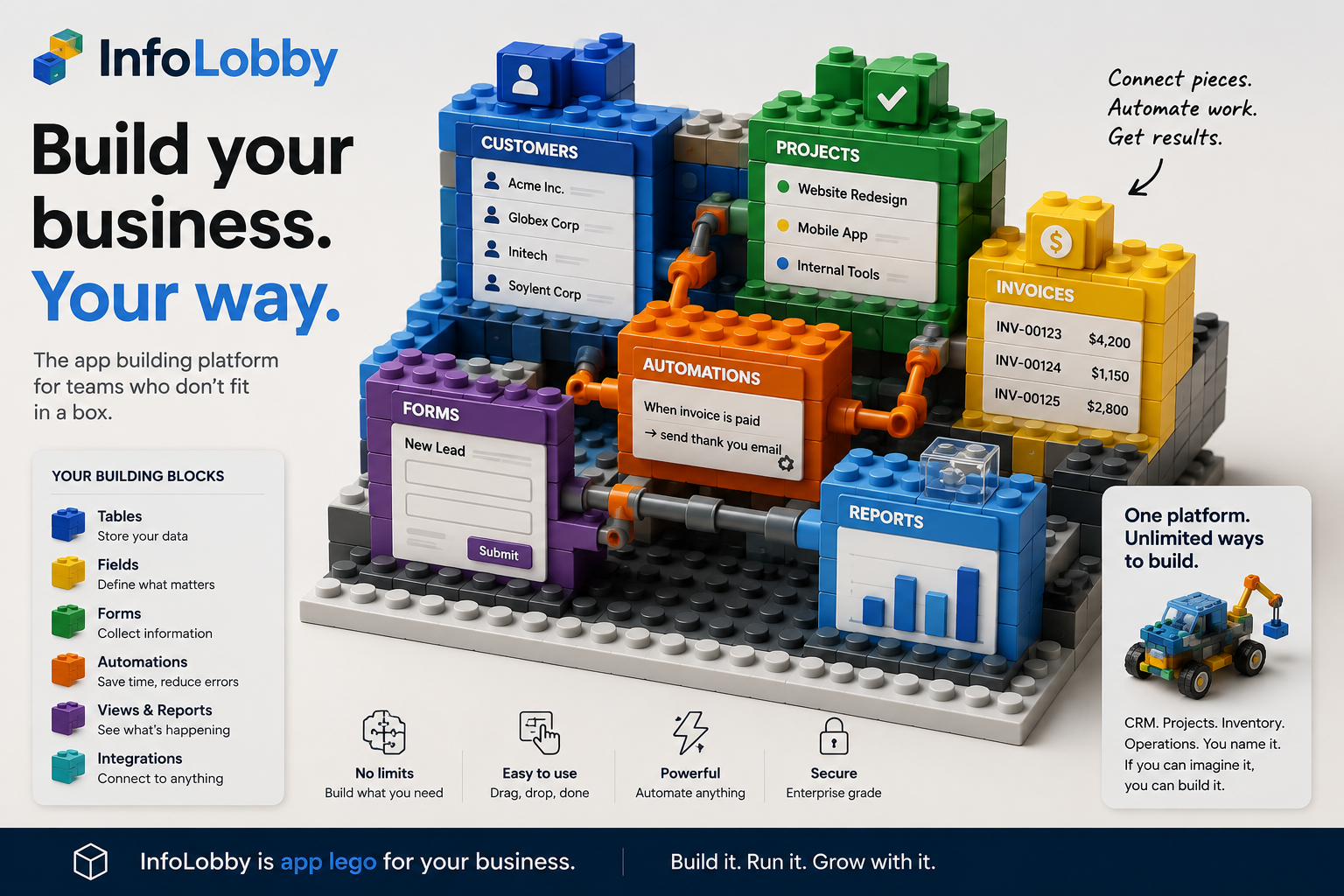
The trick to building blocks is that there are only a few kinds, each with one clear job. Learn the six and you can build almost anything. These are the same pieces shown in the image above, and they keep the same colors everywhere in InfoLobby so the visual stays consistent while you build.
| Block | Color | What it does |
|---|---|---|
| Tables | Blue | Store your data: customers, projects, invoices, anything you track |
| Fields | Yellow | Define what matters on each record: text, dates, status, links, files |
| Forms | Green | Collect information from your team, your website, or your customers |
| Automations | Orange | Do the repetitive work (assign, notify, update, create) on rules you set |
| Views & Reports | Purple | See what's happening: filtered grids, dashboards, the slice each person needs |
| Integrations | Teal | Connect to anything else: email, OpenAI, REST APIs, your own database |
None of these is exotic. What makes them powerful is that they snap together. A green form drops a record into a blue table. An orange automation watches that table and fires when a field changes. A purple report reads across several tables at once. A teal connector pushes the result to an outside system. You're not configuring a product. You're assembling one.
Same Pieces, Different Business
The clearest way to see modular software is to build two different things from the same box.
A CRM. Blue tables for Companies, Contacts, and Opportunities. Yellow fields for stage, owner, and next follow-up date. A green form on your website that creates a lead. An orange automation that assigns the lead and creates a task. A purple report showing open deals by stage.
An inventory system. Blue tables for Products, Suppliers, and Purchase Orders. Yellow fields for stock level, reorder point, and unit cost. A green form for receiving shipments. An orange automation that flags anything below its reorder point. A purple report showing what to buy this week.
Two completely different applications. The same six kinds of pieces. Nobody had to build "inventory software" or "CRM software" for you. You built both from the same blocks, shaped to your business rather than a category.
That's the whole idea: same pieces, different business.
How The Blocks Snap Together
Here's a concrete build, in the order the pieces click into place. Say you run a small services firm.
- Start with a blue table: Clients. Add yellow fields: name, status, owner, account tier.
- Add a second blue table: Projects, and link it to Clients so every project knows who it's for.
- Drop a green form on your site so new inquiries create a Client record directly, no copy-paste from email.
- Snap on an orange automation: when a new Client arrives, assign an owner and create a follow-up task. When a Project is marked won, spin up an onboarding checklist.
- Add a purple view for each person: sales sees open opportunities, delivery sees projects due this week, you see stuck accounts.
- Click on a teal integration when you're ready: send an automatic thank-you email when an invoice is paid, or let OpenAI summarize a long note.
You didn't write software. You connected pieces. And because every piece is standard, you can pull one out and add another next month without rebuilding. That is the same reason a brick model is easy to change and a molded toy is not.
Who This Is For
- Teams whose process spans sales, operations, files, tasks, and handoffs, and doesn't fit one category tool
- Businesses currently duct-taping three or four SaaS products together
- Anyone exporting from their "system of record" into spreadsheets to finish the real work
- Operators who want to shape the software themselves, without hiring developers or writing code
Who This Is Not For
- Teams a category tool already fits well. If a standard CRM or help desk matches you, buy it and move on
- People who want zero decisions. Modular means you decide the structure, and that is real work
- Requirements that demand a deep specialist product: a built-in sales dialer, enterprise forecasting, or a full marketing-automation suite
- Anyone who wants it built for them with no involvement in the design
Modular software rewards teams willing to make a few clear decisions about their own process. If that sounds like overhead rather than control, a finished box is the better buy, and that is an honest answer rather than a dodge.
Common Objections
"Isn't this just a spreadsheet?" No. A spreadsheet has no real permissions, no relationships between records, no forms, no automations, and no history you can trust. Building blocks give you those from the start. A spreadsheet is one flat block where this is the whole set.
"Will I get locked in?" Your data sits in a managed MySQL database and standard file storage. When you outgrow the managed setup, you can connect your own MySQL server, S3 bucket, or FTP instead. A managed start does not have to become a permanent cage. See avoiding vendor lock-in.
"Do I need to code?" No. Tables, fields, forms, automations, and reports are all built visually. Code is available (PHPScript, for the cases that need it) but it is the escape hatch, not the entry fee.
"Will it scale past a toy?" It's a real database and real file storage underneath, not a spreadsheet with a nicer skin. The blocks are the interface; the engine is production infrastructure.
Where InfoLobby Fits
InfoLobby is modular business software built on exactly these six blocks. You create a workspace, add tables, define fields, invite your team with role-based access, collect data with web forms, and automate record-driven work with a visual builder or PHPScript. New accounts start with managed MySQL and managed file storage, so there's no infrastructure to provision before you start building.
It's strongest when your app is part of daily operations: lead intake, sales-to-delivery handoffs, onboarding, service requests, renewals, files, tasks, and lightweight email history all living on the same records.
It's not the right fit if what you actually need is a deep specialist product with a large marketplace and category-specific tooling baked in. Modular software trades that depth for fit and control. Know which one your business needs.
FAQ
What is modular business software?
Software you assemble from reusable pieces (tables, fields, forms, automations, reports, integrations) instead of buying a pre-configured product. The pieces are generic; what you build from them is specific to your business.
How is it different from no-code app builders?
It's the same family. "No-code building blocks" is the method; modular business software is what you get. The distinction that matters is whether the pieces snap together into one connected system (shared data, relationships, permissions, automations) or just sit next to each other.
Is modular software harder to set up than a ready-made tool?
Setup takes a few clear decisions about your process, which a ready-made tool makes for you. In exchange you get software shaped like your business instead of the average one. If a category tool already fits, the ready-made path is faster.
Can I build a CRM and an inventory system in the same place?
Yes, that is the point. Both are just tables, fields, forms, automations, and reports arranged differently. You can run several applications in one workspace and connect them.
Do I own my data?
Yes. It lives in a managed MySQL database and standard file storage you can export, and you can switch to your own MySQL, S3, or FTP when you're ready.
Where do I start?
Start with one blue table and the fields you actually search or act on. Add one green form and one orange automation that removes repeated manual work. Grow from there. The whole advantage of blocks is that you don't have to design the finished thing on day one.
Build It Your Way
You don't buy an app. You build your workspace, from a small set of pieces, in the shape your business actually takes.
Start building your workspace or see the building blocks.
Related reading: why atomic master detail matters, package a working system with App Packs, custom CRM for small business, and SaaS consolidation without rip and replace.