TL;DR
- Most templates hand you a schema and leave you to rebuild the automations by hand, which is the part that actually took the time.
- An App Pack packages tables, views, forms and flows together, declares what it depends on, and refuses to install until those dependencies resolve.
- Failing the install is the feature. A half-installed system that looks complete is worse than one that refuses to start.
- It is for anyone who built a system once and needs it to exist somewhere else: a second business unit, a consultant's next client, or a packaged vertical application.
- Dependencies are declared rather than assumed, so a pack tells you what it needs before it touches the account.
Most software templates give you the structure. The tables are there. The fields are there. Maybe you get a few views.
Then you discover that the automations that made the original system useful are missing, and you have to rebuild them yourself.
That is not what we wanted templates in InfoLobby to be.
I recently published a Commercial Cleaning Quote Automation System to the InfoLobby App Market. It is a relatively small system, but a good example of what an App Pack can actually contain:
- 4 connected tables
- 4 automation flows
- 2 web forms
- Views
- Relationships between the tables
- The external connections those automations depend on
Instead of explaining how App Packs work in theory, let's install this one into a fresh InfoLobby account.
Start With The Actual Working System
The Commercial Cleaning Quote Automation System manages the process between receiving a cleaning enquiry and producing a customer-ready quotation.
An enquiry can arrive through a web form. The system stores the enquiry and customer information, checks whether required information is missing, sends the customer a form to collect it, calculates pricing, creates a quotation and generates the customer-facing quote.
There are automations behind those steps. So when I package this system, copying the four table schemas isn't enough. The flows, forms and relationships are part of the system too.
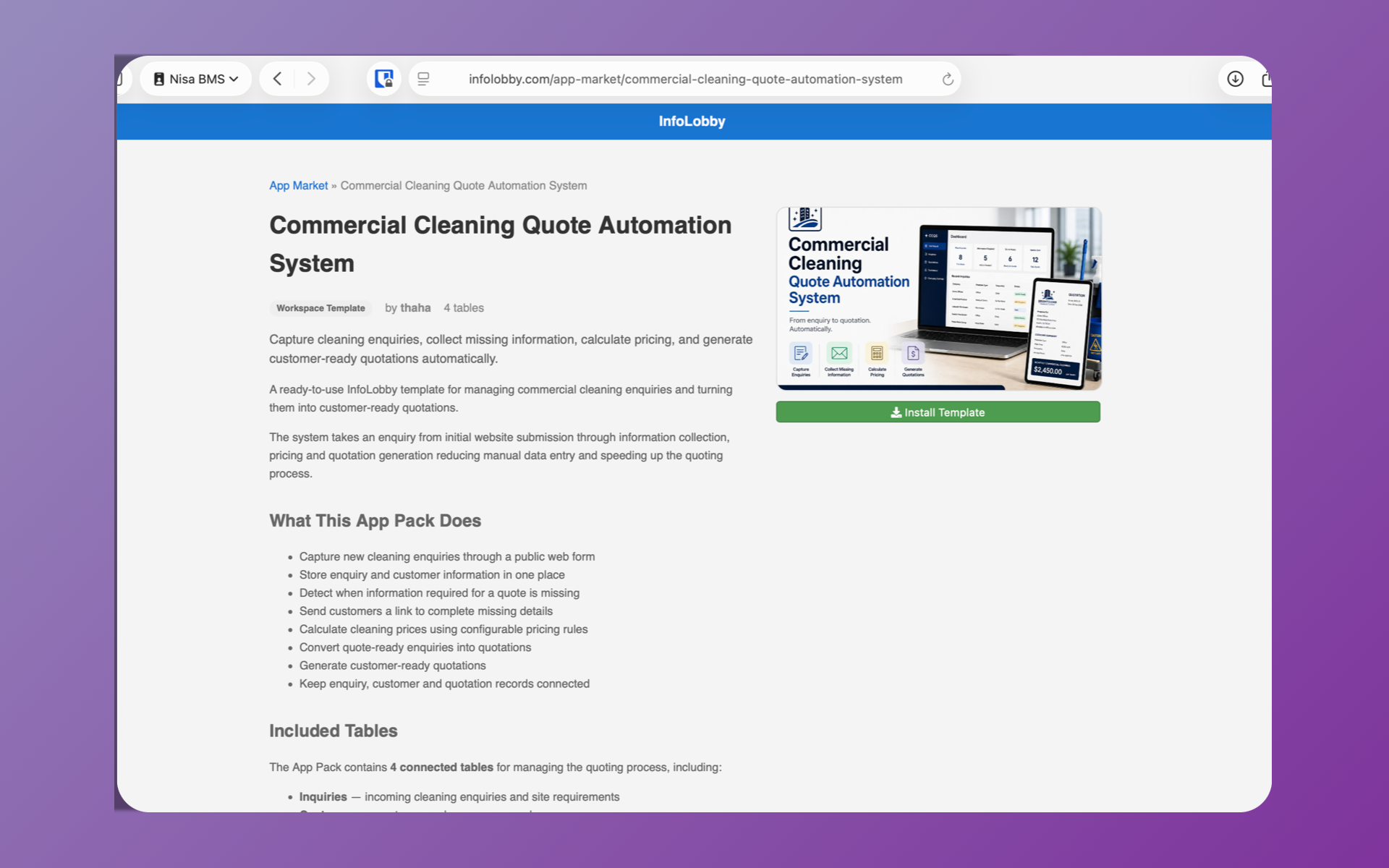
Installing The App Pack
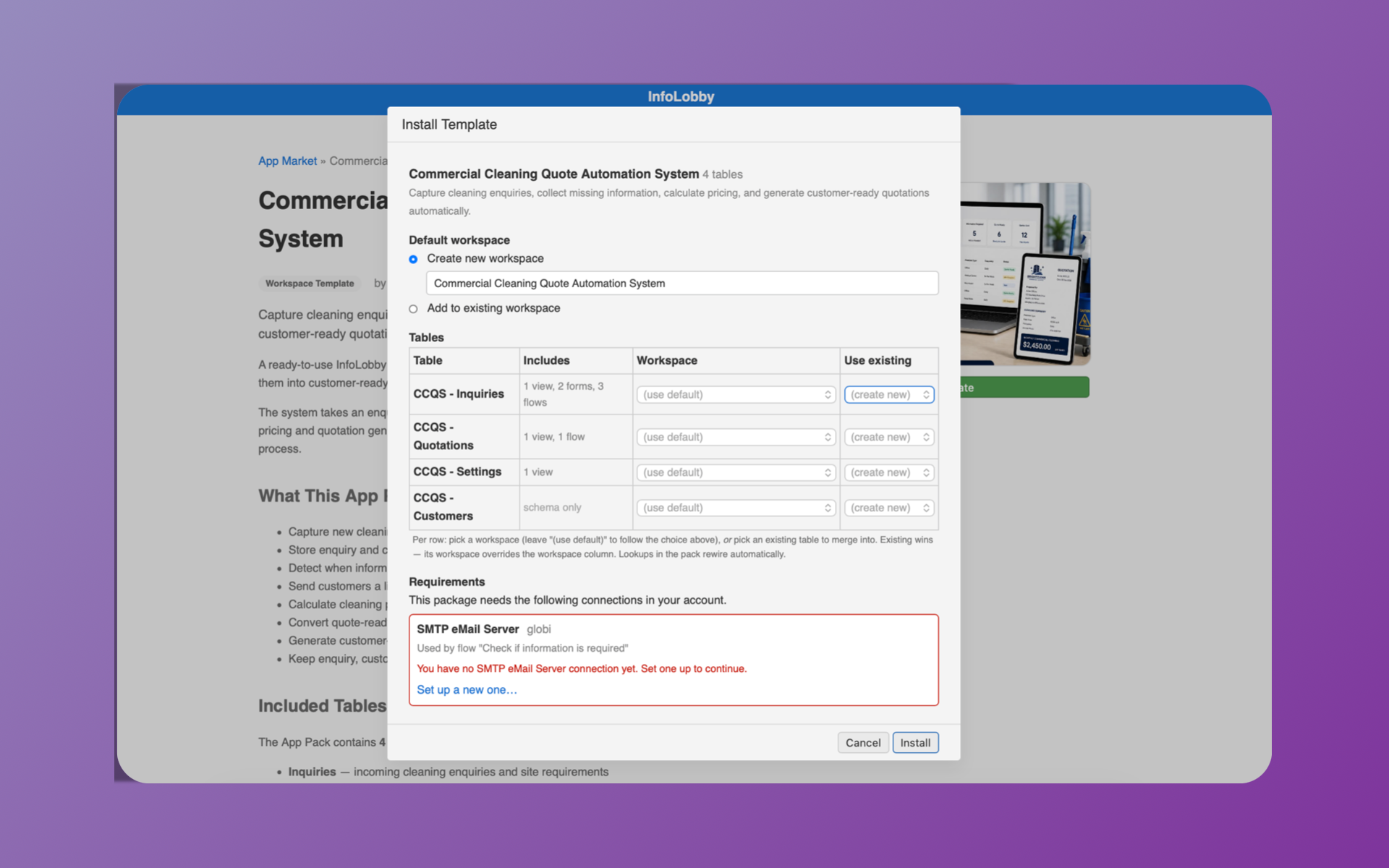
From the App Market, I can click Install Template. InfoLobby opens the installer and shows exactly what the pack wants to create.
I can create a new workspace for the system, add it to an existing workspace, or map individual tables to existing tables.
But there is another part of the installer that matters more. Requirements.
The Installer Knows What The System Depends On
One of the flows in this App Pack sends an email. That means the original system depended on an SMTP email connection. Simply copying the flow into another account would leave it pointing at a connection that doesn't exist there.
InfoLobby handles this through the App Pack's manifest. The package declares the resources it requires. During installation, InfoLobby tries to resolve those requirements against resources available in the target account.
In my fresh account, there was no SMTP email connection. So the installer caught it:
You have no SMTP eMail Server connection yet. Set one up to continue.
It even tells me why the connection is needed: it is used by the "Check if information is required" flow.
At this point, the requirement has not been resolved, so InfoLobby will not proceed with the installation. Nothing has been partially imported. Nothing needs cleaning up. First resolve the dependency, then install the system.
Resolve It And The Installation Can Continue
I created an SMTP connection in the new account and returned to the installer. Now InfoLobby could resolve the requirement. The SMTP connection from the original package is mapped to the SMTP connection available in this account.
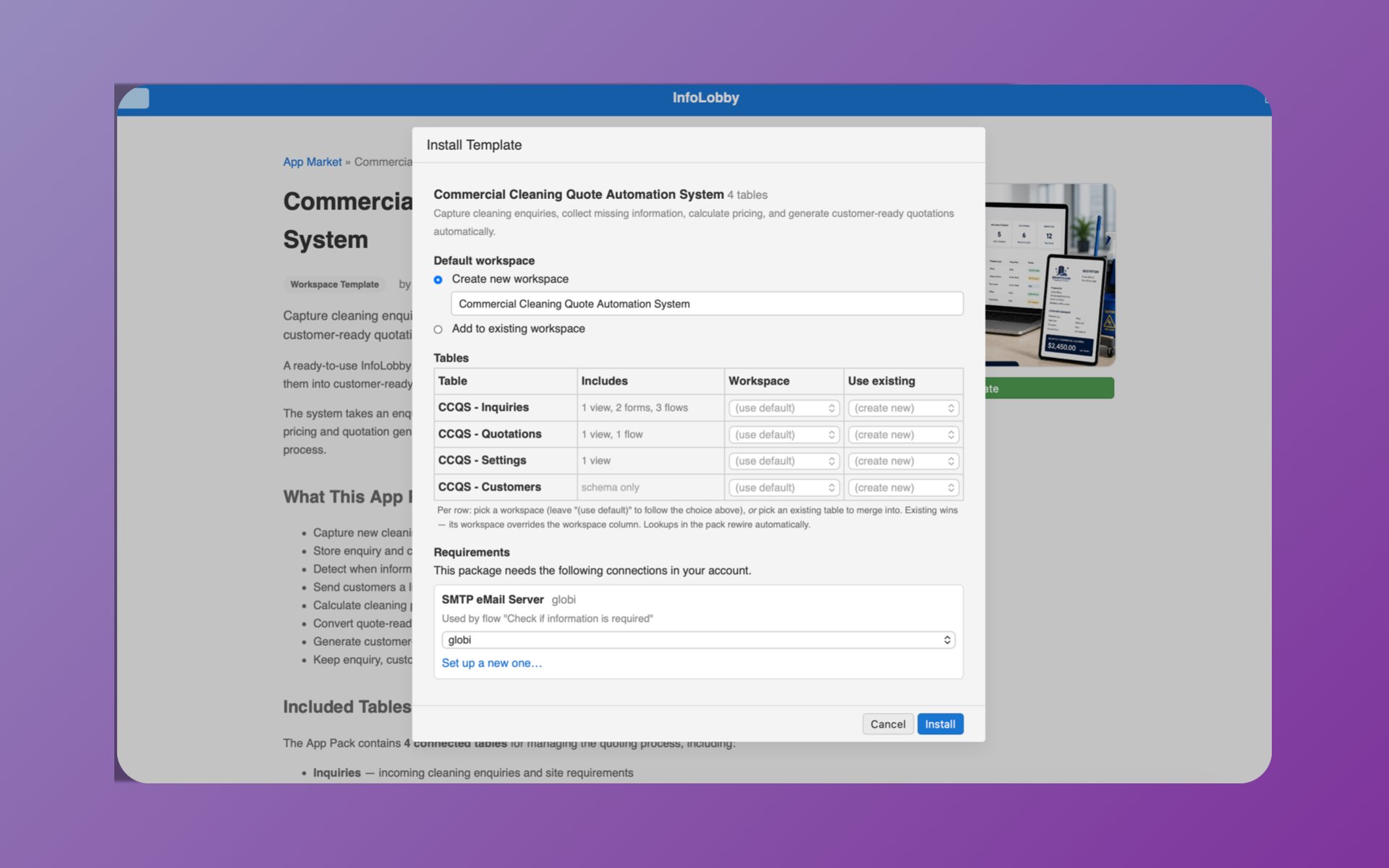
The important distinction here is that the App Pack isn't trying to copy credentials or account-specific resources from one InfoLobby account to another. It is describing what the system needs. The receiving account provides its own resource that satisfies that requirement.
Now I can click Install.
The System Arrives With Its Automation Intact
The installation creates the tables, views, forms and flows contained in the App Pack and rewires the packaged references for the new environment.
That means I am not receiving a skeleton of the Commercial Cleaning Quote Automation System and then rebuilding its behaviour. I am installing the system.
There is still one more useful check. The SMTP connection I selected exists, so the package requirement can be resolved. But its configuration isn't identical to the connection used when the system was originally built. InfoLobby catches that too.
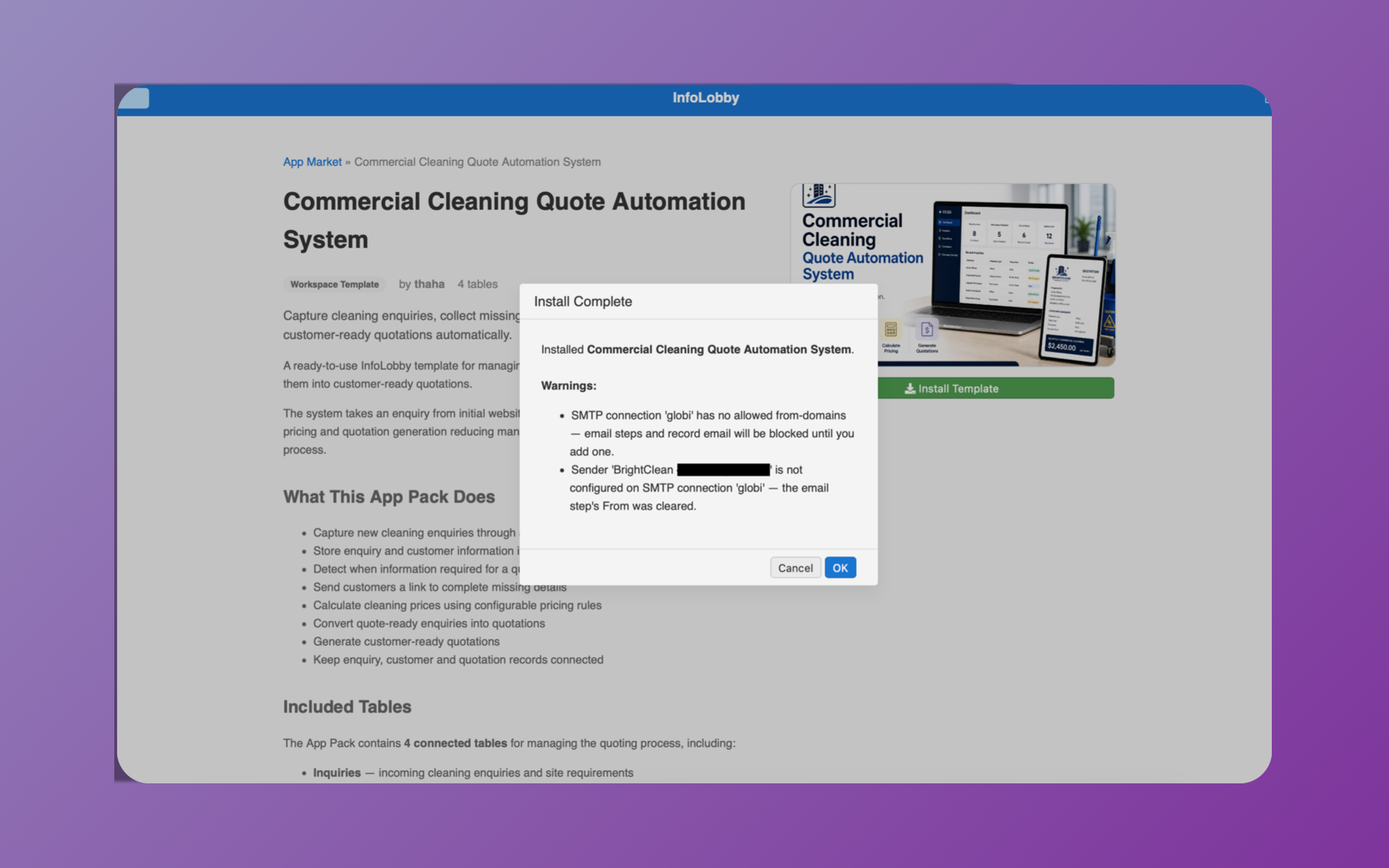
The installation completes, but InfoLobby warns me that the selected SMTP connection doesn't have an allowed From domain configured and that the original sender isn't configured on this SMTP connection. Rather than carrying an invalid sender across accounts, the From value is cleared. That is a configuration problem I can fix in the receiving account.
This distinction is intentional. A missing required resource stops installation. A resolvable resource with configuration that needs attention can be installed, but InfoLobby tells you exactly what needs fixing.
This Is What I Mean By An App Pack
The interesting part of an App Market isn't having a gallery of table templates. You can copy a database schema fairly easily. The harder problem is moving a system.
A useful business system has relationships, forms, automations and dependencies. Those pieces reference each other and sometimes reference resources that belong specifically to the account where the system was built.
An InfoLobby App Pack packages that system into a portable archive with a manifest describing what is inside it and what it needs. The importer then has a job to do before it starts writing into the receiving account: can every required dependency be resolved here?
If the answer is no, installation stops. If the answer is yes, the package can be installed and its internal references rebuilt for the new environment.
That is the difference I care about. Not:
Build → copy the tables → rebuild everything else
But:
Build → package → install
Build Once, Use It Somewhere Else
This opens up a much bigger use case for InfoLobby.
You might build a system for your own company and want to reproduce it in another business unit. You might be a consultant who has developed a good system for a particular type of client. You might specialise in an industry and want to turn the processes you have developed into something other companies can install. Or you might want to build and distribute complete applications on top of InfoLobby.
That is what the App Market and App Packs are being built for.
The Commercial Cleaning Quote Automation System is one example. It happens to manage cleaning enquiries and quotations, but the important part is the packaging and installation mechanism underneath it.
You can build a working system, package it, and hand that working system to someone else. Not just its tables. The system.
If you want to see the system itself rather than the packaging around it, here is the Commercial Cleaning Quote Automation System being built in InfoLobby:
You can explore the Commercial Cleaning Quote Automation System, or browse the App Market to see the other packs available.
FAQ
What is inside an InfoLobby App Pack?
An App Pack is a portable archive of a working system: table schemas, the relationships between them, views, web forms and automation flows, plus a manifest describing the external connections those flows depend on. It is the same archive format used by workspace export and import.
Do the automations survive the install?
Yes. Flows are part of the package, and the installer rewires their internal references to the tables, views and forms it just created in the receiving account. You are not handed a schema and told to rebuild the behaviour.
What happens if my account is missing a connection the pack needs?
Installation stops before anything is written. The installer names the missing connection, tells you which flow uses it, and links you to the setup form. Once the connection exists, you return to the installer, map it, and install. There is no partial import to clean up.
Does installing a pack copy the publisher's credentials?
No. The pack declares what kind of connection it needs, not the connection itself. When a pack is published to the App Market, the non-secret configuration used to pre-fill setup forms is stripped out as well, so a published template never carries the publisher's base URLs, usernames or sender identities.
Can I remove a pack after installing it?
You can Forget an installed pack, which drops the link between your account and the pack. Your data is never touched by that, so if you also want the tables gone you delete them from the workspace the normal way.
Who is this useful for?
Anyone who builds a system once and needs it to exist somewhere else: a second business unit, a consultant's next client, an industry specialist packaging their process, or a developer distributing a complete application on top of InfoLobby.
Related reading: modular business software building blocks, build your own helpdesk, and why atomic master detail matters. See also the App Market.