An AI Assistant That Queries Your Data and Builds With You
Ask a question about your records and get an answer. Ask for a field, a formula or a flow and see exactly what it will change first.
Nothing is applied until you say yes, and one click undoes it.
The improvements that never ship
Every team has a list of questions their data could answer and small changes they would make if it were quick. A calculated field here, a reminder flow there, the report someone asked for in March. Each one means either learning the tool properly or waiting for the person who already has, so most of them never happen.
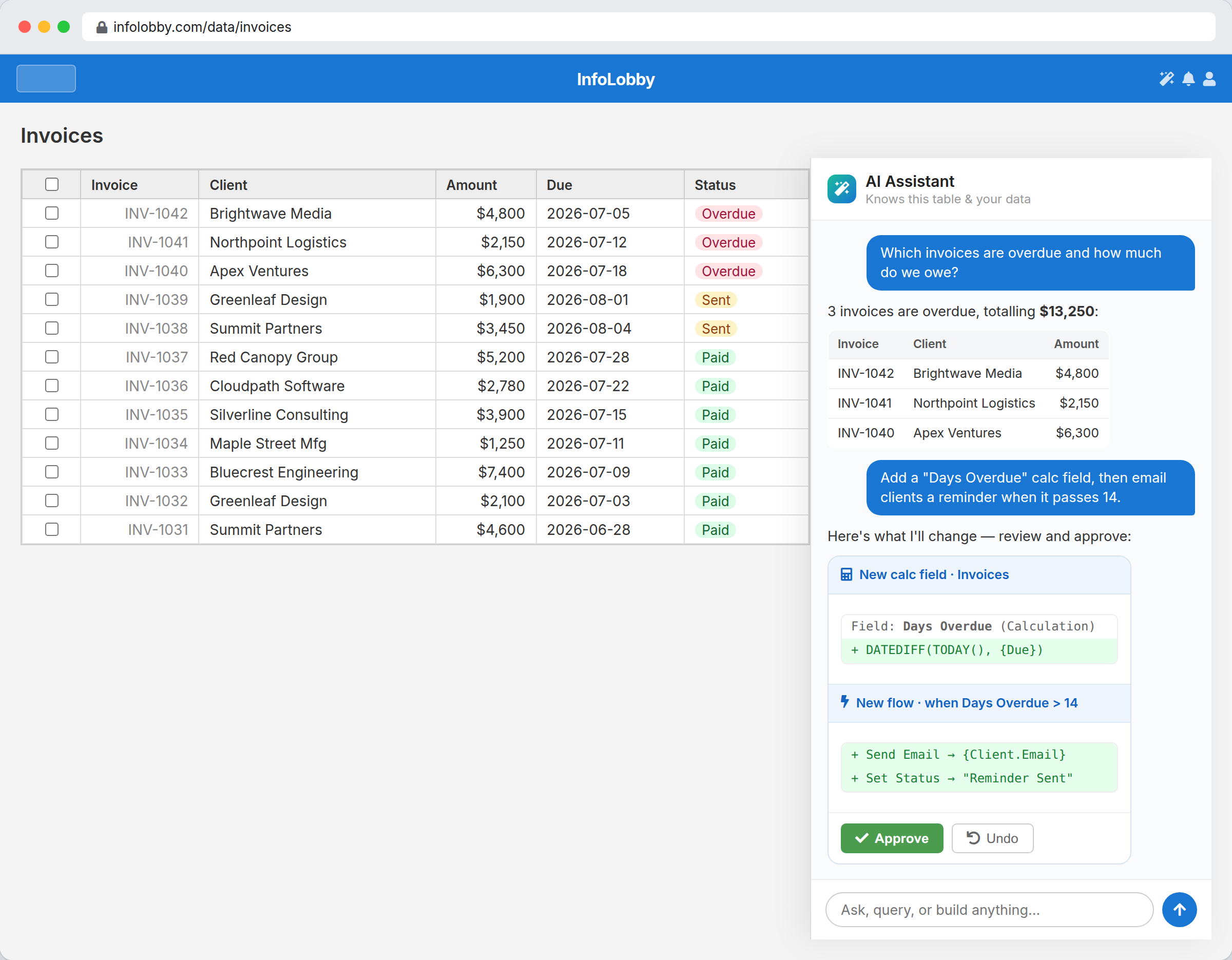
The assistant sits beside your tables and can read them. Ask a question in plain English and it queries the records and answers from them. Ask for a change and it drafts the exact field, formula or flow and shows you what it will do before it does it. Nothing is applied until you approve it, and one click puts it back.
AI that proposes, so you stay in control.
The assistant is genuinely useful because it acts on your real data and structure, but it never acts behind your back. Ask it to add a "Days Overdue" field and email clients when it passes 14, and it shows you the field, the formula, and the flow it will create. You approve what's right and undo what isn't.
- Answers come from your actual records, not a generic model
- Changes arrive as a reviewable proposal with a clear diff
- Undo reverses any applied change in one click
What you can ask it
- Query records conversationally ("which invoices are overdue and how much do we owe?")
- Propose new fields and calculation formulas on the current table
- Draft and edit workflow automations, in visual bricks or PHPScript
- Suggest integrations and record updates, always as an approvable proposal
- Keep you in control: approve, tweak, or undo. The assistant never changes data silently
Working with the assistant
- Open the assistant beside any table and ask a question about the data you're looking at.
- When you want a change, describe it (a field, a calculation, a reminder flow) and review the proposal it drafts.
- Approve what's correct, undo anything that isn't, and keep iterating in plain language.
Where it fits
Use it for
- Teams who want answers from their data without building reports by hand
- Non-technical users who want to add fields and automations by describing them
- Anyone who wants AI help but not AI making silent changes to business data
Reach for something else when
- Teams wanting a fully autonomous agent that acts without human review
- General-purpose chat unrelated to your tables and records
Questions people ask
Does the AI change my data automatically?
No. The assistant proposes every change (a new field, a formula, a flow, a record update) and shows you the exact diff. Nothing is applied until you approve it, and you can undo anything in one click.
Can it actually answer questions about my records?
Yes. It queries your live data in the table you're working in, so answers reflect your real records rather than a generic response.
Do I need to know formulas or code to use it?
No. You describe what you want in plain language and the assistant drafts the calculation, field, or workflow for you to review.
Try it on your own data
Start free and build one working process around this feature, then add the records, views, tasks and automations around it.