Work Your Data From Claude, ChatGPT, or Your Terminal
Add InfoLobby to Claude or ChatGPT as a connector, or install the Agent Skill into Claude Code, Cursor, or Codex.
You pick the workspaces it can see, it acts as you, and you can revoke it in one click.
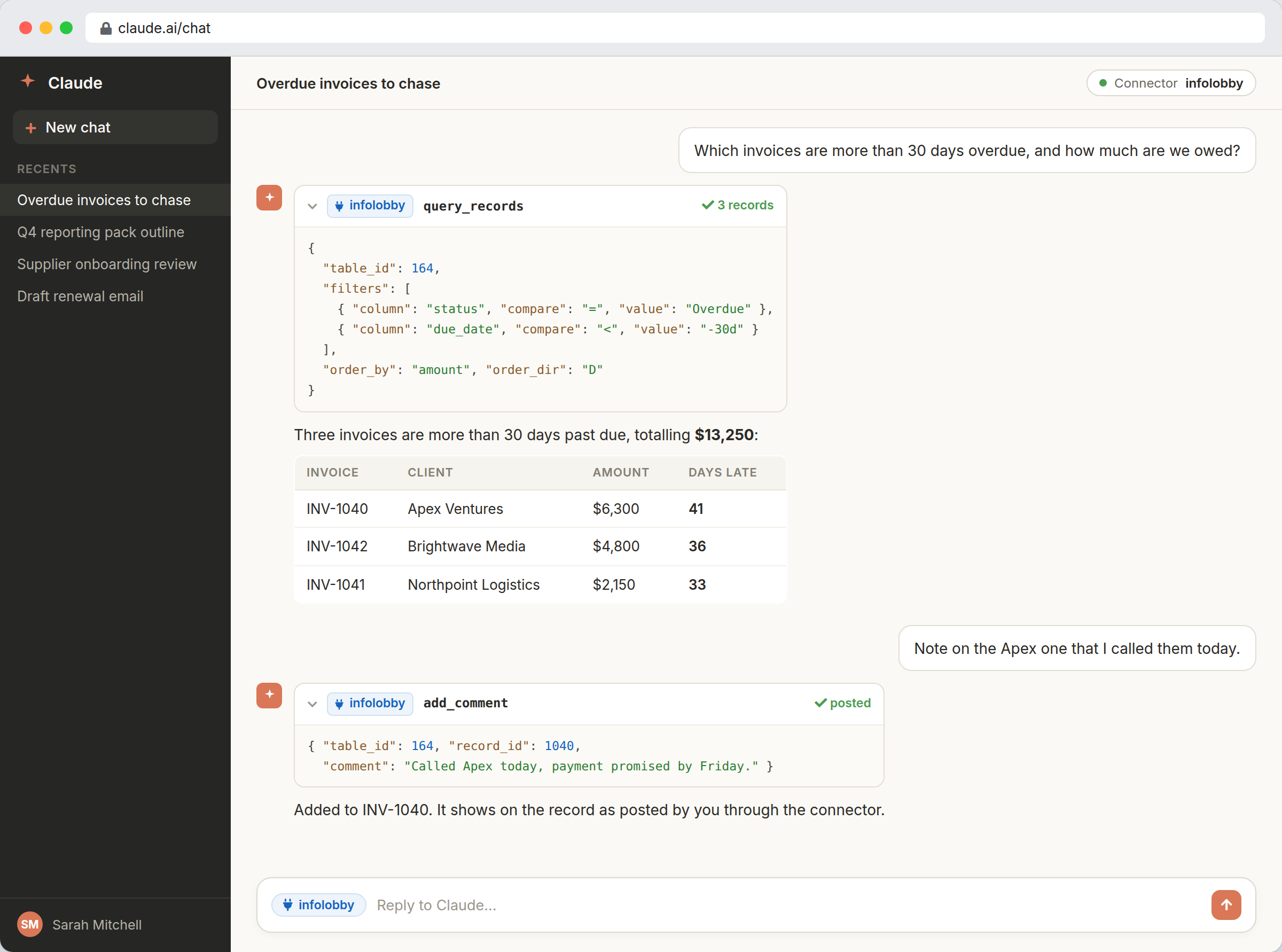
AI is useful right up to the point it needs your data
Pasting records into a chat window is slow, out of date the moment you send it, and shares more than you meant to. Handing over an API key is worse: it has no scope, no expiry, and revoking it means deleting it and updating everything else that was using it.
A connector changes the shape of the problem. Add InfoLobby to Claude or ChatGPT, sign in, and tick the workspaces you want it to reach. It acts as you, inside your permissions, and everything it changes lands in the record history with its name on it. Untick a workspace and it is gone. For agents running on your own machine, like Claude Code, Cursor or Codex, the Agent Skill does the same job for a fraction of the context.
Two paths, because the sandbox decides which one works.
A hosted assistant (Claude on the web, ChatGPT) cannot reliably make outbound calls from its sandbox, so it needs the MCP connector. A local agent already has network access, and an MCP server's tool definitions sit in the model's context on every single turn whether they are used or not. A skill costs about a hundred tokens until the moment it triggers. So: connector for hosted assistants, skill for anything running on your machine.
- Claude on the web or ChatGPT: add the connector at infolobby.com/mcp
- Claude Code, Cursor, Gemini CLI, Codex: install the Agent Skill
- Both surfaces run on the same public API, permissions, and rate limits
What the connector can reach
- Remote MCP server at infolobby.com/mcp for Claude and ChatGPT connectors
- Agent Skill install for Claude Code, Cursor, Gemini CLI, Codex, Goose, and other Agent Skills clients
- Discovery tools: list workspaces and tables, read a table's field schema, list saved views
- Record tools: query with filters and sorting, read, create, update, delete
- Comments and attachments: read a thread, post a comment, upload or remove files
- Flow authoring for account owners, with new flows created switched off until you enable them
Connecting an assistant
- In Claude or ChatGPT, open Settings, Connectors, add a custom connector, and paste https://infolobby.com/mcp.
- Sign in to InfoLobby, tick the workspaces you want to share, and approve. Review what is listed on the consent screen before you do.
- For a local agent, run the one-line installer on the Agent Skill page instead, and give it an account or personal API key the first time it runs.
Where it fits
Use it for
- Teams who want an assistant to answer questions from live records instead of exports
- Developers driving InfoLobby from Claude Code, Cursor, or another terminal agent
- Anyone who wants AI access scoped per workspace and revocable on demand
Reach for something else when
- Assistants that need to restructure workspaces, tables, members, or billing. Those stay out of reach by design
- Unattended agents acting on production data with nobody reviewing writes
Questions people ask
How do I connect Claude or ChatGPT to InfoLobby?
Open Settings, Connectors in Claude or ChatGPT, add a custom connector, and paste https://infolobby.com/mcp. You sign in to InfoLobby, choose which workspaces to share, and approve. There is no API key to paste.
What can the assistant actually do with my data?
It can list workspaces and tables, read a table's schema and saved views, query and read records, create, update and delete them, read and post comments, and handle file attachments. Account owners can also have it author flows, which start switched off. It cannot create or restructure workspaces and tables, manage members, or touch billing.
Can it see data I am not allowed to see?
No. The connection acts as you. Your workspace roles and field permissions apply unchanged, and it is limited further to the workspaces you ticked when you authorized it.
How do I revoke access?
Go to Account, Connected Apps. Every authorization is listed with its access level, the workspaces it can see, and when it was last used. Revoke takes effect immediately.
Should I use the MCP connector or the Agent Skill?
Use the connector for Claude on the web and ChatGPT, whose sandboxes cannot make the outbound calls a skill needs. Use the Agent Skill for local agents like Claude Code, Cursor, Gemini CLI, or Codex: an MCP server's tool definitions occupy context on every turn, while a skill loads only when it is needed.
Does it work with agents other than Claude?
Yes. ChatGPT connects through the same MCP server, and the skill uses the open Agent Skills format, so Cursor, Gemini CLI, Codex, Goose, OpenCode and other compatible clients can use it. Scripted clients can also send an existing InfoLobby API key as a bearer token against the MCP endpoint.
Try it on your own data
Start free and build one working process around this feature, then add the records, views, tasks and automations around it.