Send the Email From the Record, and See When It Was Opened
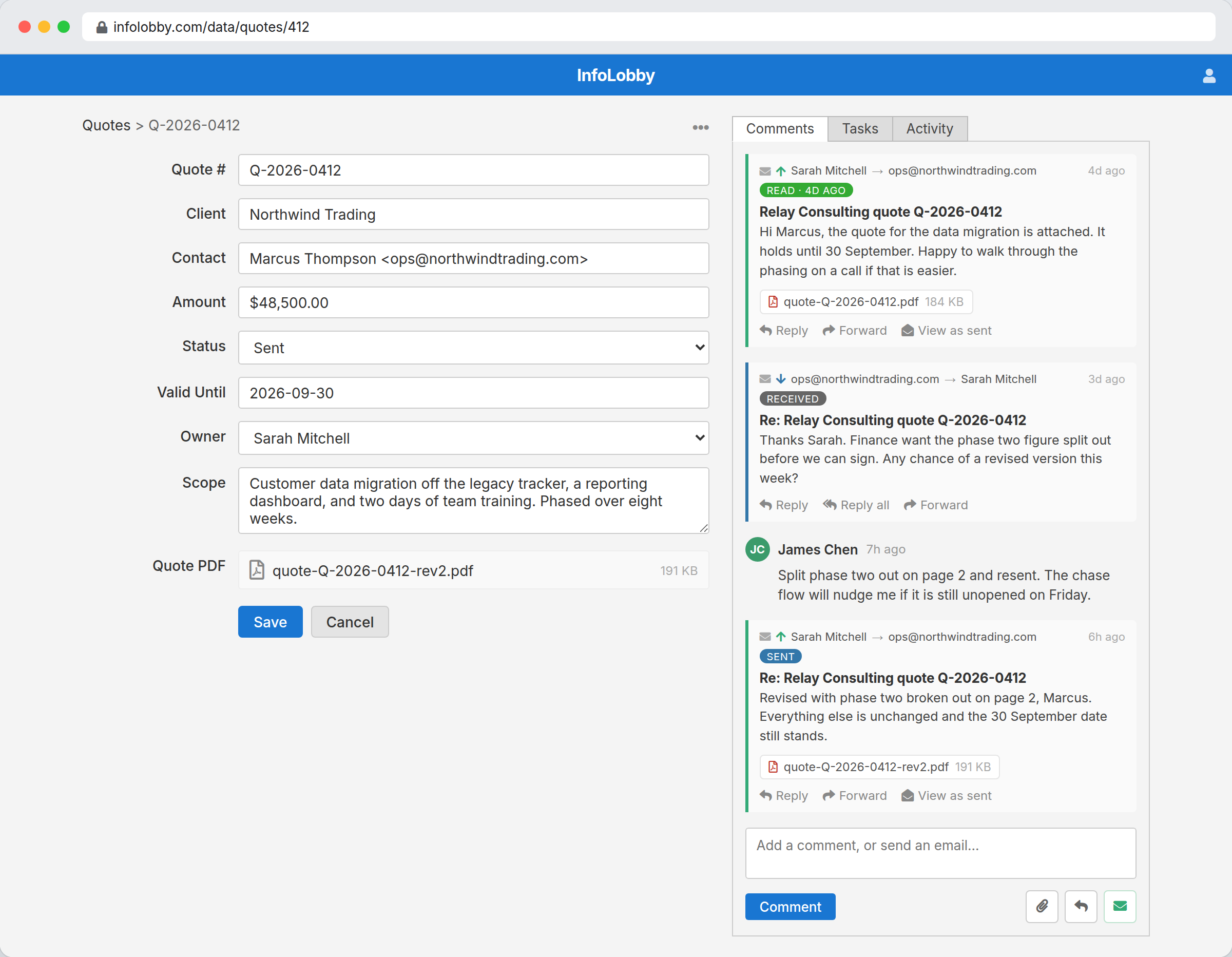
Send an email from a record through your own mail server. The reply lands back on the same record, and the email tells you when it was opened.
Nobody has to remember to copy the thread into the system, because it was never outside it.
The thread is in somebody else's inbox
You send the quote from your mail client. The client replies to you, not to the system. Three weeks later a colleague picks up the account and has no idea what was agreed, because the only record of it sits in a mailbox they cannot open. So they ask the client, and the client repeats themselves.
Send it from the record instead and the exchange stays attached to the thing it is about. Replies route back to the same record with their attachments. Your team's internal comments sit in the same timeline, and the recipient never sees those. Anyone who can open the record can read the whole history without asking anyone for it.
Read tracking is a nudge, not a certainty.
The open status comes from a 1x1 image at the bottom of the message. It fires when the recipient's mail client loads images, which most do and some deliberately do not. A read pill means it was almost certainly opened. The absence of one does not prove the opposite, so treat it as a prompt to follow up rather than as evidence about someone.
- Use it to decide who to chase, not to accuse anyone of ignoring you
- Switch the pixel off on the SMTP integration if you would rather not track at all
- Let an On Email Opened flow do the following up so nobody has to watch for it
What a record email can do
- Send through your own SMTP server, from an address on your own domain
- Choose a From identity, add CC and BCC, and attach files already on the record
- Drop record values into the subject or body with a
{{field:slug}}token - Sign off with a saved HTML signature, written once and reused
- Watch the status move from queued to sent, then to read when it is opened
- See a bounce with the reason the receiving server actually gave
- Reply, reply all, or forward straight from the record's timeline
- Open a sent message exactly as the recipient saw it, or pull the archived original
Turning email on for a table
- Open your SMTP integration and fill in its CRM Email section: the domains it may send from, and the name and address recipients should see.
- On the table's Configure screen, General tab, pick which of those integrations the table may use. Email is off for every table until somebody does this.
- Open a record, click the envelope in the comments panel, and write. Replies find their own way back.
Where it fits
Use it for
- Quotes, proposals and contracts you are waiting on a decision for
- Support and account threads that more than one person picks up
- Supplier and contractor correspondence that belongs to a job rather than a person
- Chasing work, where knowing a message was opened changes what you do next
Reach for something else when
- Bulk marketing. This is one message to one record's contacts, not a campaign tool
- Campaign-style open-rate reporting. The read status is per message, on the record, not a percentage across a send
- Any audience where a tracking pixel would be unacceptable, unless you switch it off
Questions people ask
Whose mail server does this use?
Yours. InfoLobby does not provide an outbound mail service. You point it at your own SMTP server or provider, so mail leaves from your domain, under your deliverability and your sending reputation.
How do replies find their way back to the record?
Every message goes out with its own unique reply address. When the recipient replies, that address routes the message onto the record it came from, and it appears in the timeline as a received email with any attachments. You get a record notification like any other activity.
How does the open tracking work?
A 1x1 transparent image is added to the bottom of the email. When the recipient's mail client loads it, the message flips from sent to read and the time is recorded. Mail clients that block images never fire it, so a message with no read pill has not necessarily been ignored.
Can I turn the tracking off?
Yes. The SMTP integration has a Disable read-tracking pixel option. Switch it on and nothing is added to the message.
Can an automation run when someone replies or opens?
Yes. Flows have an On Email Reply trigger and an On Email Opened trigger. A common pattern is a chase flow that creates a task if a quote still has not been opened a few days after it went out.
Can I see an open rate across a whole table?
Not as a single percentage. The read status lives on each message in each record's timeline, so you can see it per email and per record, and a flow can act on it. There is no campaign-style open-rate report.
Can I pull in an email I received somewhere else?
Yes. Every record has its own stable inbound address on its ellipsis menu. Forward a message to it and it lands on that record's timeline as a received email, attributed to the original sender rather than to you.
Try it on your own data
Start free and build one working process around this feature, then add the records, views, tasks and automations around it.