Give a Table Its Own Email Address
Give a table its own email address. Anything sent to it becomes a new record.
Support requests and supplier notices stop being an inbox and start being a queue.
Some work arrives by email and always will
A supplier confirms an order. A customer replies to an ad. A partner forwards a spreadsheet. None of them is going to fill in your form. So somebody reads the inbox and re-types it into the system, or it sits there and gets handled twice, or not at all.
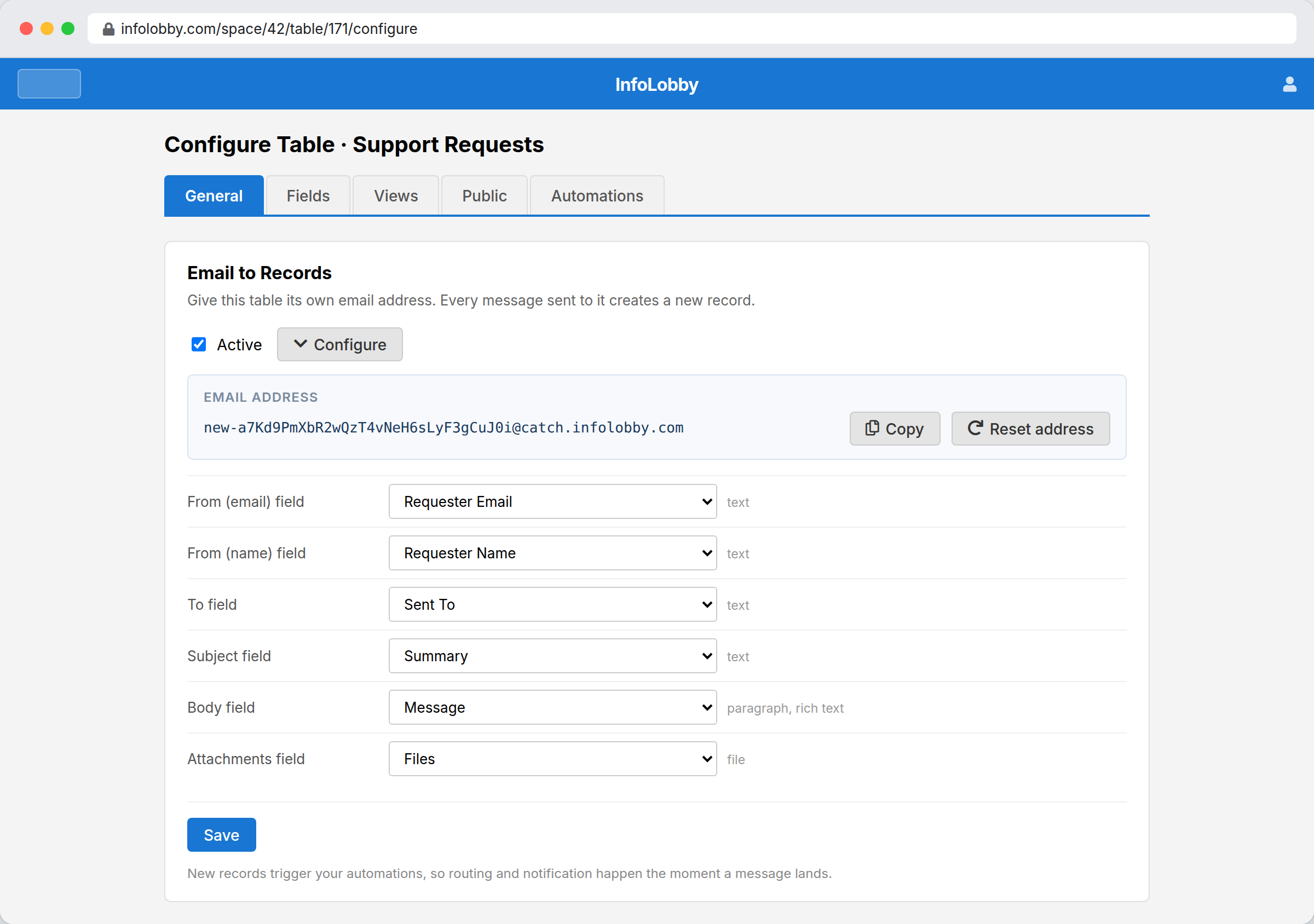
Give the table its own private address and every message that arrives becomes one record. Sender, recipient, subject, body and attachments map onto fields you pick. After that it is an ordinary record, so your automations route it, your team comments on it, and it turns up in the same views as everything else.
The address is the only secret, so treat it like one.
There is no sender allowlist and no sign-up step. Anyone who learns the address can create a record, which is exactly what makes it useful for suppliers and customers, and exactly why you reset it if it leaks. A reset kills the old address immediately.
- Publish the address wherever you want work to arrive from
- Reset it the moment it attracts anything unwanted
- Let a flow triage what arrives instead of a person
What gets mapped onto a record
- Map sender name, sender address, recipient, subject and body onto text or paragraph fields
- Map attachments onto a file field
- Keep the HTML body when the target paragraph field is set to rich text
- Reset the address at any time to issue a fresh one
Turning on an address
- Open the table's Configure screen and go to the General tab.
- Turn Email to Records on and map the parts of a message onto fields. Sender, recipient, subject and body need text or paragraph fields, and attachments need a file field.
- Copy the address and start sending or forwarding mail to it.
Where it fits
Use it for
- Support and enquiry mailboxes that should really be a work queue
- Supplier and partner notices that only ever arrive as email
- Forwarding a recurring report or alert into a table
- Catching submissions from people who will never use a form
Reach for something else when
- Threaded conversations. Every message makes a new record rather than joining one
- Anything needing sender verification. There is no SPF, DKIM or allowlist check
- Attachments when the workspace has no file storage connected. Those are skipped and the record is still created
Questions people ask
What does the address look like?
A long random string at our catch domain, generated when you turn the feature on. You can reset it whenever you like, which invalidates the old one immediately.
Does a reply join the original record?
No. Every message creates a new record. If you want a threaded conversation on a record, use the record's own email feature instead.
What happens to attachments?
They are uploaded to your workspace's file storage and attached to the file field you mapped. If the workspace has no storage connected, the attachments are skipped and the record is still created.
How do I stop spam?
Reset the address. There is no sender allowlist, so the address itself is what keeps it private. Share it deliberately, and reset it if it leaks.
Try it on your own data
Start free and build one working process around this feature, then add the records, views, tasks and automations around it.