A Portal Where Each Client Sees Only Their Own Records
Build a sign-in area over your own data where each client, contractor or partner sees only the records that belong to them.
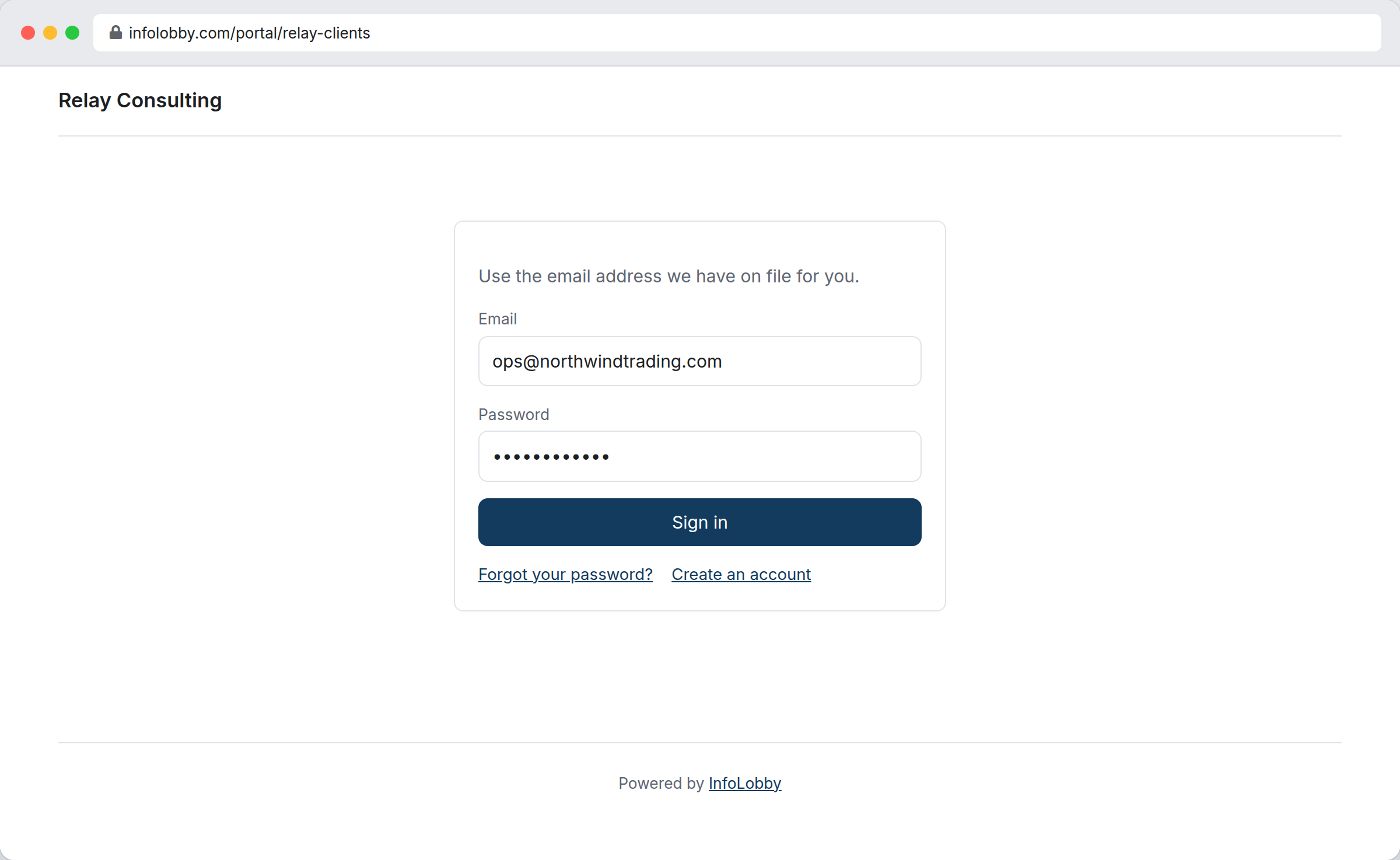
Deactivate the record and they are out on their next click.
Clients want status, and your system was not built for them
So you answer by email, or you assemble a weekly summary by hand, or you hand them a login to a workspace built for your team and then spend the afternoon working out what they must not be allowed to see.
A portal is a small separate app over the same data, published at its own address and under your branding. You build the screens and scope each one so a visitor reaches only the rows that belong to them. They sign in against a password field on their own record, which means shutting someone out is editing a record, and they are gone on their next click.
The scope is the product.
Everything a portal serves runs against a filter you wrote, re-checked on every request rather than once at sign-in. Move a job to another client and it leaves the first client's portal mid-session. A screen with no scope is refused at save time, so the unsafe version cannot be published by accident.
- Scope every screen to the signed-in visitor
- Field-level control decides what they can change
- Access follows the record, so it updates the moment the data does
What you can build into a portal
- Build sign-in, text, list, record and form screens
- Drill down from a list into a single record, and on again into its related records
- Choose exactly which fields a visitor may edit, field by field
- Let visitors add records through a form, with values you stamp on automatically
- Turn on a comment thread, and control whether visitors may post and attach
- Let visitors download the files on their own records, and upload new ones
- Open sign-up to the public behind a CAPTCHA, or keep it invitation only
- Send a one-use sign-in link so nobody has to remember a password
- Put your logo, colours and wording on every screen, including all 41 on-screen strings
- Preview the whole thing as a visitor would see it before anyone can reach it
What your client sees after they sign in
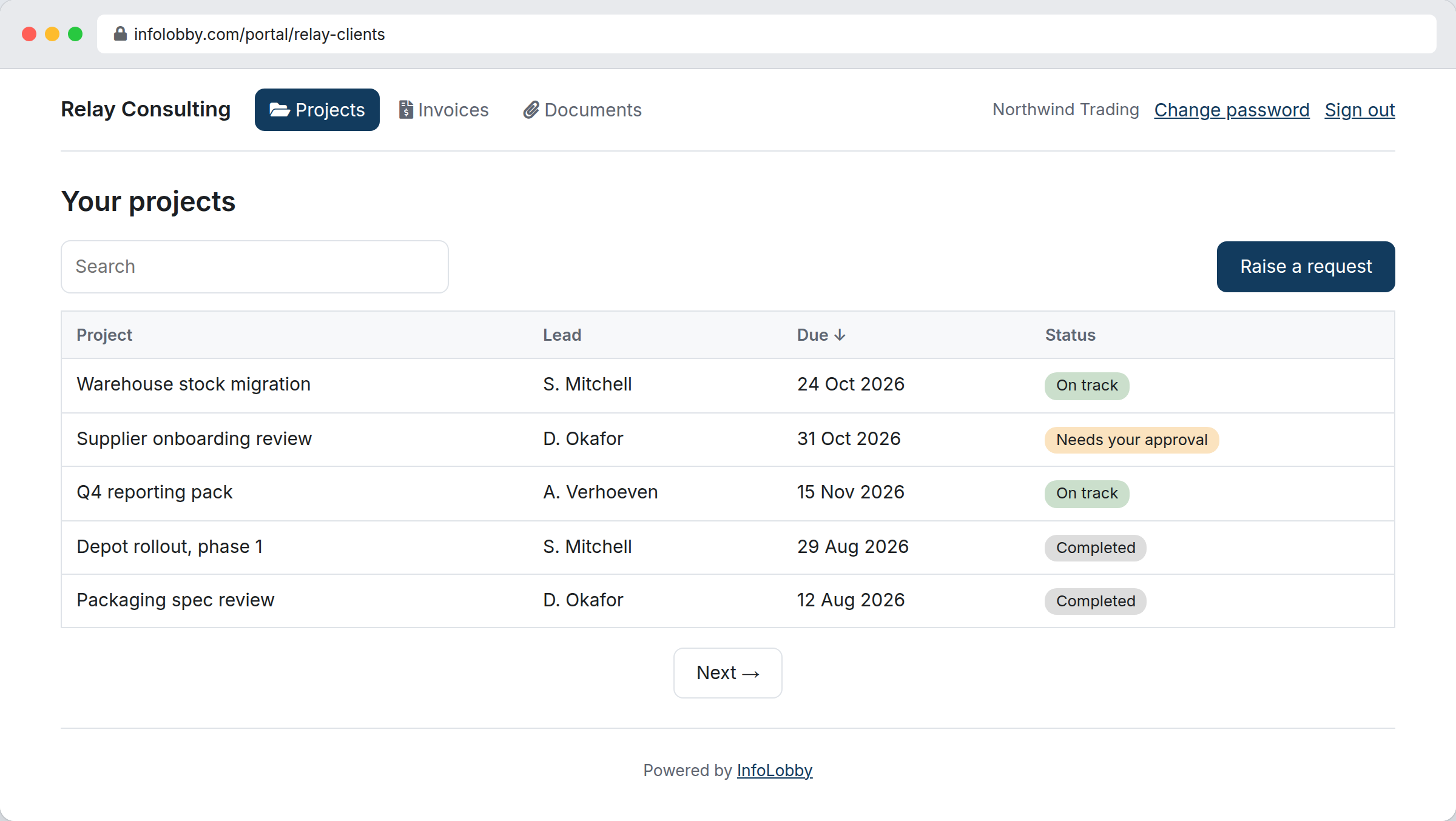
A portal is made of screens you choose, named how you like and listed across the top: their jobs, their invoices, their documents, a form for raising a request. Each screen reads a table you already have, filtered to the visitor in front of it, so the rows are the live records rather than last week's export. Clicking one opens it, and from there they can read the fields you published, change the ones you marked editable, download a file or answer on the record's comment thread, with everything they write landing on the record your team is already working in.
Standing up a portal
- Add a password field to the table that already holds your clients or contractors.
- Build the portal's screens and scope each one to the signed-in visitor.
- Point it at your SMTP integration, so sign-in mail leaves from your own address.
- Preview it as a visitor, then publish it at its address.
- Send each person their login from the builder, or open sign-up and let them register.
Where it fits
Use it for
- Client status portals for agencies and professional services
- Contractor and supplier portals for job updates and document upload
- Partner portals where each account sees only its own records
- Anywhere you currently email a status update every week
Reach for something else when
- Public pages with no sign-in. Use an embed or a web form
- Signing documents, which stays on the signature form
- Taking payments, which InfoLobby does not do
Questions people ask
How do portal users get an account?
Whichever way suits you. Send someone their login from the builder and they get a generated password by email, let them sign themselves up through a form you choose, or email them a one-use sign-in link that needs no password at all. Lost-password recovery is built in, and every one of those messages leaves through your own SMTP integration so it arrives from your domain rather than ours.
Can a visitor see another client's records?
No. Every screen is scoped to the signed-in visitor and that scope is re-checked on every request, not just at sign-in. A screen with no scope cannot be saved in the first place.
What can a visitor change?
Only the fields you marked editable on a record screen, and only field types a public page can safely accept. Lookup, user, signature and password fields are never editable from a portal.
What do I need before I can build one?
A table holding the people who will sign in, and an SMTP integration on your account. Every plan can build a portal, the free trial included, so you can put a real one in front of a real client before deciding anything. The mail integration is required rather than optional: a portal sends credentials to your customers, and those messages should come from your address with your domain's reputation behind them, not from shared infrastructure of ours.
Does it look like our company or like yours?
Yours. Your logo, your colours, your own wording on every string down to the message shown when a sign-in link has expired, and custom CSS if you want to go further. On Business and above the small "Powered by InfoLobby" line comes off as well. The address is on our domain, as infolobby.com/portal/your-name: portals on your own domain are not built yet.
Can a portal visitor see our internal notes?
Only if you turn on the comment thread for a screen, and then yes: the thread is the same one your team uses on that record, which is the point of it and also the thing to think about first. Email archived against the record never crosses, mentions of your staff are stripped of their identifiers, and attachments become short-lived links. Nothing marks an individual comment private, so if a record's thread is where your team talks frankly about that client, leave comments off for that screen.
Can a portal write start an automation?
Yes. A visitor's edit or submission goes through the same record API your team and your integrations use, so any flow that triggers on that table fires as normal. History and the activity feed name the visitor rather than you, so you can see which changes came in through the portal.
How is portal usage counted?
By operation: one read or write a visitor's screen performs against your data. Refreshing a list of forty rows is one operation, not forty, and page loads, sign-ins and CAPTCHAs are not counted at all. There is no cap on how many portals you build or how many people sign into them. We warn you at 80 percent of your monthly allowance, and if you go past it the portal turns read-only rather than dark: your clients keep seeing their data, and writes resume at the start of the next month.
Try it on your own data
Start free and build one working process around this feature, then add the records, views, tasks and automations around it.