Ask why an approval process is slow and you get answers about people being busy. Measure it and you usually find something else: the request sat for six days in a state nobody could see, waiting on information the requester was never asked for, with an approver who did not know it was theirs.
Approval processes are rarely slow because of decision time. They are slow because the state is invisible between decisions.
The four places approvals actually stall
Worth diagnosing before choosing software, because different stalls need different fixes.
Incomplete requests. The approver cannot decide without a quote, a budget code, or a justification, so they ask, and the clock restarts. Fixed at intake, not by chasing.
Unclear ownership. The request went to a group, or to someone on leave, or to a person who thought someone else had it. Fixed by assignment rules, not reminders.
Invisible queues. The request is in an inbox. Nobody can see the queue, so nobody can see it is long. Fixed by making requests records.
No escalation. Nothing happens when a request ages. It waits indefinitely until the requester chases. Fixed by scheduled rules.
Email plus a spreadsheet fixes none of these. Most dedicated approval tools fix the first three and price per approver, which pushes teams to limit who is in the system, which recreates the second problem.
InfoLobby plans are $29, $59, and $129 a month with unlimited users, so an approval chain can include everyone it should rather than everyone you licensed. Web forms are the limit worth checking, at 2 on Starter, 10 on Team, and unlimited on Business, since most teams want a separate intake form per request type. Create, edit, and signature forms all draw on that same allowance.
What the build looks like
| Table | Key fields | Links to |
|---|---|---|
| Requests | Reference, type, requester, amount, justification, attachments, status, current approver, submitted date, decided date | Approvals, Departments |
| Approvals | Request, approver, decision, decided date, comments | Requests |
| Approval Rules | Request type, threshold, approver role, sequence | Requests |
Approvals as a separate table is the decision that makes multi-step chains work. One request can carry three sequential approvals, each with its own approver, decision, timestamp, and comment. Storing approver and decision as fields on the request works for single-step sign-off and falls apart the moment you need two.
Current approver on the request is a convenience field a flow maintains, so that "what is on my desk" is a simple filter rather than a query across the Approvals table.
Conditional routing without a rules engine
The routing most teams need is threshold-based. Under $500, the team lead. Under $5,000, the department head. Above that, the finance director. Capital expenditure always adds a second approver regardless of amount.
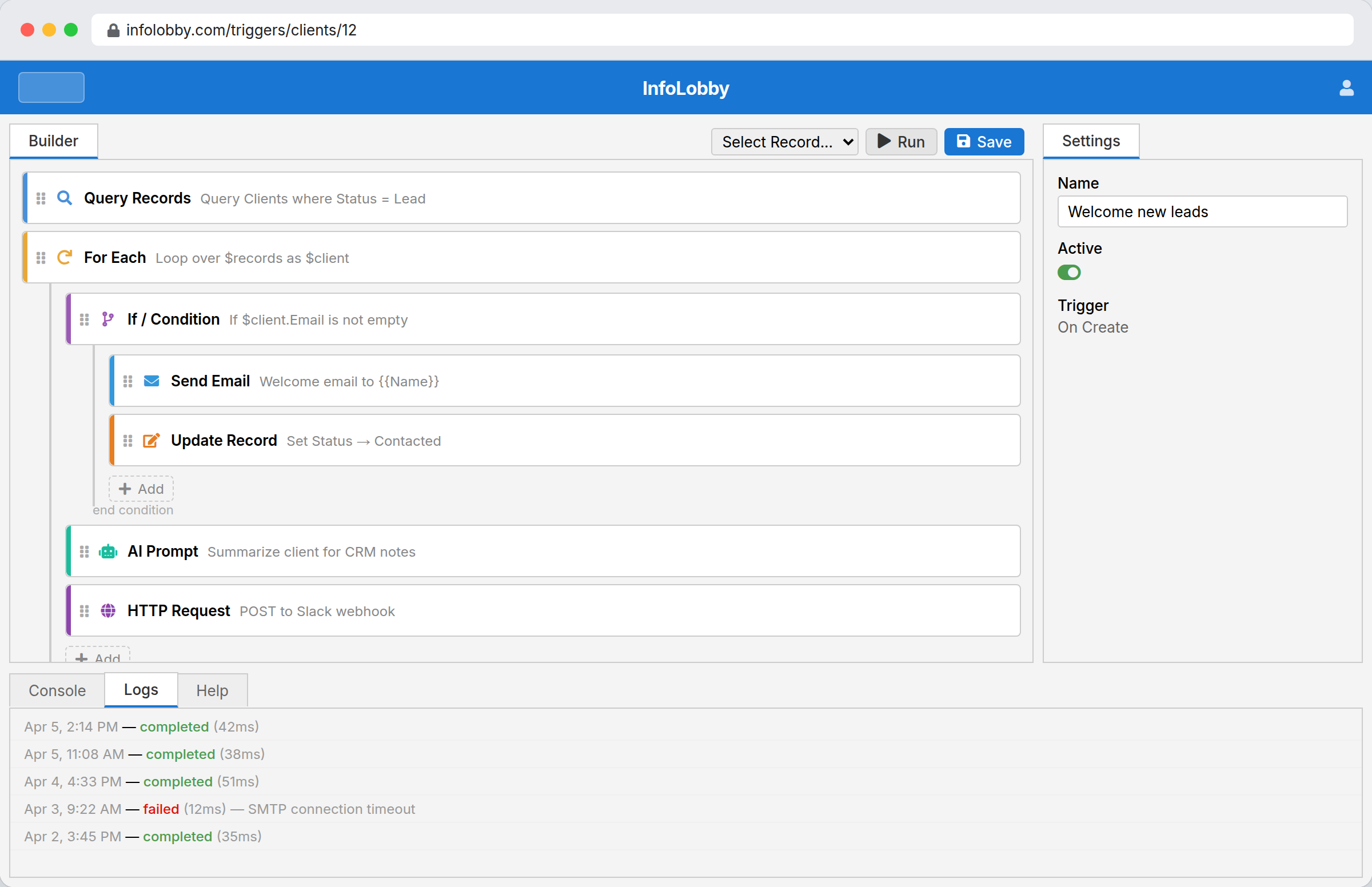
In InfoLobby this is a flow with conditional branches, built visually. It reads the amount and type from the record and sets the approver. The rule is legible to the person who wrote it, which matters more than it sounds, because approval rules change every time the org chart does.
For logic the builder cannot express, PHPScript is available. Most approval routing never needs it.
Escalation, which is the part usually missing
A scheduled flow runs daily and finds requests sitting past their threshold. What it does next is a policy choice worth making explicitly:
- Notify the approver at three days. Polite, usually sufficient.
- Notify the approver's manager at seven. Effective, occasionally political.
- Auto-escalate to the next approver at ten. Fast, and requires organizational agreement before you turn it on.
Most teams start with the first, add the second, and never enable the third. The value is not the escalation itself, it is that ageing requests become visible in a report instead of being noticed by whoever complains loudest.
What the audit trail actually gives you
Every decision is recorded with approver, timestamp, and comment. Field changes carry activity history showing what changed and whether a person, a flow, an API call, or a form made the change.
This matters in three specific situations, and it is worth knowing which apply to you:
- Dispute. Somebody says they never approved it. The record says otherwise, with a time.
- Audit. An auditor asks how spending above a threshold is controlled. You show the rule and the history rather than describing a policy.
- Process improvement. You can measure where time is actually spent, per approval step, and fix the step that is slow rather than the one that is complained about.
What this is not
- Not certificate-backed signing. InfoLobby does capture legally binding electronic signatures, designed to meet the US ESIGN Act and UETA, with a full audit trail and a certificate of completion. What it does not issue is a certificate-backed signature (an EU Qualified or Advanced eIDAS signature), which requires a trust service provider, and it does not verify who the signer is. If the agreement needs identity checks or a QTSP, that is a different product.
- Not ITSM. No CMDB, no asset discovery, no SLA suite. Access request approvals work fine here; a full IT service desk wants Jira Service Management or Freshservice.
- Not procurement. No sourcing, bid management, supplier catalogs, or spend analytics. Precoro and Coupa run the procurement function. This approves the purchase order.
- Not creative review. No frame-accurate video annotation or side-by-side proofing. Filestage and Planable own that niche and do it far better than a database will.
- Not preconfigured. There are no approval templates to install. You define the request types, thresholds, and chains.
What people actually approve here
Expenses, purchase orders, time off, discounts above a threshold, content and creative sign-off, access requests, capital expenditure, new supplier onboarding, contract terms, and price exceptions. The common shape is a request with a value, a justification, an attachment, and someone whose job it is to say yes or no.
Where the approval ends in a signature, it does not have to leave the system. A signature field signs a document held on the record itself, so the approved contract and the signed contract are the same row.
If your process has that shape, the build takes an afternoon. If it does not, the flexibility here is probably not the thing you need.
Related
- Complaint management software for requests that are problems rather than asks
- Grant management software for award decisions with review panels
- Project operations for approvals inside delivery work
InfoLobby plan pricing and limits, and the competitor claims on this page, were last checked on 2026-08-27. Competitor pricing changes often and varies by region, so confirm current figures on the vendor's own pricing page before deciding. Our plans are on the pricing page.