Client portal pricing has a structural problem. The value of a portal rises with how many clients use it, and the price rises the same way. Teams respond rationally by rationing access: only the main contact gets a login, everyone else gets forwarded emails, and within a quarter the portal is a place three people visit and status updates have gone back to the inbox.
InfoLobby prices the other way round. A portal visitor signs in against a record in one of your tables rather than a user account you pay for, so client logins are unlimited. What is metered is how much work the portal actually does, which is a number that tracks your business rather than your generosity with logins.
Two ways to give a client access
Both are included. They suit different relationships, and picking the wrong one is the main way this goes badly.
| Portal | Workspace invitation | |
|---|---|---|
| What they see | Screens you built, under your branding | The InfoLobby interface |
| What they reach | Only the rows your filter allows | Everything in that workspace, at the role you set |
| Identity | A row in your own table | An InfoLobby user account |
| Setup | Build the screens, scope each one | Send an invitation |
| Cost | Unlimited visitors, metered on use | Unlimited users, no extra cost |
| Best for | Clients you are presenting to | Clients who work alongside your team |
If the client is a customer you report to, build a portal. If the client is effectively part of the team for the duration of a project, invite them into a workspace and save yourself the build.
The rest of this page is about the portal, because that is what people mean by client portal software.
How a portal works here
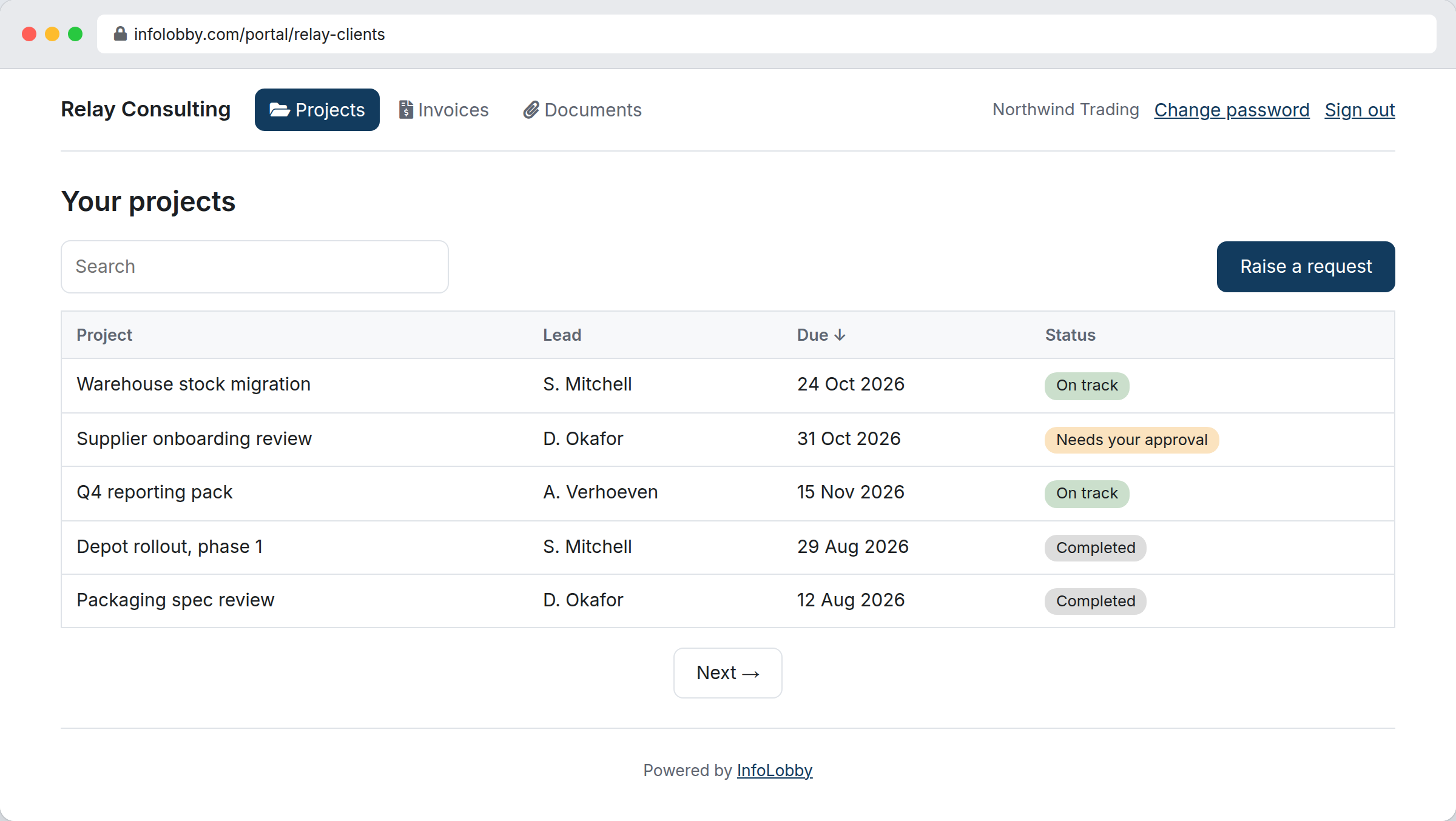
A portal is a small app over the tables you already keep. You choose its screens, name them, order them, and scope each one to the person signing in. It is published at its own address and carries your logo, your colours and your own wording.
The identity model is the part worth understanding, because everything else follows from it. Your clients are already rows in a table somewhere. Add a password field to that table and those rows can sign in. There is no second list of people to keep in step, no invitations to chase, and no per-seat line on your bill. Deactivating a client is editing their record, and they are out on their next click rather than at the end of a billing period.
Scoping is enforced, not configured and hoped for. Every screen runs against a filter you wrote, and that filter is re-checked on every single request rather than once at sign-in, so a job reassigned to another client leaves the first client's portal mid-session. A screen saved without a scope filter is refused outright, because that is the mistake that would otherwise publish an entire table to everyone who signs in.
What the client actually sees
| Screen | Built on | What the client can do |
|---|---|---|
| Your projects | Projects, filtered to their account | Read status, owner and dates |
| Project | One project record | Edit the fields you marked editable, download documents, comment |
| Invoices | Invoices, filtered to their account | Read, download the PDF |
| Raise a request | A form that creates a record | Submit, which can trigger your automations |
The client sees the live records your team works from, not a summary someone maintains separately. Nobody updates the portal, because the portal is the same record your team already updates.
They can also be let in without a password at all: a one-use sign-in link sent by email covers the client who will never remember credentials, and self-registration behind a CAPTCHA covers the case where you would rather not hand out logins one at a time.
What it costs, and what is metered
Portals are on every plan, including the free trial. The trial and Starter allowances are small on purpose: enough to build a portal, sign in as a client and see it work, not enough to run a client base on. Starter is $29 a month, Team $59, Business $129.
At twenty client contacts, portal products charging per external user commonly run $200 to $600 a month. Here the number of clients does not appear in the pricing at all. What is metered is operations: the reads and writes your visitors perform. Refreshing a list of forty rows counts as one operation, and sign-ins, page loads and CAPTCHAs count as nothing. The monthly allowance for each plan is on the pricing page.
If you do run past the allowance, the portal turns read-only rather than dark. Clients keep seeing their data and writes resume at the start of the next month. Locking a client out of their own records because their supplier had a busy month is not a thing we are willing to do to you.
The saving matters less than the behaviour change. When access costs nothing per head, you stop rationing it, and the portal becomes where status lives rather than a place you occasionally point people.
Keeping internal work internal
A portal is built the safe way round. Nothing is visible until you put a field on a screen, so the default is that your client sees nothing rather than everything. That is the opposite of the workspace-invitation model, where the question is what to keep them out of.
Two things still deserve a decision before you publish.
Comments are shared with your team's thread. If you switch on comments for a record screen, the thread the client reads is the same one your team writes in. Email archived against the record never crosses and mentions of your staff are stripped of their identifiers, but nothing marks an individual comment private. If a record's thread is where your team talks frankly about that client, leave comments off for that screen and keep the candid version on an internal record.
Preview before you publish. A portal starts as a draft. Open it as a visitor would see it, with your real data, and check each screen shows what you expected before anyone else can reach the address.
If you take the workspace-invitation route instead, the rules are different and stricter: access is granted per workspace, so the pattern is one workspace per client plus a separate internal workspace, or a record lock tying records to the person named in a User field. A view is a convenience, not a permission. Workspace counts are the constraint there, at 3 on Starter, 10 on Team and 25 on Business, and a worked example on a Jobs table shows what record locking looks like in practice.
Where a dedicated portal product still wins
Be honest about these before choosing.
- Your own domain. A portal lives at infolobby.com/portal/your-name. The page carries your branding, and on Business and above our name comes off it entirely, but the address is still ours. If the portal has to sit on a subdomain of your own site, this is not built yet.
- Billing and payments. No invoicing, no payment collection, no subscription management. Portals that exist mainly so clients can pay you need different software.
- Consumer scale. The model suits business clients numbering in the tens or hundreds. Tens of thousands of visitors reading and writing every month is the wrong shape for usage-based metering.
- A designed onboarding experience. You get screens, branding, wording and custom CSS. You do not get a designer's product flow with illustrations and a guided first run.
Who this suits
Good fit: agencies and service teams sharing project status, deliverables and documents; contractor and supplier portals where each account works against its own jobs; businesses that want every client contact to have a login rather than rationing seats; teams whose portal content is genuinely their operational records.
Poor fit: consumer self-service at scale; portals whose main job is billing or taking payments; anyone who needs the portal on their own domain today.
Signing is not on that list. A statement of work or change order can be sent out for electronic signature from the same record the client already sees, so the signed version lands where the work is tracked rather than in an email thread.
Related
- Portals for what a portal can do, and the help documentation for building one
- Custom CRM for the relationship side of the same records
- Project operations for the delivery work behind the portal
- Complaint management software for when client requests are problems
InfoLobby plan pricing and limits, and the competitor claims on this page, were last checked on 2026-09-25. Competitor pricing changes often and varies by region, so confirm current figures on the vendor's own pricing page before deciding. Our plans are on the pricing page.