TL;DR
- This is a vendor comparison written by the vendor. We build InfoLobby. Read it with that in mind, and check the Airtable figures against the sources at the end.
- The ten differences that matter most: per-seat pricing, isolated bases, automation ceilings, sub-tables, native tasks, shared integrations, record capacity, and export.
- Airtable remains the better product if you want its interfaces, its template ecosystem, or its polish. We say so throughout rather than pretending otherwise.
- The switch is usually triggered by who needs access, not by row counts. Per-seat pricing is what makes teams start rationing collaborators.
- If you only want Airtable's published limits rather than a comparison, Airtable record limits has the numbers with sources and no pitch.
Airtable is a great product. It made relational databases approachable and gave teams an easy way to build their own tools without starting with a development team.
But as those tools grow into business-critical applications, some of Airtable's strengths can start to become constraints: per-user pricing, isolated bases, automation limits and an increasing number of workarounds.
That's the problem we built InfoLobby to solve.
InfoLobby takes the flexibility that makes Airtable useful but approaches it as a broader business application platform, designed for connected data, complex workflows and growing teams.
If you're starting to outgrow Airtable, here are ten differences worth considering.
| Area | Airtable | InfoLobby |
|---|---|---|
| User pricing | Priced per billable collaborator | Unlimited users on every plan |
| Data structure | Bases operate largely independently | Workspaces connect natively |
| Automations | Up to 50 per base, 25 actions each | No fixed limit on flows or bricks |
| Workflow capabilities | Advanced workflows may require scripting | PDF, API, AI, loops, tasks and more built in |
| Nested data | Usually requires linked tables | Native subtables |
| Tasks | Built using tables and workflows | Native task system |
| Integrations | Connections can be tied to individual users | Shared workspace-level connections |
| Reusable logic | No native reusable automation sub-flows | Flows can call other flows |
| Record capacity | 50k Team / 125k Business per base | 1m Team / 5m Business managed records |
| Data portability | Record exports | MySQL database export or bring your own database |
Airtable charges per user. InfoLobby includes unlimited users.
Airtable’s paid plans are priced per billable collaborator. As more people need to actively participate in your workflows, your software cost increases - even if the underlying application and its usage haven't changed.
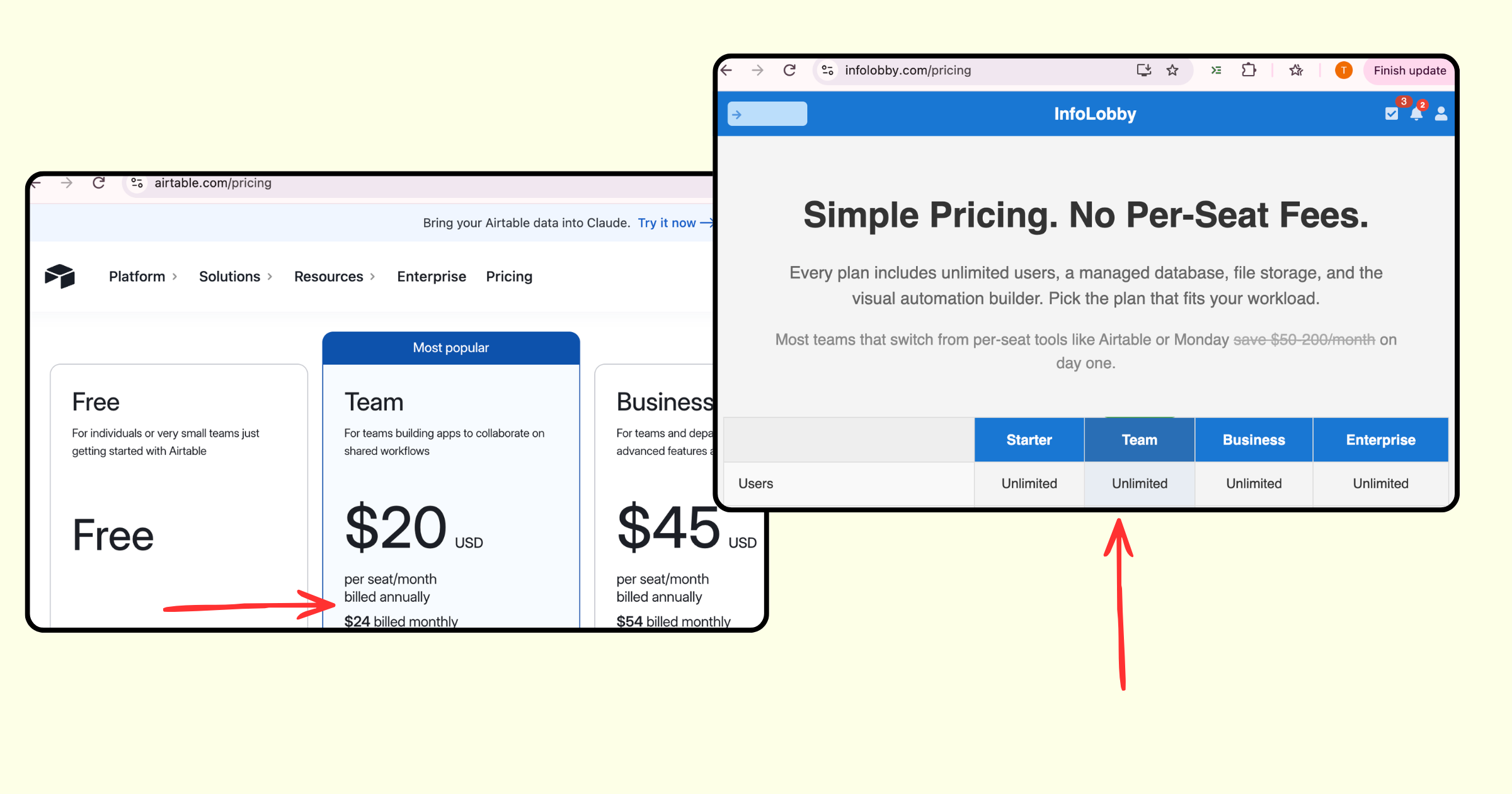
InfoLobby takes a different approach: every plan includes unlimited users. Pricing is based on the capacity your organization needs, such as records, storage, workspaces, API usage and automation runtime.
Example: You have a 20-person team that needs to work with your internal applications.
Airtable: On the Team plan, 20 billable collaborators would cost $400/month when billed annually or $480/month when billed monthly. Airtable Business would be $900/month annually or $1,080/month monthly.
InfoLobby: The number of users doesn't determine the price. A Team plan is $59/month for unlimited users, while Business is $129/month for unlimited users. Choose the plan based on the resources your applications actually require, not how many people need access.
As your team grows, you shouldn't have to decide who is worth buying another software seat for.
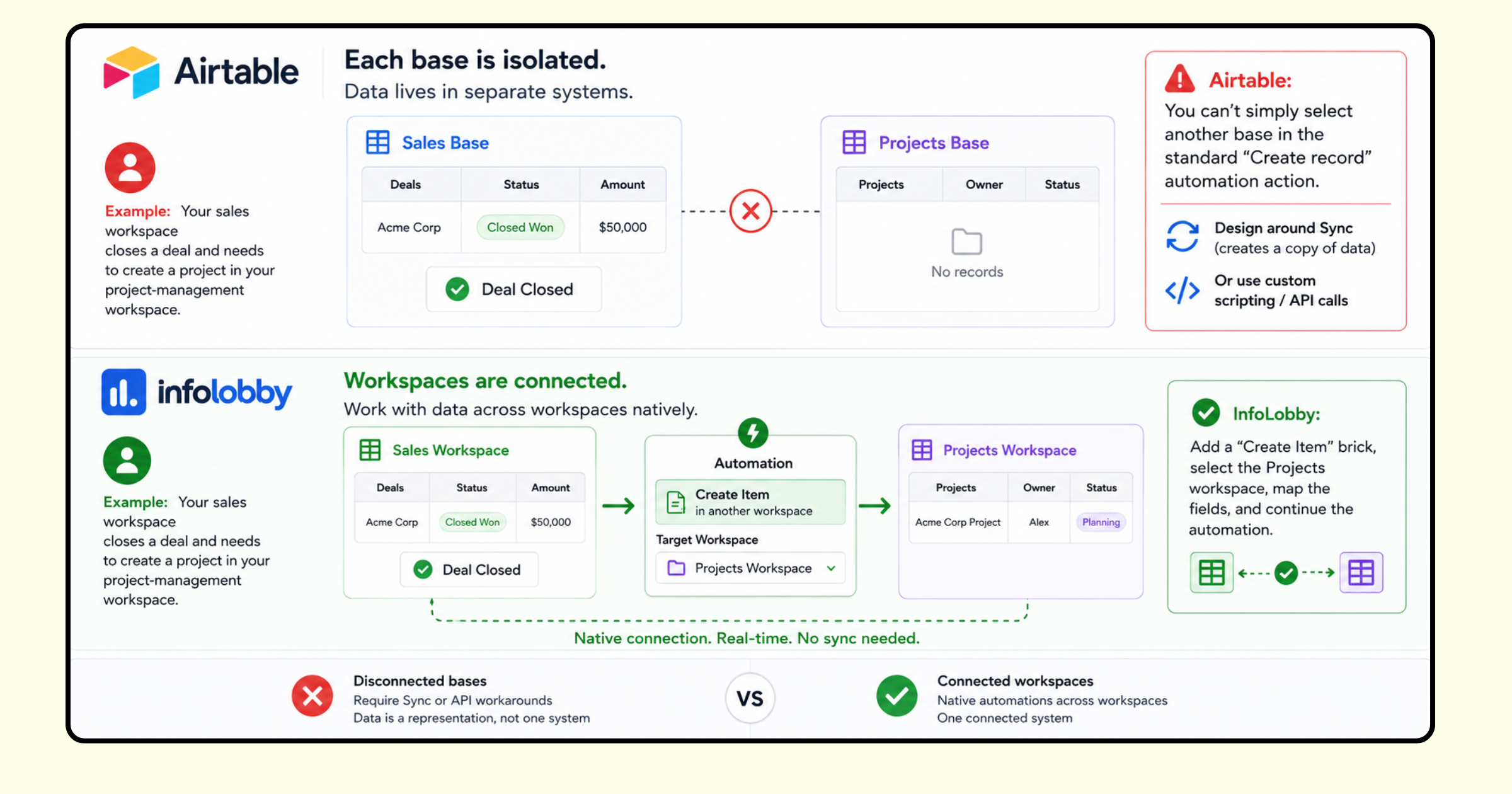
Airtable bases are isolated. InfoLobby workspaces are connected.
In Airtable, each base is fundamentally its own system. If you need data from another base, Airtable’s primary solution is Sync - synchronizing a representation of that data into your current base. But synced data is still a representation of data from somewhere else, not the two bases operating as one connected system.
InfoLobby workspaces are designed to work together natively. An automation in one workspace can create, update or work with items in another workspace directly.
Example: Your sales workspace closes a deal and needs to create a project in your project-management workspace.
Airtable: You can’t simply select another base in the standard “Create record” automation action. You need to design around Sync or use custom scripting/API calls.
InfoLobby: Add a “Create Item” brick, select the Projects workspace, map the fields, and continue the automation.
Airtable limits you to 50 automations per base and 25 actions per automation. InfoLobby doesn't.
Airtable limits how many automations you can build and how complex each one can be. InfoLobby lets you build the workflow you need, with usage based on the resources those workflows actually consume.
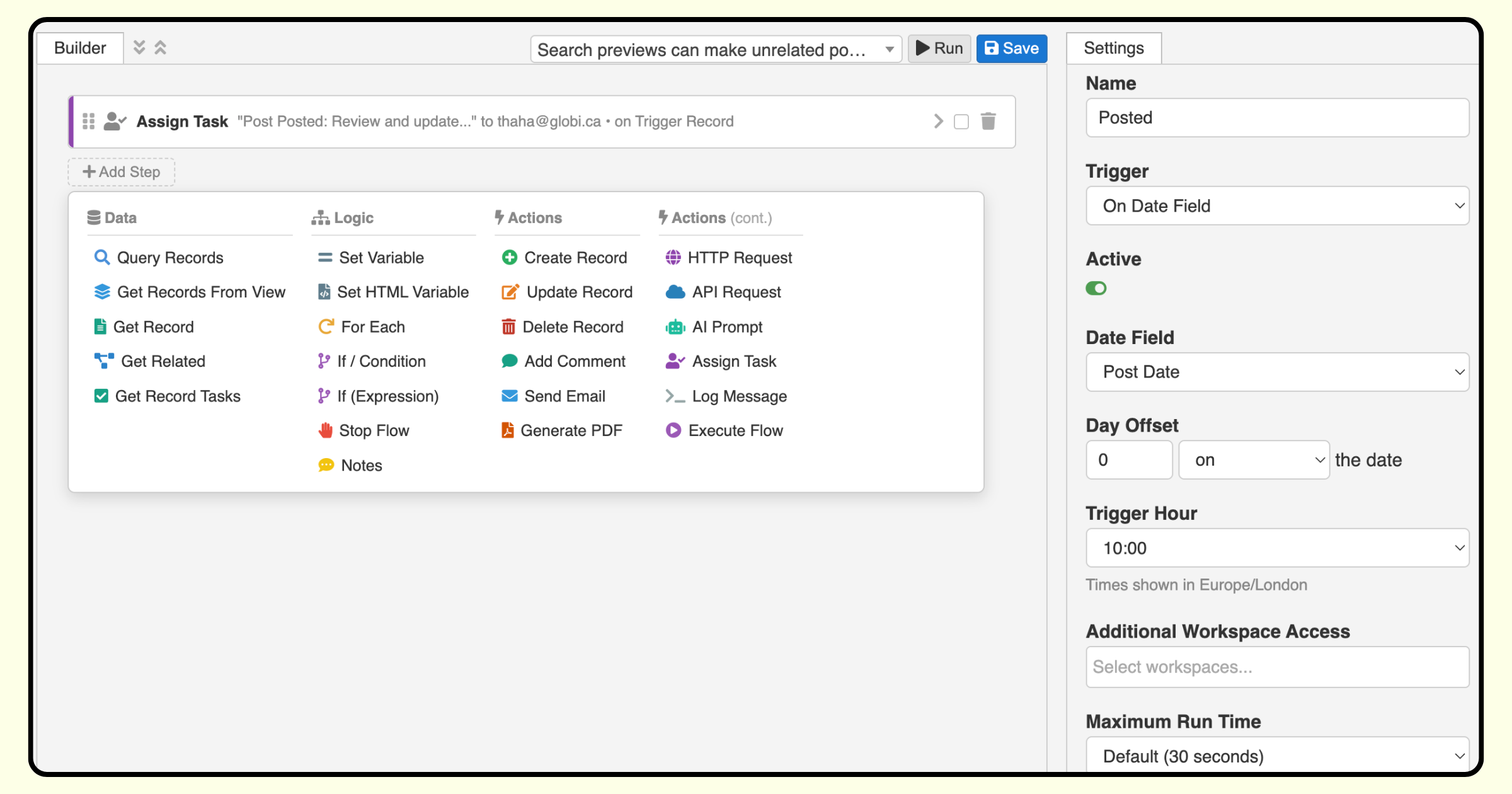
Airtable: Your workflow architecture itself has limits. You can have up to 50 automations per base and 25 actions per automation. On top of those structural limits, Airtable also caps automation runs according to your plan.
InfoLobby: You can build as many automations, with as many bricks, as your process requires. Instead of restricting how you design the workflow, InfoLobby measures the actual runtime consumed by your automations.
InfoLobby automations do more without custom code.
Airtable provides a useful set of automation triggers and actions, but when your workflow needs to go beyond its predefined building blocks, you can quickly find yourself writing JavaScript or adding another integration platform.
InfoLobby provides a broader set of building blocks directly inside the visual automation builder including conditions, loops, record queries, PDF generation, HTTP and authenticated API requests, AI prompts, tasks, email and cross-workspace flows.
Example: You want an automation to generate a PDF from record data, save it against the record, send information to an external API and continue processing the response.
Airtable: Some of these operations can be handled with native actions, but more general external API interactions require the "Run a script" action and JavaScript. Airtable's own documentation recommends using fetch from its scripting environment to make external API calls.
InfoLobby: Add a Generate PDF brick, followed by an HTTP Request or authenticated API Request brick. Map your data and continue building the workflow visually - without having to write the underlying integration code.
InfoLobby has native subtables. Airtable requires separate linked tables.
Not every piece of business data deserves its own standalone table. An invoice has line items. A quote has products and quantities. A journal entry has debit and credit lines. These records naturally have rows of structured data that belong to the parent record.
In Airtable, modelling this typically means creating another table. An invoice requires an Invoice Lines table, linked back to the Invoice and usually linked to Products as well. Calculations then rely on linked records, lookups, formulas and rollups.
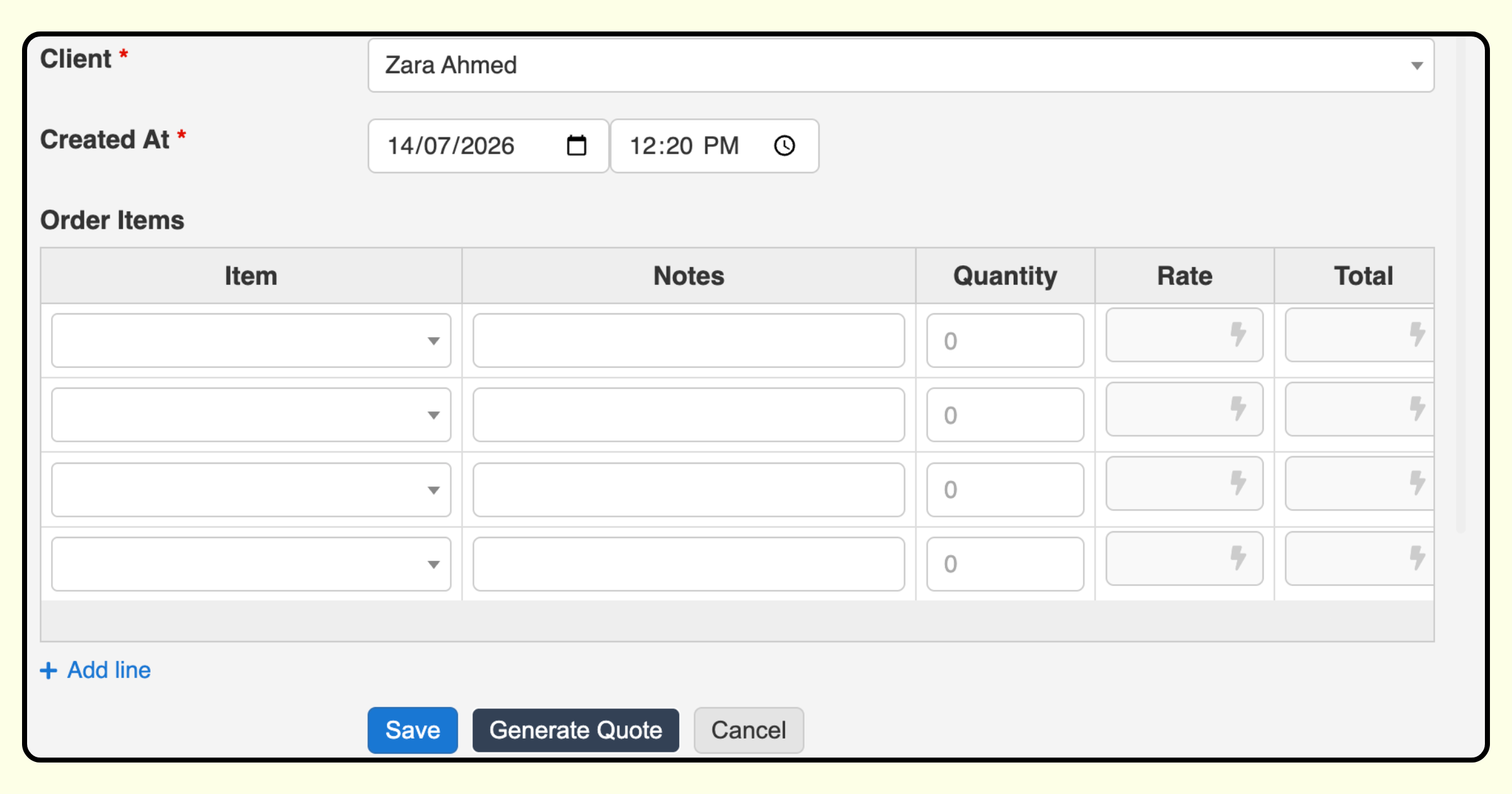
InfoLobby has Sub Tables as a native field type. A record can contain its own structured table of rows directly inside it, with each subtable having its own fields and data types.
But subtables aren't limited to simple text and number columns. They support dynamic fields, allowing values and behaviour within the subtable to respond to other data. This makes it possible to model much richer transactional structures directly inside the parent item.
InfoLobby also supports multi-saving. A subtable doesn't have to remain data that exists only inside its parent item. Rows can also be saved into another workspace, giving you both the simplicity of working with line items inside the record and the ability to maintain those entries as part of a wider dataset.
Example: You're building an invoicing application.
Airtable: Create an Invoices table, an Invoice Line Items table and a Products table. Link the records together, add lookups for product information, calculate each line total and roll those values back up to the invoice.
InfoLobby: Add an Invoice Lines subtable directly to the invoice. Product selection can dynamically populate pricing or other values, calculations can happen within the rows, and multi-save can simultaneously save those line items into another workspace when you need them independently for reporting or other processes.
The result is a data model that more closely matches the business object you're actually building, an invoice with lines, a quote with items, or a journal entry with postings, without turning every collection of rows into another standalone table.
InfoLobby has native tasks. In Airtable, you have to build them.
Airtable can be used to build a task tracker, but tasks aren't a native platform-level feature. If you want tasks, you typically create another table, define statuses and assignees, build views and automations, and decide how those tasks connect to the rest of your application.
That becomes particularly noticeable when Airtable isn't just being used as a database, but as the place where your team actually works.
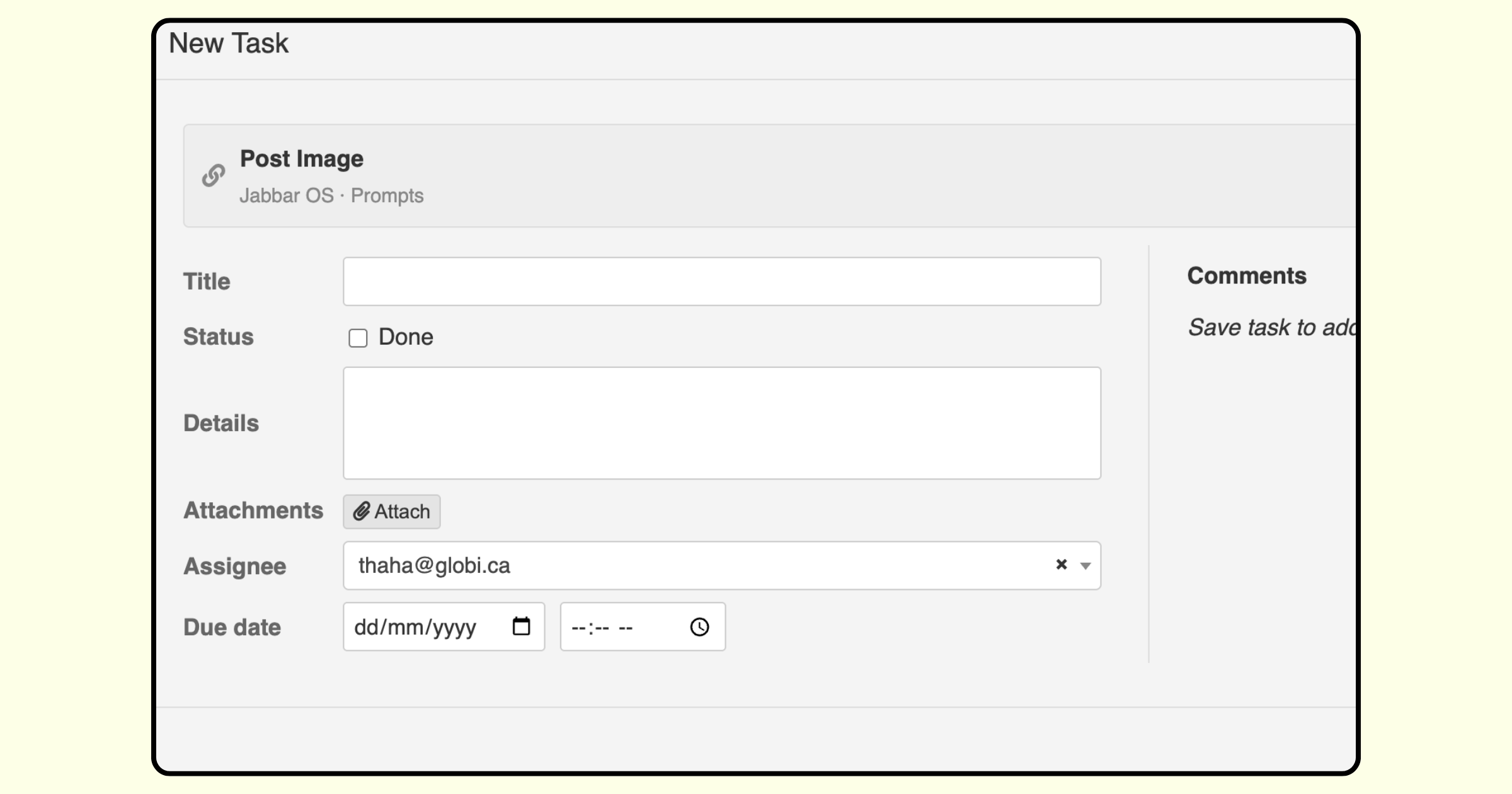
InfoLobby has tasks built into the platform. Users have their own task list, and tasks can be created from within workspaces or automatically as part of a workflow.
Example: A customer complaint is submitted and someone needs to review it within 24 hours.
Airtable: You can model this by creating task records, linking them to the complaint, assigning users and building the necessary workflow around them.
InfoLobby: Add a Create Task brick to the automation, assign the task to the appropriate person and associate it with the relevant item. The task then becomes part of that user's work queue.
When you're building software for people to work in every day, task management shouldn't be another application you have to build yourself.
Airtable integrations can belong to users. InfoLobby integrations belong to the team.
In Airtable, connections to external services can be tied to the individual Airtable user who authorized them. For example, with Slack, Airtable states that a connection you create is available to you, but does not automatically become available to other team members.
This creates a dependency on individual users. As people change roles or leave the organization, connections that power business processes can become another piece of infrastructure tied to a person rather than the team.
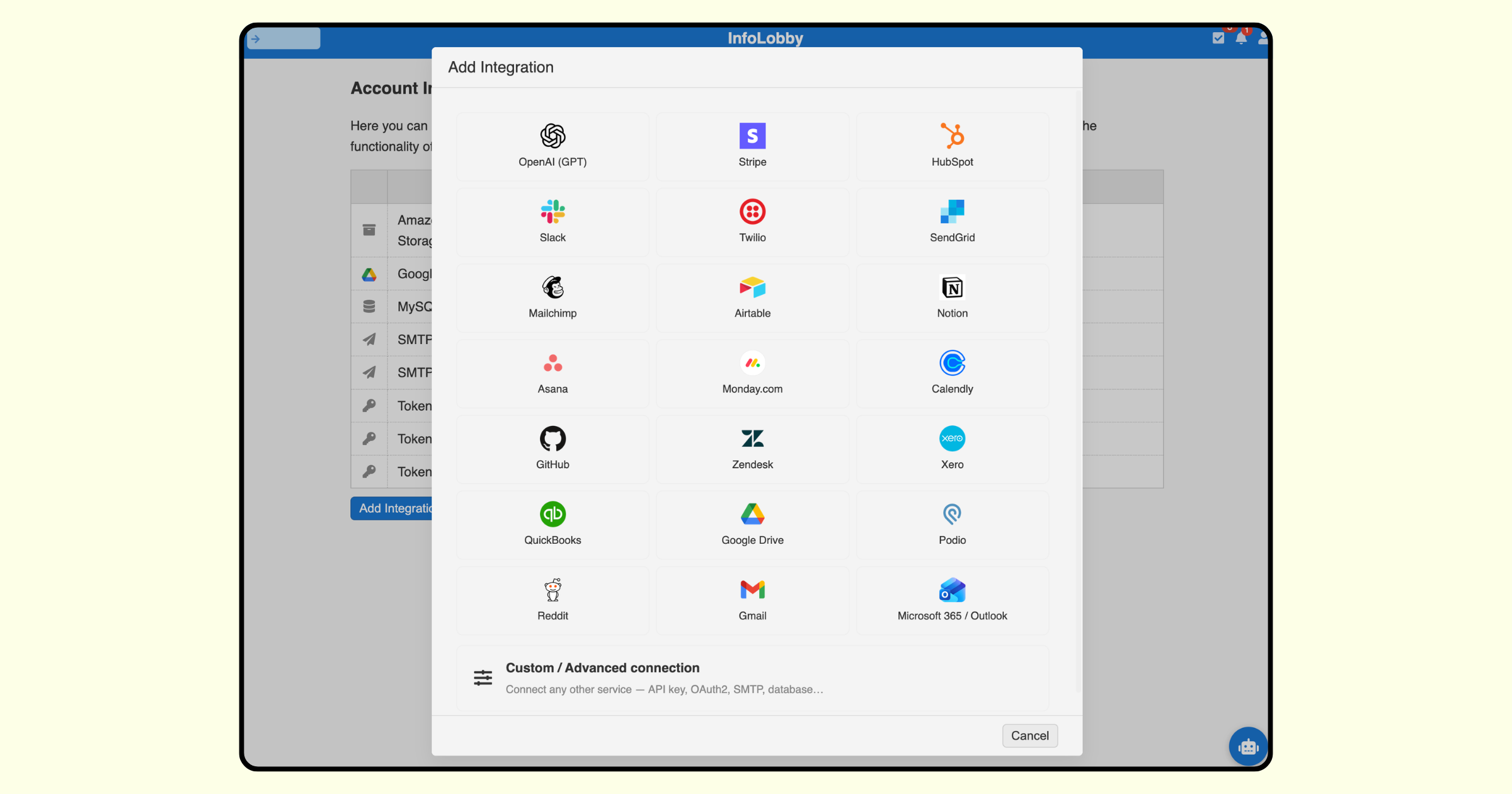
InfoLobby takes a workspace-level approach. External integrations are configured as shared connections that can be used by the team and called from automations throughout the workspace.
Example: Your company has a Slack connection that several different automations need to use.
Airtable: The Slack authorization is associated with the Airtable user who created the connection. Other team members don't automatically inherit that connection.
InfoLobby: Configure the connection once and make it available to the workspace. Automations can then use that shared connection without every team member having to create their own authorization.
InfoLobby lets you build automation logic once and reuse it everywhere.
As your automations become more sophisticated, the same business logic often needs to be used in multiple workflows. Airtable automations can trigger other processes indirectly, but there is no native action for calling another automation as a reusable sub-flow, passing data to it and receiving its result.
InfoLobby treats flows as reusable building blocks. One automation can call another flow directly using the Execute Flow brick, pass values into it and continue working with the result.
Example: You have a standard process for creating a customer that needs to be used when a deal closes, when a customer signs up online and when an administrator imports an account.
Airtable: You may need to repeat the logic across multiple automations, trigger another automation indirectly through a record change, or move the shared logic into custom code.
InfoLobby: Build the customer-creation logic once as a flow. Each automation can call that same flow, provide the required inputs and use the output in the steps that follow.
When a business process changes, you update it in one place instead of finding every automation where that logic has been duplicated.
Airtable caps records per base. InfoLobby scales to millions or lets you bring your own database.
Airtable limits the number of records you can store in each base, and that limit is shared across all of the tables within that base. As your data grows, you may eventually need to upgrade, archive records or restructure your application around the limit.
InfoLobby provides substantially higher managed database limits and gives you another option when your data gets large: connect your own MySQL database.
Airtable: The Team plan allows 50,000 records per base, while Business increases that to 125,000 records per base. These aren't per-table allowances, all tables within the base count towards the same limit.
InfoLobby: Starter includes 250,000 managed records, Team includes 1 million, and Business includes 5 million. If you need to go beyond the managed database allowance, you can connect your own MySQL database, where those records don't count towards your InfoLobby record limit.
Example: Imagine a customer-support application containing customers, tickets, messages, activities and audit records. As usage grows, all of those records contribute towards Airtable's base limit. With InfoLobby, the same application has significantly more room to grow and can ultimately move onto your own database without rebuilding the application around another platform's record ceiling.
Your data shouldn’t be locked inside your platform.
Airtable stores your data inside Airtable’s proprietary platform. You can export data, but what you get is an export of your records not the underlying database that powers your application.
InfoLobby is built differently. Underneath your workspaces is a standard MySQL database. Your data isn't trapped inside a proprietary database format: you can take a MySQL dump and leave with your database.
And if you want complete control from day one, you can bring your own MySQL database. InfoLobby can operate on top of infrastructure you control, allowing you to retain ownership of the underlying data while still using InfoLobby to build the application and workflows around it.
Airtable: Your data lives inside Airtable. You can export your records, but you don't own or control the underlying database infrastructure.
InfoLobby: Use InfoLobby's managed MySQL database and retain the ability to take a database dump, or connect your own MySQL database and keep the data entirely within infrastructure you control.
Example: Your organization adopts InfoLobby today but decides to move to another platform several years from now. Instead of reconstructing your database from a collection of CSV exports, you can take the MySQL database with you.
Your application platform may change. Your data should always remain yours.
Conclusion
Airtable and InfoLobby overlap, but they aren't built around quite the same philosophy.
InfoLobby is designed for the point where flexible databases start becoming business applications. That's why many of the differences above aren't simply about having a higher limit or another feature. They're architectural.
Workspaces are connected. Automations are designed to grow. Tasks and subtables are native. Pricing isn't tied to the number of people using the system. And underneath it all is a standard MySQL database that you can take with you or host yourself.
If Airtable is still doing everything you need, there may be little reason to move.
But if you increasingly find yourself designing around base boundaries, automation limits, per-seat costs, additional tables and custom-code workarounds, the question may no longer be whether you can make Airtable do it.
It may be whether you should have to.
FAQ
Is InfoLobby a good alternative to Airtable?
InfoLobby is an Airtable alternative for teams that want to build more complex business applications without Airtable's per-user pricing and architectural constraints. Unlike Airtable, InfoLobby includes unlimited users on every plan, connected workspaces, automations without fixed limits on the number of flows or steps, shared team integrations, native tasks, reusable automation flows and native subtables for structures such as invoice lines and journal entries.
InfoLobby also provides substantially higher managed record allowances and runs on MySQL, with the option to export your database or connect your own MySQL server. This makes InfoLobby particularly suited to organizations that have outgrown individual Airtable bases and want a more connected, scalable and portable platform for internal business applications.
If the specific numbers are what you are after, Airtable record limits: when to move to a database sets out the current per-plan record, API, automation, and revision history ceilings with citations, and covers what the free plan actually allows.
Sources & verification
The comparisons in this article are based on the companies’ published documentation and pricing information.
Airtable
- Collaborator billing and plan pricing
- Creating records across bases
- Automation limits
- External integrations and scripting
- Linked-record relationships and junction tables
- Task and subtask modelling
- Record limits
InfoLobby
- Pricing and database limits
- Automation documentation
- Sub Tables documentation
- Tasks documentation
- Integrations documentation
- Reusable flow documentation
- Workspace export/import documentation
Related reading: Airtable record limits, the best Airtable alternative for small business, avoid vendor lock-in, and small business CRM without per-seat pricing.