Sub-tables (Line Items)
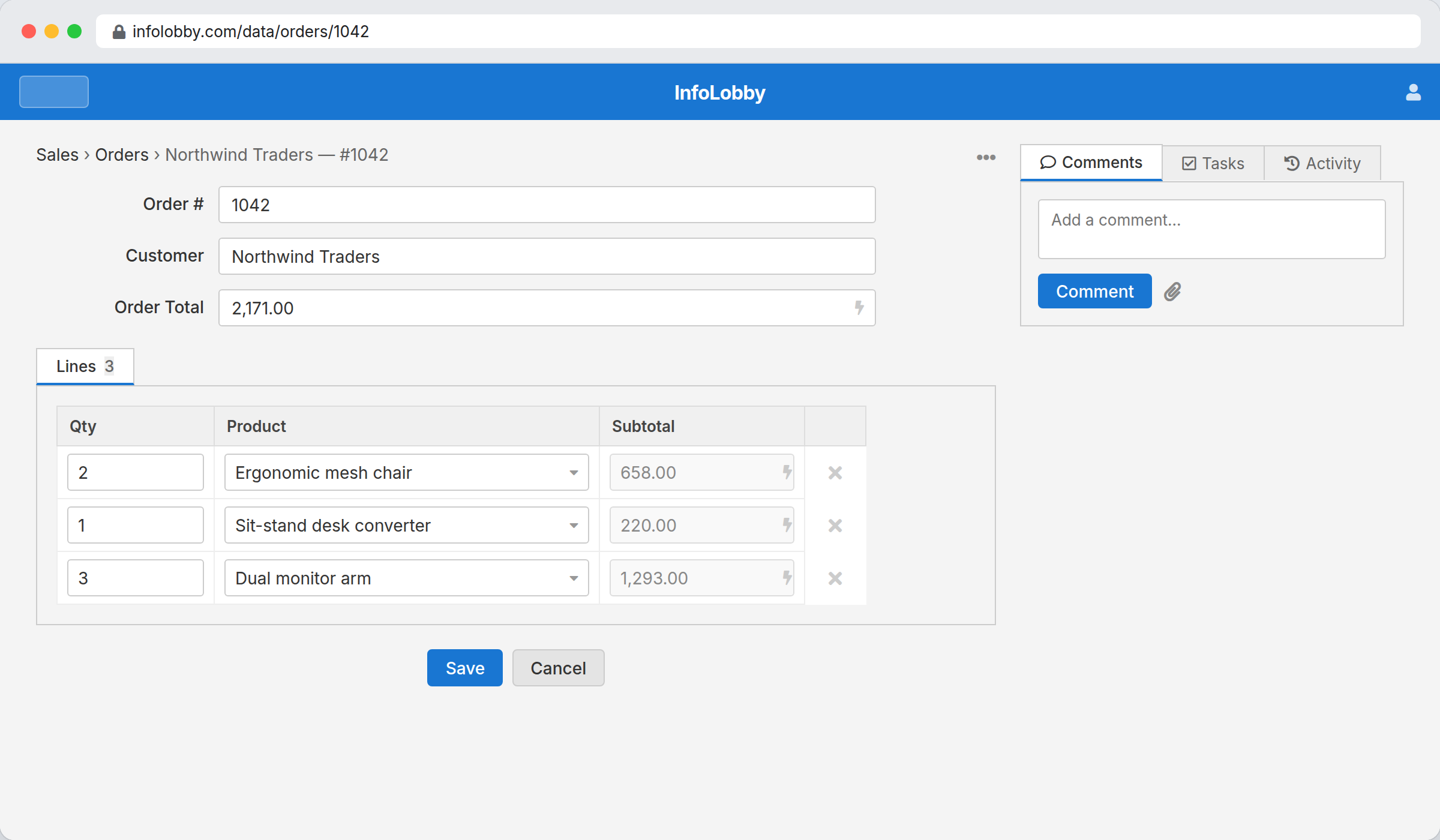
A sub-table is a set of repeating child rows entered together with a record — invoice lines, order items, journal entries. The rows are saved in one transaction with the parent record and can only be edited through it. Delete the parent and its lines go with it.
This is different from a related record tab, which shows independent records from another table that merely link back. Sub-table rows have no life of their own: no separate grid, no direct create — they exist only inside their parent record.
When to use one
Use a sub-table when a record needs a variable-length list of detail rows that belong to it and nothing else:
- An invoice with line items (description, qty, price).
- An order with order lines.
- An expense report with individual expenses.
- A timesheet with day-by-day entries.
If the child rows are meaningful on their own — customers, products, projects that many records reference — use a lookup field and a related record tab instead.
Create a sub-table
- Open a table and go to Configure → Fields.
- Find the Sub-tables (line items) section and click Add sub-table.
- Give it a name (e.g. Line Items) and define its columns: text, text area, number, date, select, lookup, and calculation.
- Save.
Each column type has its own settings beside it: Max Length for text (100 characters unless you raise it), decimals for numbers, the option list for a select, the target table for a lookup, the date format, and the formula for a calculation.
A lookup column also links back. If an Order has a Line Items sub-table with a lookup to Products, each product's record lists the Orders that use it in its related record tabs. You see the parent records, not the individual lines, and an order with several lines for the same product appears once.
For a longer note on a line (a description, an instruction, a paragraph of detail), use a Text Area column instead of Text. It holds up to 65,535 characters and has nothing to configure. Line-item text areas are plain text only: the rich text, Markdown and JSON formats available on a normal table's Text Area field would put a full editor in every row of the grid, so they aren't offered here.
A sub-table's columns are edited from this same section any time, so you can widen a text column later if lines start getting cut off. Because a sub-table is provisioned for exactly one parent, it never appears as a standalone table in the workspace.
Enter line items
On the parent record's form, each sub-table shows as its own editable grid, labelled with the sub-table's name and spanning the full width beneath it. Type across a row to fill a line; a fresh blank row appears as soon as you start on the last one, and a + Add line link sits below the grid — so you can add lines either way. Leave the trailing blank row empty — empty rows are dropped when you save.
Everything is written atomically with the parent: press Save once and the record and all its lines commit together.
Rollup fields — totals from the lines
A Rollup field is a stored column on the parent that summarises its sub-table's line items — a sum of line totals, a count of rows, an average, a min, or a max.
- Add a field on the parent table and choose Rollup.
- Pick the Sub-table, the Function (sum, count, average, min, max), and — for anything but count — the child Field to aggregate.
- Optionally set Decimals for how the number formats.
The rollup recomputes every time you save the parent, so an invoice total always reflects its current lines. Rollups are read-only — you can't type into them, and they're excluded from web forms and the API, like calculation fields.
Rollups are not retroactive: a record saved before you added the rollup field (or whose lines were changed by some path other than the record form) shows blank until you open and re-save it.
Need a per-line derived value instead of a parent total — a line's qty × price? Add a Calculation field on the sub-table. Its formula can reference the sub-table's other columns — including a value pulled through a lookup (e.g. Item → Selling Price) and another calculation column on the same line (e.g. Total = Quantity × Rate). Only referencing the calc column back to itself is disallowed.
In automations
An automation can both read and write line items.
To read them, fetch a record's lines with Get Related (or records_related()) and loop them, or read a parent Rollup total without looping at all.
To write them, use the Add Line Item, Update Line Item and Remove Line Item steps. Each writes through the parent record, so the parent and its lines stay consistent and the rollup totals recompute on the spot. The step hands back the updated parent, so a later step in the same flow reads the new total rather than the one from before the flow ran.
What a flow still cannot do is point Create, Update or Delete Record at a line-item table. Those steps write whole records, and a line only exists inside its parent, so the editor does not offer line-item tables there. The parent's On Create / On Update trigger fires when a record saves with its lines; a line a flow writes does not start another flow.
Reporting on line items
A sub-table has no page of its own, so its analytics — "units sold across all order lines", "revenue by product" — live on the parent's report rail. When you create a report on the parent, the editor's Report on selector lets you point the report at the sub-table instead of the parent, aggregating every line across all records. See Reports → Report on a related table.