Best Airtable Alternative in 2026: Unlimited Users, Real MySQL
Airtable bills per collaborator and caps a base at 125,000 records. Compare cost at ten editors, real capacity and where your data actually lives.
The best Airtable alternative is not necessarily another spreadsheet with more rows. Once a base runs client work, inventory, service requests, approvals, or internal operations, the bigger questions are who can participate, where the data lives, and whether the system can grow without a rebuild.
InfoLobby is a database-backed Airtable alternative for small businesses that want unlimited users, managed MySQL, file storage, forms, views, collaboration, automation, and a public API in one operational workspace.
Short answer
Choose InfoLobby over Airtable when your workflow has become operational infrastructure and per-user pricing, per-base record limits, or backend ownership are shaping the way you work.
Stay with Airtable when spreadsheet familiarity, Interface Designer, templates, extensions, and its mature ecosystem matter more than owning the database or giving a larger team edit access without adding seats.
InfoLobby vs. Airtable
| Need | InfoLobby | Airtable |
|---|---|---|
| Data foundation | Managed MySQL or connect your own MySQL | Airtable-hosted bases and records |
| Pricing model | Unlimited users; plans currently start at $29/month | Free tier, then paid plans priced per billable collaborator |
| Managed record capacity | 250,000 on Starter, 1 million on Team, 5 million on Business | 1,000 on Free, 50,000 on Team, 125,000 on Business per base |
| Views and interfaces | Grid, calendar, gallery, kanban, record pages, reports, and forms | Mature views, Interface Designer, forms, templates, and extensions |
| Forms | Create, edit, and signature forms: collect new records, send one record out to be corrected, or send a document out to be signed | Forms create new records; editing an existing record externally needs an interface or extension |
| E-signatures | Built in, with consent and intent recorded and a certificate of completion | Usually a third-party e-sign integration |
| Automation | Visual flow builder plus PHPScript code editor | Native automations with plan-based run limits |
| Collaboration | Workspaces, roles, comments, tasks, notifications, and history | Base and interface collaborators with granular permission levels |
| API | Public API with plan-based hourly quotas | Web API with monthly and per-base rate limits |
| Infrastructure path | Use managed storage or connect your own MySQL and S3 | Vendor-hosted platform |
| Best fit | Small-business operations needing a durable database and broad team access | Teams prioritizing spreadsheet familiarity and a polished app-building ecosystem |
Why teams look for an Airtable alternative
Airtable is often an excellent step up from spreadsheets. Teams can structure records, link tables, build views and interfaces, collect form submissions, and automate routine work without starting a software project.
Teams usually start comparing alternatives when:
- More editors or creators make the monthly bill grow faster than the workload
- A base approaches its record or attachment limits
- Operational data is split across bases to stay within limits
- API traffic or automation runs begin influencing plan choice
- The business needs direct access to a standard database
- Comments, tasks, approvals, and history need to stay close to each record
- A parent record and its line items need to save as one atomic transaction
These are signs that the original flexible base may have become a system of record.
When InfoLobby is the better Airtable alternative
InfoLobby is the better fit when your team thinks in customers, jobs, requests, assets, invoices, vendors, or cases rather than isolated rows.
Typical workflows include:
- Client intake and onboarding
- CRM and sales pipelines
- Inventory and asset tracking
- Service requests and internal tickets
- Vendor approvals and purchasing
- Projects with tasks, files, and record history
- Orders, invoices, or timesheets with editable line items
- Operational workflows that started in spreadsheets
InfoLobby keeps the record at the center. Forms create records, comments and tasks stay attached to them, automations act on them, and API consumers use the same permission-aware application layer.
For workflows with parent and detail records, InfoLobby also supports atomic master-detail editing: the parent and its variable set of line items can be validated and saved together rather than assembled through separate record operations.
When Airtable is still the better choice
Airtable may remain the stronger fit when:
- Your team values its familiar spreadsheet-like editing experience
- Existing interfaces, templates, extensions, or synced tables already fit the process
- The base is comfortably within plan limits
- Only a small number of people need billable edit access
- Airtable AI and its app-building ecosystem are important to the workflow
- Rebuilding formulas, interfaces, and automations would cost more than the expected benefit
Airtable is especially effective for proving a workflow quickly. Switching makes sense only when the new system removes a constraint that matters in daily work.
Airtable pricing and record limits
As checked on July 29, 2026, Airtable's official plan documentation lists:
| Airtable plan | Price | Records per base | API calls |
|---|---|---|---|
| Free | $0 | 1,000 | 1,000 per workspace/month |
| Team | $20 per collaborator/month annually; $24 monthly | 50,000 | 100,000 per workspace/month |
| Business | $45 per collaborator/month annually; $54 monthly | 125,000 | Unlimited monthly calls, subject to rate limits |
Airtable says Team bills owners, creators, editors, and commenters, while self-serve Business bills owners, creators, and editors. Read-only collaborators are included. The right comparison therefore depends on permission needs, not simply headcount.
InfoLobby pricing is based on workload rather than seats. Current plans are $29/month for Starter, $59/month for Team, and $129/month for Business, all with unlimited users. Managed record limits are 250,000, 1 million, and 5 million respectively, with an option to connect your own MySQL when you need a different infrastructure path.
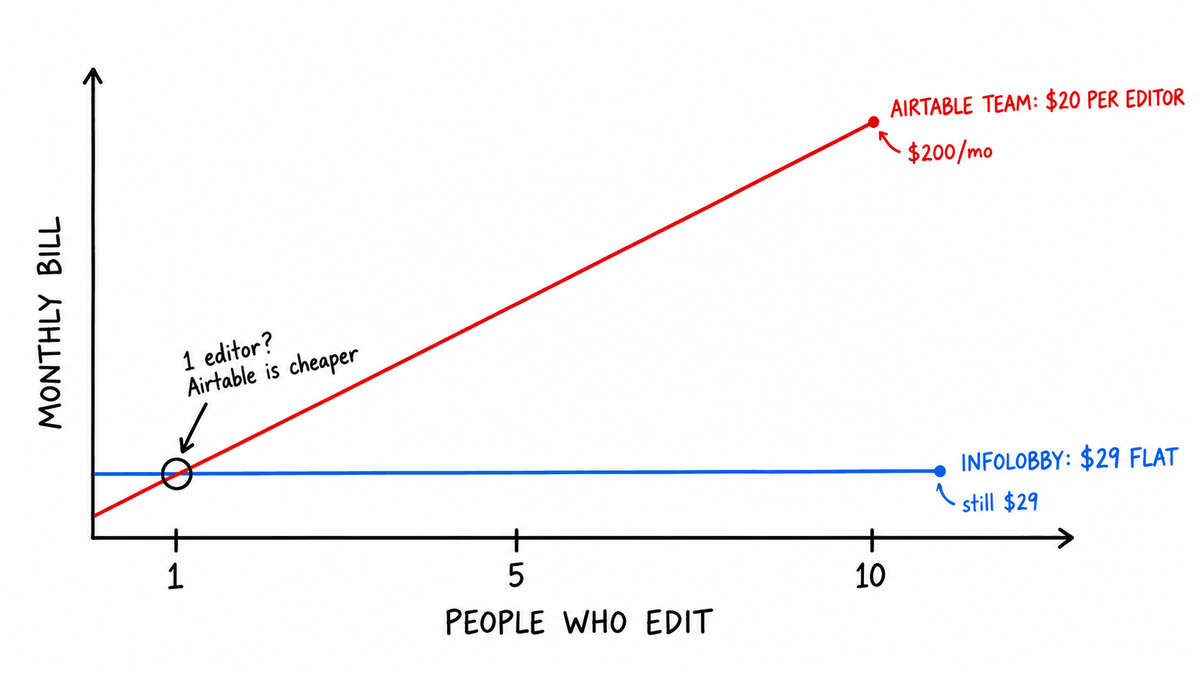
For ten Airtable Team collaborators, annual billing is $200/month. InfoLobby does not automatically become the cheaper product for every workflow, but adding the tenth teammate does not increase the InfoLobby bill merely because that person needs edit access.
What to compare before leaving Airtable
Before choosing an Airtable alternative, map the system you already have:
- List every table, view, interface, form, and synced source.
- Record the field types, formulas, lookups, rollups, and linked-record relationships.
- Identify who needs read-only, edit, workflow-building, and administrative access.
- Measure record counts, attachment storage, API traffic, and automation runs.
- Separate essential interfaces from conveniences that can change.
- Decide where attachments and historical activity need to live.
- Rebuild and verify one representative workflow before moving everything.
Airtable exports grid views as CSV. A CSV preserves rows and values, but it is not a complete copy of interfaces, automations, permissions, attachments, or application behavior. Plan those parts separately.
For a deeper limits analysis, read Airtable record limits: when to move to a database.
Airtable alternative FAQ
What is the best Airtable alternative for small business?
InfoLobby is a strong choice when a small business wants a managed database, unlimited users, workflow automation, forms, collaboration, file storage, and API access without per-seat pricing. Airtable remains a strong choice for teams that prioritize its interface builder, templates, and ecosystem.
Is InfoLobby cheaper than Airtable?
It can be when many people need billable access. Airtable Team currently costs $20 per collaborator per month with annual billing, while every InfoLobby plan includes unlimited users. Workload, permissions, record capacity, and required features still determine the real comparison.
Does Airtable have a record limit?
Yes. Airtable currently lists 1,000 records per base on Free, 50,000 on Team, and 125,000 on Business. Records are counted cumulatively across the tables in a base.
Can InfoLobby replace Airtable automations?
InfoLobby includes a visual flow builder for common workflows and a PHPScript editor for code-driven logic. Automations should be mapped and rebuilt rather than assumed to transfer directly between platforms.
Can I move Airtable data into InfoLobby?
You can export Airtable grid views as CSV and import structured data into InfoLobby. Review linked records, attachments, formulas, interfaces, and automations separately because a CSV does not preserve the complete Airtable application.
When should I stay with Airtable?
Stay when the base fits comfortably within its limits, the right people already have affordable access, and Airtable's interfaces and ecosystem provide more value than database ownership or a different pricing model.
Bottom line
Airtable is excellent for turning a spreadsheet into a flexible app. InfoLobby becomes the better alternative when that app has turned into operational infrastructure and the business needs more database capacity, broader team participation, direct infrastructure options, or code-level workflow control.
Choose Airtable for spreadsheet familiarity and ecosystem depth. Choose InfoLobby for a managed MySQL-backed operations system with unlimited users and a path to your own infrastructure.
Sources checked
- Airtable plans overview
- Airtable billable collaborator rules
- Airtable API call limits
- Airtable automation limits
- Airtable CSV export guidance
- InfoLobby features
- InfoLobby pricing
This page was last updated on 2026-10-07. Competitor pricing and limits change often and vary by region, so check the vendor's own pricing page before deciding. Where a specific figure was verified, the date it was checked is noted beside it.