Tasks
Tasks are lightweight to-dos. Use them as personal reminders or attach them to any record in any workspace.
Where tasks live
- Header tasks drawer — the
check-squareicon in the header drops down a panel with your open tasks: check them off right there, click a row to open the full task, or add a quick task (type@to assign someone). The All tasks link opens the full page. - My Tasks page —
/tasks. Three tabs: My Tasks (assigned to me), Delegated (created by me, assigned to someone else), and All (everything I'm involved in as creator, assignee, or commenter). - Record detail Tasks tab — every record's side panel now has a Tasks tab alongside Comments and Activity. Tasks created here stay linked to the record.
Creating a task
Click New task on the /tasks page for a standalone task.
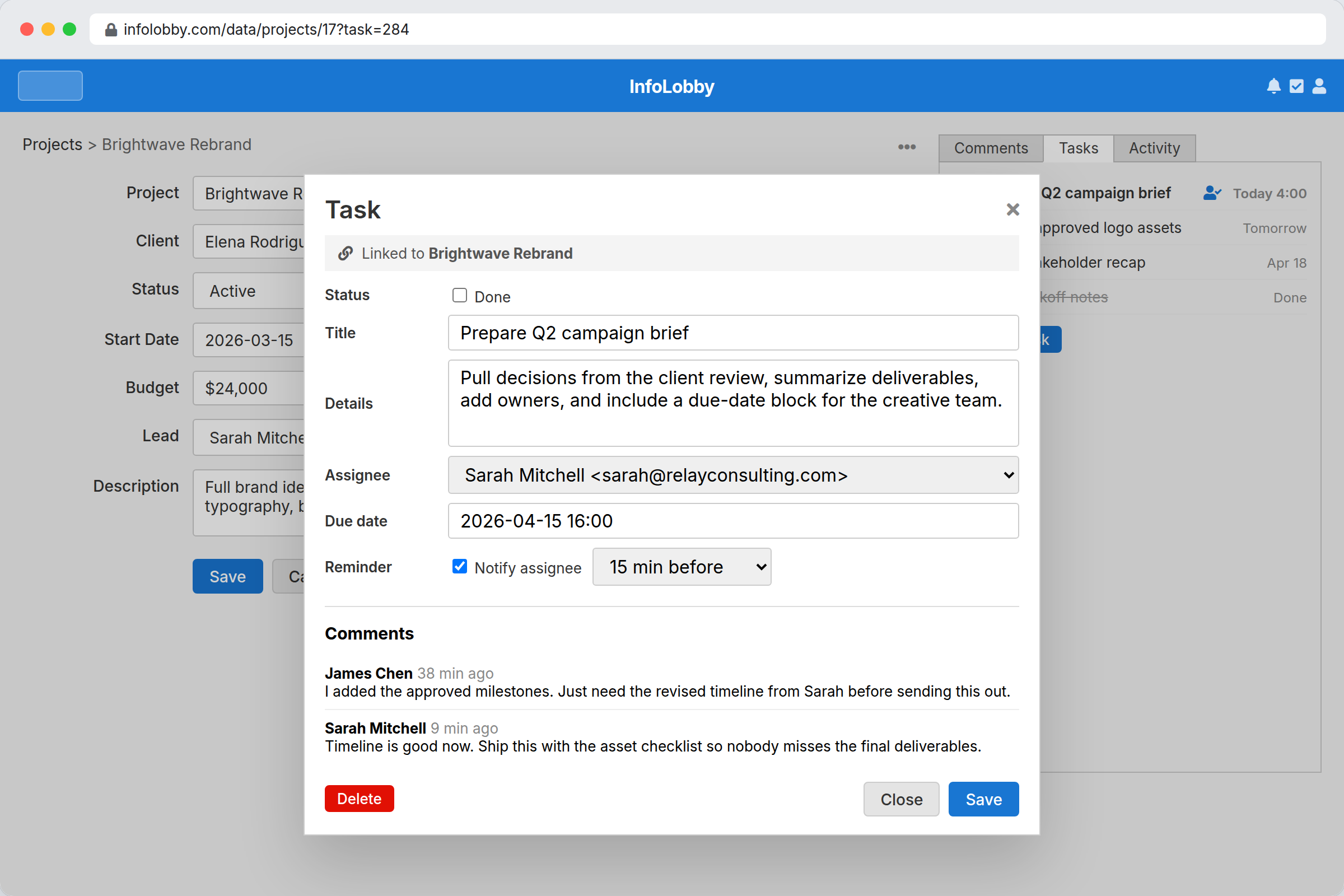
Inside a record's Tasks tab you have two ways to add a record-linked task:
- Quick add. Type the task in the box and click Add task. The
first line becomes the title, anything after it becomes the details,
and typing
@lets you assign one person. - Add with details. Click the expand button next to Add task to open the full task form, where you can set a due date, a reminder and attachments. Anything already typed in the box comes with you, so you can start quick and switch over mid-thought.
Fields:
- Title (required)
- Details (optional long text)
- Assignee — standalone: anyone who shares a workspace with you. Record-linked: any current member of the record's workspace. If blank, the task is assigned to you.
- Due date and optional due time
- Reminder (off by default):
- Task with a due time → pick an offset like 30 min before, 1 day before.
- Date-only task → pick a time of day on the due date.
- Task with no due → no reminder option.
Marking done
Click the checkbox on a row to mark a task done. The row flips to done immediately and fades out after 3 seconds — clicking the row again within that window cancels the removal. Completed tasks are kept for 30 days then automatically purged along with their comments.
Who can do what
| Action | Standalone | Record-linked |
|---|---|---|
| View | creator, assignee, anyone who commented | + anyone with read access to the record |
| Create | anyone logged in | anyone with record-write permission |
| Edit / set due / reminder | creator, assignee | + workspace Admin |
| Reassign | creator, assignee | + workspace Admin |
| Mark done / reopen | creator, assignee | + workspace Admin |
| Delete | creator | + workspace Admin |
Notifications
You get a notification when:
- Someone assigns a task to you.
- Someone comments on a task you're subscribed to.
- Someone updates, completes, or deletes a task you're subscribed to.
- A reminder fires for a task assigned to you.
You're auto-subscribed as the task's creator, as its assignee, and whenever you comment on it. You can unsubscribe from the task modal.
Tasks raised by an automation are an exception: they belong to the person they're assigned to, so triggering an automation never signs you up for its tasks. An automation can name someone under Assigned by, and that person is only notified if the automation also ticks Notify the assigner of updates.
The header check-square icon shows how many tasks are assigned to
you and due today or overdue — judged in your timezone. The badge is
red when at least one of those tasks is overdue, and a muted grey
when they are only due today (nothing overdue yet). A timed task counts as
overdue once its time passes; a date-only task only the day after its due
date. Click the icon to open the tasks drawer; the All tasks link
inside jumps to /tasks.
Timezones
Due dates with a time, and reminder times, are entered and shown in your local timezone (the timezone on your account). Behind the scenes they are stored in UTC, so a task you set for 3:00 PM shows as 3:00 PM to you and fires its reminder at your 3:00 PM, even if a teammate in another timezone opens the same task (they see it in theirs). A due date with no time is a plain calendar date and is the same for everyone.
Comment timestamps follow the same rule. A comment shows how long ago it was posted (for example "3 hours ago"), and hovering it reveals the exact time in your own timezone.
Reminders
Reminders are off by default. When you enable one, pick an offset (for timed tasks) or a time of day (for date-only tasks). Reminders fire within about a minute of when they come due. Times are stored in UTC and shown in your local timezone.
Comments
Type in the box at the bottom of a task and click Comment to post. You can also press Ctrl+Enter (Cmd+Enter on a Mac), the same shortcut the comment box on a record uses.
If you type a comment and click Save instead, the comment is posted too, so nothing you wrote is lost.
File attachments
Click the paperclip in a task's edit area to attach files (drop a file on the Details textarea also works). Up to 50 MB per file. Files appear inline with click-to-open previews for images, PDFs, and text. Anyone with edit access to the task can add or remove attachments.
Comments on a task can also carry attachments. Use the paperclip next to the Comment button. Comment attachments are frozen at post (delete the comment to remove them).
A task row in the lists shows a paperclip badge with the file count when attachments are present.
The paperclip is disabled with a tooltip when storage is unavailable: record-linked tasks need workspace storage configured. Your own standalone tasks always accept attachments, including on a guest account, where storage is set up the first time you attach something and is capped at 250 MB.
Public API
Tasks can be created, listed, and managed over the public API, but only for record-linked tasks (standalone tasks remain session-only). See the Tasks API reference.