Operations Management Software for Small Business Teams
Run operations on shared records instead of scattered spreadsheets. Forms, files, tasks, permissions, history, and automation, with unlimited users.
If you are searching for operations management software, you probably need a better way to coordinate the work that does not fit neatly inside one CRM, project board, spreadsheet, or inbox. The pain is usually not one missing feature. It is the daily drift between records, owners, requests, files, approvals, tasks, and follow-up.
InfoLobby is built for small teams that need a practical operations system: structured data, workspaces, forms, tasks, comments, files, permissions, automations, activity history, and API access around the same operational records.
Short answer
InfoLobby is a strong fit when operations management means keeping shared business records and the work around them in one place.
It works best for teams managing intake, approvals, onboarding, client delivery, service requests, vendor follow-up, inventory-adjacent tracking, project operations, or custom internal workflows.
It is not a full ERP, manufacturing execution system, workforce scheduling suite, field-service dispatch platform, or enterprise operations command center. If you need a specialized vertical operations suite, start there. If your operations pain is custom workflow, scattered data, and weak accountability, InfoLobby is closer to the problem.
What operations management software should fix
Small business operations are usually messy because the work crosses tools.
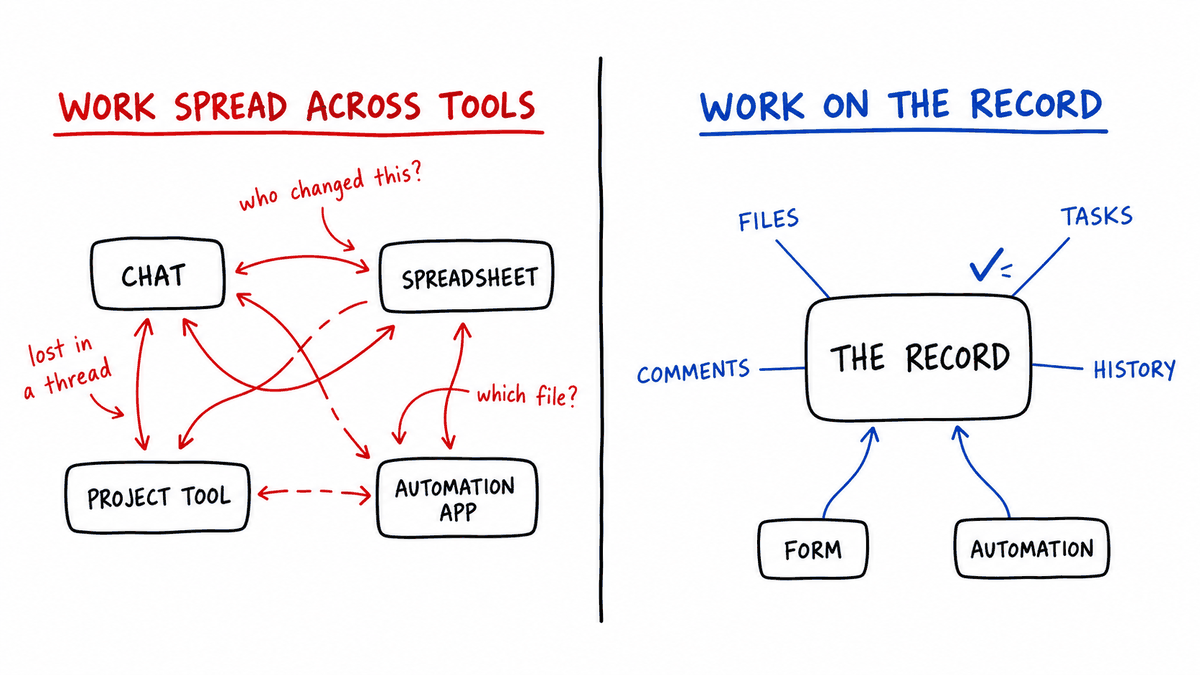
One request starts in a form, gets discussed in chat, tracked in a spreadsheet, assigned in a task app, documented in a shared drive, approved by email, and reported in another spreadsheet. That can work for a while, but it becomes hard to trust.
Useful operations management software should help a team:
- Capture requests and updates in a structured way
- See who owns each record or next step
- Keep files, comments, and tasks attached to the relevant work
- Move handoffs forward without constant chasing
- Track what changed and who changed it
- Automate routine routing, reminders, notifications, and updates
- Give different teammates the right level of access
- Connect external systems when the workflow grows
That is the operational layer InfoLobby focuses on.
Signs your operations have outgrown spreadsheets
Spreadsheets often become the unofficial operations system because they are flexible and already available. The problem is that operations work needs more than editable rows.
Common signs:
- Only one person understands the latest version
- Status updates live in multiple tabs, tools, or messages
- Follow-up depends on memory
- Requests arrive through email and get copied by hand
- Files are separate from the record they explain
- Approval decisions are hard to reconstruct
- New teammates need tribal knowledge to understand the process
- Automations exist as fragile scripts or disconnected tools
When that happens, the issue is not that the spreadsheet is bad. It is being asked to manage a workflow it was never designed to own.
How InfoLobby supports operations management
InfoLobby lets teams create workspaces around operational data. You can model customers, requests, projects, vendors, assets, approvals, onboarding accounts, or other business objects as structured records.
Around those records, teams can add:
- Web forms for intake
- Files for supporting documents
- Comments for discussion
- Tasks and reminders for follow-up
- Notifications for people watching the work
- Activity history for changes and accountability
- Automations for routing, updates, email, API calls, and AI steps
- Public API access for integrations
The point is not to create a generic dashboard. The point is to give the team one reliable place where operational work can be seen, updated, and moved forward.
Where InfoLobby fits best
InfoLobby is a good fit for operations workflows like:
- Internal request management
- Lead intake and routing
- Customer onboarding
- Client delivery tracking
- Approval workflows
- Vendor and partner management
- Inventory or asset tracking
- Service request management
- Project operations
- Audit-ready operational processes
These workflows share the same pattern: records move through people, statuses, files, comments, tasks, and decisions.
Operations management software vs. project management software
Project management tools are useful when the main unit of work is a task, board, milestone, or timeline. Operations management often needs a stronger record layer.
| Need | Better fit |
|---|---|
| Plan tasks, timelines, sprints, or projects | Project management software |
| Track structured business records with status, files, comments, tasks, and history | InfoLobby |
| Manage finance, inventory, purchasing, and accounting in one enterprise system | ERP |
| Dispatch field technicians and manage routes | Field service software |
| Coordinate custom internal workflows that started in spreadsheets | InfoLobby |
InfoLobby can help with project operations, but it is not trying to replace every project management suite. It is strongest when the project work depends on structured operational records.
Why a raw database is not enough on its own
MySQL, PostgreSQL, and other databases are powerful, but they are not business applications by themselves.
If you start with only a raw database, you still need to build or assemble:
- User login and permissions
- Tables, forms, and record views
- File handling
- Search and filtering
- Comments and task follow-up
- Change history
- Web forms for outside intake
- Automations and notifications
- API access patterns
InfoLobby starts with those operational layers included, while still keeping the data in a real managed MySQL database underneath.
Why chat alone is not enough
Chat is useful for fast conversation, but it is weak as a system of record.
Common problems:
- Decisions disappear into long threads
- New teammates cannot reconstruct context
- Tasks are mentioned but not tracked
- Files are shared without staying attached to the right record
- Status changes happen in one place but data changes in another
- Read-only collaborators either get too much access or too little visibility
- Managers ask for updates because the system cannot show the current state
InfoLobby does not replace chat for conversation. It gives the operational work a home so chat does not have to become the database, task tracker, and audit trail.
Why standalone automation tools can become fragile
Tools that connect everything to everything can be useful. The problem is that operational context often gets lost between systems.
Common failure signs:
- A form creates a record in one tool and a task in another
- A workflow updates a spreadsheet but nobody knows why
- API calls live in a separate automation account
- Reminders fire without enough record context
- Nobody can tell whether a person or automation changed the data
- Debugging requires checking three products and one script
InfoLobby is strongest when the automation and the record should live together.
Choosing between adjacent categories
"Operations software" overlaps with several other categories that use similar language but solve different problems. These tables show where each one is the better answer.
Storage and structure:
| Need | Better fit |
|---|---|
| Store and edit operational records with forms, tasks, permissions, files, history, and automations | InfoLobby |
| Build a custom app backend with developer-controlled auth, APIs, and infrastructure | Backend platform |
| Host raw relational databases for developer access | Database hosting |
| Analyze large datasets and power dashboards | Data warehouse or BI platform |
| Prototype simple lists or calculations quickly | Spreadsheet |
Records and documents:
| Need | Better fit |
|---|---|
| Track business objects with fields, status, owners, tasks, comments, and history | InfoLobby |
| Store, version, search, and retain documents as the main workflow | Document management system |
| Archive official records for legal retention and compliance | Records retention or compliance platform |
| Run tasks without custom structured records | Task management tool |
InfoLobby can store files on records, but it is not trying to be a document archive. It is better when the file is part of a larger operational record.
Automation:
| Need | Better fit |
|---|---|
| Automate record-driven internal operations with forms, tasks, data, history, email, APIs, and AI | InfoLobby |
| Connect hundreds of SaaS apps with packaged connectors | iPaaS or connector automation tool |
| Run email journeys, audience segments, and campaign reporting | Marketing automation platform |
| Automate desktop actions across legacy software | RPA platform |
| Model enterprise-wide process governance | BPM suite |
Collaboration:
| Need | Better fit |
|---|---|
| Real-time messaging and channels | Chat app |
| Meetings, calls, and screen sharing | Video collaboration tool |
| Co-edit documents and knowledge pages | Document collaboration platform |
| Plan tasks, timelines, and boards | Project management tool |
| Collaborate around structured operational records with tasks, files, comments, permissions, history, and automation | InfoLobby |
The pattern across all four: InfoLobby is the answer when the work revolves around structured business records that people need to update, discuss, and move forward together.
What makes InfoLobby different
InfoLobby keeps the data and the operational work together.
That means:
- A request can start from a form and become a record
- The record can hold fields, files, comments, tasks, and history
- A workflow can assign, notify, update, or call an API when the record changes
- A manager can review what happened without reconstructing it from chat
- External systems can read or write data through the public API
- Read-only users can stay informed without changing the data
For small teams, that is often more valuable than buying another tool that handles one slice of the workflow and leaves the rest in spreadsheets.
What it costs
Plans are $29, $59, and $129 a month, and every plan includes unlimited users. Capacity is what changes: 3, 10, or 25 workspaces; 250,000, 1 million, or 5 million records; 25 GB, 100 GB, or 500 GB of file storage; and 2, 10, or unlimited web forms. Connecting your own MySQL server or S3 storage makes records and files unlimited on any plan. There is a 14-day trial with no credit card.
The pricing model is the part worth comparing rather than the number. Most operations tools in this space charge per user, commonly $9 to $30 a seat per month. That is fine when a small fixed team does the work, and it becomes the deciding factor when operations touch sales, finance, delivery, and support. At fifteen people needing access, per-seat tools in that range run $135 to $450 a month. Flat pricing changes who gets an account, which changes whether the system holds the whole process or just the part staffed by licensed users.
If only three or four people will ever touch the records, per-seat tools are frequently cheaper and the argument above does not apply.
When InfoLobby is not the right operations management software
InfoLobby is probably not the right choice if you need:
- Full ERP with accounting, procurement, inventory, and finance modules. NetSuite and Odoo cover this.
- Manufacturing execution, production planning, or shop-floor control. Look at MRPeasy or Tulip.
- Field-service dispatch, route optimization, or technician scheduling. Jobber, ServiceTitan, and FieldPulse are built for it.
- Workforce management, time clocks, or payroll operations.
- Advanced BI dashboards as the primary product. Power BI, Looker, and Metabase do this properly; InfoLobby reports are operational, not analytical.
- A pure project board with no custom operational records. Asana, monday.com, or Trello will be faster to adopt.
- Legal records retention with formal disposition rules, or enterprise content management. FileHold and RecordPoint serve that market.
- Heavy document versioning, approval, and archival workflows.
- Regulated records systems in medical or legal settings with specialized compliance requirements.
- Connecting hundreds of SaaS apps as the main job, with no record layer of your own. That is iPaaS work: Zapier, Make, or Workato.
Those categories are valid. They are just more specialized than InfoLobby's sweet spot, and picking one of the named tools above will serve you better than bending a general platform to fit.
Questions to ask before choosing
Before choosing operations management software, map the actual process.
Ask:
- What records does the process revolve around?
- How does new work enter the system?
- Who owns each step?
- What files and comments need to stay attached?
- What tasks prevent the work from stalling?
- What status changes matter?
- What should be automated?
- What history will we need later?
- Who needs read-only, read-write, or admin access?
- Which systems need API integration?
If these questions describe the pain better than a simple task-board comparison, InfoLobby is worth evaluating.
Operations management software FAQ
What is operations management software?
Software that runs the recurring administrative work a business depends on: the records, the intake, the ownership, the status changes, and the follow-up. It differs from project management software, which organizes work into plans and tasks, and from ERP, which covers finance, procurement, and inventory as integrated modules. Most small businesses need the first and buy one of the other two.
How is this different from a project management tool?
Project tools model tasks with dates and assignees. Operations software models records with their own lifecycle: a vendor, a request, an asset, a client. Tasks hang off those records rather than being the thing itself. If your work is a plan with a finish date, use a project tool. If it recurs and revolves around records, you want this.
Do we need a developer?
No. Tables, fields, relationships, views, forms, permissions, and most workflow logic are configured visually. PHPScript is available for logic the visual builder cannot express, and a typical operations build never needs it.
How long does it take to set up?
A single process usually takes an afternoon to model and a week or two of real use before the field list settles. Migrating an entire operation at once takes considerably longer and is the wrong way to start. Pick the process causing the most drag and move only that one.
Does everyone need a paid seat?
No. Every plan includes unlimited users, with access granted per workspace as Read Only, Read and Write, or Admin. This is the main structural difference from per-seat operations tools and it is why the whole process can live in one system rather than the licensed part of it.
Can it connect to our other systems?
Yes, through the public REST API and outbound webhooks from workflows. There is no marketplace of one-click connectors, so integrations are built rather than installed. If connecting many SaaS apps is the main job, an iPaaS tool is the better purchase.
What happens to our data if we leave?
It sits in a managed MySQL database you can export, and you can connect your own MySQL server instead if you prefer to hold it yourself from the start.
Sources checked
InfoLobby plan pricing and limits verified August 20, 2026 against the pricing page. Competitor products are named for category orientation rather than quoted on price; check their own pricing pages for current figures.
- InfoLobby pricing and features
- Public API documentation
- Related comparisons: online database software, best database for small business
Bottom line
Operations management software should make daily work easier to coordinate and easier to trust.
For small business teams, that often means moving from scattered spreadsheets, inboxes, and task tools into one operational system where records, forms, files, comments, tasks, automations, permissions, history, and API access work together.
That is where InfoLobby fits.
This page was last updated on 2026-10-07. Competitor pricing and limits change often and vary by region, so check the vendor's own pricing page before deciding. Where a specific figure was verified, the date it was checked is noted beside it.