Custom Database Software: Hire, Vibe Code, Buy, or Build?
Custom database software compared: hire a developer, vibe code it with AI, buy off the shelf, or build on a platform. Real costs and risks.
You have a process that no off-the-shelf product models properly. Maybe it lives in a spreadsheet with forty columns, an old desktop database one person understands, or a stack of tools that each hold part of the picture. You want a database shaped like your business.
There are four realistic ways to get one, and they differ by an order of magnitude in cost and in what can go wrong. This page lays them out, including the cases where hiring a developer is the right answer. InfoLobby publishes it, so the recommendation for InfoLobby is stated plainly.
Start a free trial or send us your spreadsheet.
Quick answer
| Path | Typical cost | Time to first use | Who changes it later |
|---|---|---|---|
| Hire a developer | $2,400 to $13,000+ for a small tracker, far more for a full system | Weeks to months | The developer, billed hourly |
| Vibe code it with AI | $20 to $25/month for the tool, plus usage credits and hosting | An afternoon for a demo, longer to trust it | You, by prompting, in code you may not be able to read |
| Buy off-the-shelf software | Commonly $9 to $30 per user/month | Days, once you find a close fit | The vendor, on its roadmap |
| Build it on a database platform | InfoLobby from $29/month, unlimited users | Days | You |
Choose a database platform when the logic is yours to describe but you do not want to own a codebase. Hire a developer when the system is the product you sell, or when it needs logic no platform will express. Vibe code it when it is a prototype, or when you can read the code it writes and are ready to own security and backups. Buy off the shelf when a product already fits your process closely and you are happy to work its way.
What "custom database software" actually means
The phrase covers two different purchases, and the search results mix them up.
Custom-built database software. A developer, an agency, or now an AI coding tool designs a schema, builds screens on top of it, and hands you an application. You own the code and every future change to it.
Database software you customize. A platform where you define the tables, fields, relationships, forms, and rules yourself, and the platform supplies hosting, the interface, permissions, and backups.
Both end with a database that matches your process. The difference is who does the work each time the process changes, and processes change constantly.
The four paths in detail
Hire a developer
Does well: Anything. A good developer will build exactly the screens, logic, and integrations you describe, with no platform ceiling.
Where it hurts: Freelance database developers charge roughly $60 to $110 an hour at mid-level and $110 to $180 for senior work. A modest internal tracker (a few linked tables, forms, permissions, a couple of reports) is typically 40 to 120 hours, so $2,400 to $13,200 before hosting, backups, and the first round of changes. Every new field after launch is another invoice, and if the developer moves on, the next one starts by reading someone else's code.
Right choice when: The software is customer-facing and branded, it is part of what you sell, it needs heavy real-time processing, or it has to meet a compliance regime where the system itself gets audited.
Vibe code it with AI
Does well: Tools like Lovable, Bolt, Replit Agent, Cursor, or Claude Code can turn a description into a working app with a login, forms, and a database in an afternoon. Entry pricing is low: Lovable Pro is $25 a month and Replit Core $20 a month, with usage credits on top. For a prototype or a one-person tool, it is remarkable.
Where it hurts: You now own a codebase you did not write and may not be able to read. The demo works. The parts that matter for business data are the ones the AI is least likely to get right without being asked: who can see which rows, backups, changing a field without losing data, and two people editing the same record. In 2025, a researcher found more than 170 apps built with Lovable exposing their databases to anyone, because access rules were missing (CVE-2025-48757). The same year, Replit's agent deleted a user's production database during a code freeze. Every change is another prompt, and every prompt can break something that already worked.
Right choice when: It is a prototype, a personal tool, or you (or someone on your team) can review the code and will own hosting, security, and backups after launch.
There is a middle path: use AI to configure a platform instead of to write an app. InfoLobby's AI assistant builds tables, fields, and automations from a description and shows you each change before applying it, and you can work your records from Claude or ChatGPT through the MCP connector. The AI does the setup. Login, permissions, history, and backups are the platform's job, so they are not left to whatever the model remembered to write.
Buy off-the-shelf software
Does well: Ready on day one, with features refined across thousands of customers. For standard jobs like accounting, payroll, or a conventional sales pipeline, a mature product will beat anything you build.
Where it hurts: It models the vendor's idea of your process, not yours. The fields you need do not exist, so they end up in a notes box or a spreadsheet kept next to the product. Most products in this space charge per user, so every person you add raises the bill, and the part of the team without a seat works outside the system. When you need a change, you file a feature request.
Right choice when: Your process is close to how most businesses in your industry work, and the product's defaults match it with only minor adjustments.
Build it on a database platform
Does well: You describe your process as tables, fields, and links, and get a working browser interface immediately. Changes take minutes and do not need a developer.
Where it hurts: You are working inside the platform's interface conventions. You get grids, record pages, forms, and views, not a pixel-perfect custom frontend. Someone on your side has to think clearly about the data model, even if they never write code.
Right choice when: The system is internal, the process changes more than once a year, and more than a couple of people need to use it.
What a developer would build vs. what you get on day one
The usual brief for a custom database project, and where each piece lives in InfoLobby:
| Typical requirement | Custom build | InfoLobby |
|---|---|---|
| Tables with related records | Schema design, then screens for each relationship | Tables, fields, and relationships defined in the browser |
| Line items (orders, invoices, inspections) | Master-detail screens | Sub-tables saved in one transaction with the parent |
| Calculated values and rollups | Custom code | Calculation fields using live SQL formulas across related rows |
| Rules the data must obey | Server-side validation code | Validation rules that run before every create, update, and delete |
| Intake from customers or staff | A public form plus backend | Web forms that create records directly |
| Role-based access | Auth system and permission checks | Workspace roles: Read Only, Read and Write, Admin |
| Workflows and notifications | Background jobs | Automations with a visual builder or PHPScript code |
| Reports and dashboards | Reporting layer | Reports: charts, gauges, aggregate tables |
| Integration with other systems | API you design and maintain | A public REST API and outbound HTTP from automations |
| Hosting, backups, file storage | Your server, your problem | Managed MySQL and S3 file storage included |
Underneath, your data sits in standard MySQL. That matters for two reasons. A developer you bring in later can query it directly instead of reverse-engineering a proprietary format, and you can export everything and leave.
If you are the kind of person who wants to get under the hood, you can. PHPScript handles logic the visual builder cannot express, calculation fields take raw SQL, and you can connect your own MySQL server instead of using the managed one.
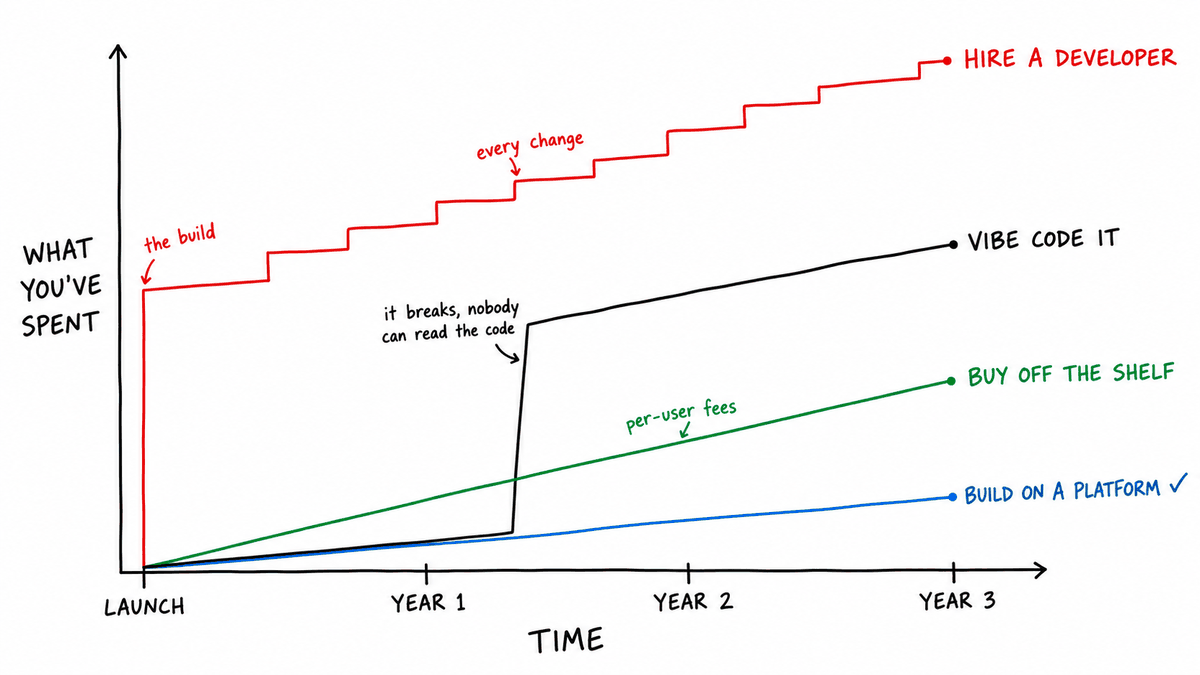
What it costs over three years
A rough comparison for a ten-person team running one internal system. The point is the shape of the costs, not the exact figures.
| Hire a developer | Vibe coded | Off the shelf | InfoLobby | |
|---|---|---|---|---|
| Upfront | $2,400 to $13,200 (40 to 120 hours) | Your time, plus usage credits | Setup and data migration time | $0, or a free rebuild of your spreadsheet during our launch period |
| Ongoing software | Hosting, roughly $20 to $100/month | Tool subscription, plus hosting and a database billed separately | $9 to $30 per user/month, $90 to $300/month for ten | $29 to $129/month flat, any number of users |
| Changes | Hourly, at the rates above | Another prompt, then retest everything it touched | Feature requests, or workarounds | You make them |
| Remote and mobile access | If you paid for it | Once deployed | Usually included | In the browser |
Ongoing change usually decides it. A custom system that needs ten hours of changes a year at $85 an hour costs $850 a year in changes alone, before anything breaks. A vibe-coded app moves that cost rather than removing it: it is cheap until something breaks that nobody can read, and then you are paying a developer to learn a codebase no one designed. Off-the-shelf software costs less to start and more to fit: the per-user fee grows with the team, and every gap in the product becomes a workaround someone maintains by hand.
Who this is for
InfoLobby fits as custom database software when:
- Your process is specific enough that packaged software keeps forcing workarounds
- The spreadsheet or desktop database that runs it has reached its limits
- Several people, possibly in different places, need to work in it
- You want to change the system yourself, not file a ticket with a developer
- You might want to script or query it directly later, without being forced to
Every plan includes unlimited users, so giving the whole team access does not change the bill.
Who this is not for
Hire a developer, or buy a specialist product, if:
- The database is part of a product you sell, with your own branding and frontend
- You need a mobile app distributed through the app stores
- The system processes high-volume real-time data such as telemetry or trading
- A regulator audits the software itself, as with EHR or certain financial systems
- You want accounting, payroll, or ERP. Buy the dedicated product and integrate it
FAQ
Is there free custom database software?
Free options exist: LibreOffice Base, self-hosted open-source tools such as NocoDB or Baserow, and free tiers of hosted platforms with tight record limits. Free usually means you supply the hosting, backups, and maintenance yourself, or you hit a cap quickly. InfoLobby has a 14-day free trial with no credit card, and paid plans start at $29 a month.
How much does it cost to have a custom database built?
For a small internal tracker, expect roughly 40 to 120 hours of developer time. At mid-level freelance rates of $60 to $110 an hour, that is about $2,400 to $13,200, plus hosting and ongoing changes. Larger systems with integrations and many user roles run well beyond that.
Can I bring my existing data?
Yes. Export each table from your spreadsheet or existing database to Excel or CSV, recreate the tables and relationships in InfoLobby, then import the rows. Forms and macros from a desktop database do not carry over. Their logic gets rebuilt as views, web forms, validation rules, and automations, which is usually the moment to drop the parts nobody uses. Moving off Microsoft Access specifically is covered in the Microsoft Access alternative guide.
Can I just build it with ChatGPT or Claude?
You can, and for a prototype it is a good way to find out what you need. Before real customer data goes in, check four things: that each user can only see the rows they should, that there are tested backups, that you can add a field without losing data, and that someone can fix it when the AI cannot. If those sound like work you do not want, use AI to configure a platform instead. InfoLobby's AI assistant builds tables and automations from a description, and Claude or ChatGPT can work your records through the MCP connector.
Do I need to know SQL or programming?
No. Tables, fields, forms, views, and most automations are built in the browser without code. SQL and PHPScript are available for calculation fields and complex logic if you want them.
Can a developer still work on it later?
Yes. The data is standard MySQL, there is a public REST API, and PHPScript runs inside the platform. A developer can extend the system without rebuilding it.
Can you build it for me?
Send us the spreadsheet that runs your process today and we will rebuild it as a working InfoLobby workspace. It is normally $250 and free during our launch period. See how it works.
Related pages
- Best database for small business: 10 options compared
- Online database software
- Microsoft Access alternative
- Custom CRM built around your actual sales process
- Replace spreadsheets
- Internal tools for operations
Sources checked
Developer rates, AI builder pricing, and incident reports checked October 7, 2026. Confirm on the source before deciding.
- goLance freelance database developer rate guide, 2026
- Replit pricing
- Lovable pricing (plan figures as reported by eesel, since the page renders prices client-side)
- CVE-2025-48757 and Superblocks write-up on exposed Lovable-built apps
- eWeek on the Replit production database deletion
- InfoLobby pricing and features
Bottom line
If the database is your product, hire a developer. If it is a prototype, vibe code it. If it is how you run the business, build it yourself on a platform, keep the data in standard MySQL, and spend the developer budget on something else.
This page was last updated on 2026-10-07. Competitor pricing and limits change often and vary by region, so check the vendor's own pricing page before deciding. Where a specific figure was verified, the date it was checked is noted beside it.