Best Podio Alternative for Small Business in 2026
Moving off Podio? Compare pricing, workflow depth, and data ownership, plus what the InfoLobby importer brings across from your existing Podio apps.
If you are looking for a Podio alternative, you probably do not just want another project management app. You want a flexible place to run the operational work that sits between CRM, spreadsheets, forms, tasks, files, and approvals.
InfoLobby is built for small businesses that need custom workspaces, managed database storage, team permissions, web forms, tasks, comments, file storage, automation, and API access without turning every seat into a pricing decision.
Short answer
InfoLobby is a strong Podio alternative for small businesses that want a focused operational database with unlimited users, managed MySQL, S3-backed file storage, workflow automation, web forms, public API access, and built-in collaboration.
Podio is still a serious work management platform. Its official product page describes customizable apps, workspaces, multiple views, workflows, client access, mobile apps, integrations, and dashboards. If your team is already deeply invested in Podio apps, partner extensions, or its specific workflow model, switching may not be worth the disruption.
But if you are a small team trying to replace spreadsheet sprawl, centralize client or internal operations, and avoid per-user pricing pressure, InfoLobby may be the cleaner fit.
Why teams look for a Podio alternative
Podio became popular because it lets teams build custom apps around their own process. That flexibility matters. The problem is that many small businesses eventually want the same flexibility with fewer moving parts, clearer data ownership, and pricing that does not punish broader team access.
Common reasons teams compare alternatives:
- Too much work still lives in spreadsheets beside Podio
- Internal users, light users, clients, and permissions become hard to reason about
- Automation needs grow beyond simple task assignment
- Teams want database-style records, history, forms, files, and comments in one place
- Small businesses want more people involved without watching every extra seat
- Teams want public API access for real operational integrations
InfoLobby vs. Podio
| Need | InfoLobby | Podio |
|---|---|---|
| Custom operational data | Managed MySQL-backed tables and records | Custom apps and app items |
| Team collaboration | Workspaces, roles, comments, tasks, notifications | Workspaces, comments, tasks, mentions |
| Forms | Create, edit, and signature forms: collect new records, send one record out to be corrected, or send a document out to be signed | Webforms on Podio plans |
| E-signatures | Built in, with consent and intent recorded, a retained copy of the signed document, and a certificate of completion | Typically none native, handled by an integration |
| Automation | Visual builder and PHPScript code editor | Workflow automation and advanced automations |
| Files | Managed S3 file storage or connect your own storage | File attachments |
| API | Public API for records, comments, files, tasks, notifications, and subscriptions | API integrations listed by Podio |
| Pricing fit | Unlimited users; plans currently start at $29/month | Free for up to 5 users; paid plans are priced per user |
| Moving from Podio | Built-in importer for apps, records, attachments, views, and comments | Export and API options |
| Best fit | Small business operations needing flexible data plus workflow | Teams already centered on Podio apps and ecosystem |
When InfoLobby is the better fit
Choose InfoLobby if your team thinks in records, tables, forms, files, and follow-up work.
InfoLobby fits workflows like:
- Client intake and onboarding
- Internal request tracking
- Approval workflows
- CRM-style pipelines for small teams
- Vendor and partner follow-up
- Inventory or asset tracking
- Service request management
- Admin operations that started in spreadsheets
The strongest fit is not "we need project management." It is "we need one reliable operational system where the data and the work around the data live together."
How hard is it to move from Podio?
InfoLobby includes a built-in Podio importer, so moving does not have to start with CSV exports and manual field mapping.
The importer brings across:
- Podio apps as InfoLobby tables
- Items as records, preserving the original Podio item ID
- Fields, attachments, views, and comments
- Relationships to apps that have already been imported
- GlobiFlow automations, which arrive switched off so you can review them first
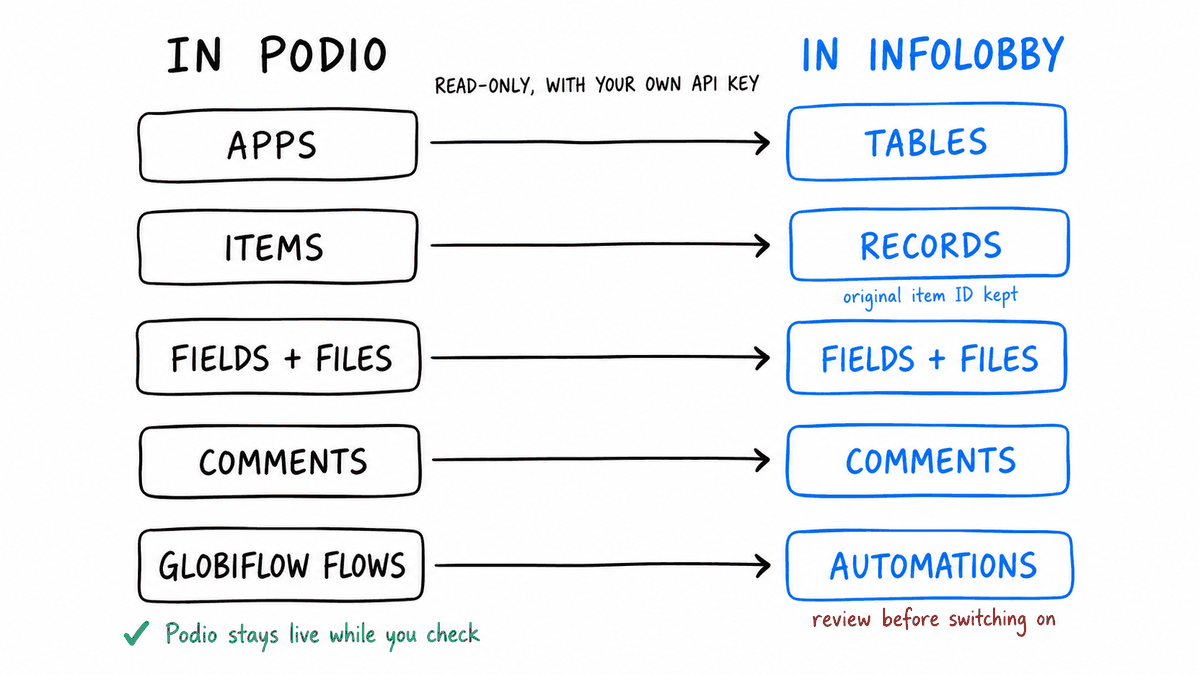
The import only reads from Podio, so you can keep Podio live while you verify the new workspace. Calculation formulas and multi-relationship fields need extra attention, and related apps should be imported in dependency order.
Review the Podio importer reference before planning a move.
When Podio may still be better
Podio may be the better choice if:
- Your team already has mature Podio apps
- You rely on Podio partner extensions
- You need Podio's specific mobile or dashboard experience
- Your process is already designed around Podio workspaces, app items, and automation rules
- External client access in Podio already works well for your business
Switching tools has a real cost. A better alternative is only better if it reduces day-to-day friction after migration.
What small businesses should compare before switching
Before choosing a Podio alternative, compare the workflow you actually run, not just feature checklists.
Ask:
- What records do we manage every day?
- Who needs read-only, read-write, and admin access?
- Which forms create new work?
- Which tasks and reminders prevent dropped follow-up?
- Which comments, files, and history need to stay attached to the record?
- Which automations save time without becoming fragile?
- What data needs to leave or enter the system through an API?
If the answers point to structured operations, InfoLobby deserves a close look.
Why InfoLobby works for spreadsheet-heavy teams
Many small businesses do not move directly from Podio to another all-in-one work platform. They move from Podio plus spreadsheets plus email plus shared drives plus manual reminders.
InfoLobby is designed to replace that patchwork with:
- Structured tables instead of fragile spreadsheets
- Record pages with comments, tasks, files, and activity
- Role-based workspaces for controlled access
- Web forms for external or internal intake
- Automations for handoffs, notifications, and updates
- Public API endpoints for integrations
- Managed database and storage so setup does not begin with infrastructure
This is the practical difference: the operational record becomes the center of the work.
Pricing angle
As checked on July 29, 2026, Podio's official pricing page lists a free plan for up to five users, Plus at $11.20 per user per month with annual billing, and Premium at $19.20 per user per month with annual billing. Monthly billing is higher. Podio also includes unlimited external clients on paid plans, which can make it attractive when most collaborators only need limited client access.
InfoLobby pricing is based on workload rather than seats. Current plans start at $29/month and include unlimited users. At ten paid internal users, Podio Plus is $112/month and Podio Premium is $192/month on annual billing; an InfoLobby plan does not increase merely because the tenth teammate needs access.
That does not automatically make InfoLobby cheaper for every company. It matters most when broad team access is part of the operational problem you are trying to solve.
Podio alternative FAQ
Can InfoLobby import my Podio data?
Yes. InfoLobby can import Podio apps, fields, records, attachments, views, and comments. Relationships can be reconnected when the related Podio app has already been imported.
Can I keep using Podio during migration?
Yes. The importer reads from Podio without changing the Podio account, so you can migrate one app at a time and verify the result before switching.
What does not migrate automatically?
Podio calculation formulas do not translate automatically, and multi-relationship fields are not currently imported. Related apps also need to be imported in dependency order so their record links can be resolved.
Which is cheaper for a growing team?
It depends on the mix of internal and external users and the workload you need. Podio charges per internal user on paid plans but includes external client users. InfoLobby includes unlimited users and sets limits around records, storage, workspaces, automation runtime, web forms, and API calls.
When should I stay with Podio?
Stay with Podio when your existing apps, partner extensions, mobile workflows, dashboards, and client-access model already work well enough that migration would add more disruption than value.
Bottom line
The best Podio alternative for a small business is the one that matches how the business actually works.
Choose InfoLobby if you want a flexible operational database with forms, tasks, comments, files, automation, API access, and unlimited users. Stay with Podio if your team is already productive in Podio's app ecosystem and the current pricing, permissions, and automation model still fit.
For small businesses trying to move from scattered spreadsheets and workarounds into one shared operations system, InfoLobby is a practical Podio alternative in 2026.
Sources checked
- Podio product overview
- Podio pricing
- InfoLobby features
- InfoLobby pricing
- InfoLobby Podio importer documentation
This page was last updated on 2026-10-07. Competitor pricing and limits change often and vary by region, so check the vendor's own pricing page before deciding. Where a specific figure was verified, the date it was checked is noted beside it.