Best Google Sheets Alternative for Small Business in 2026
Google Sheets has no enforced structure, record permissions, or reliable history. See what changes when a shared spreadsheet becomes a real database.
The best Google Sheets alternative depends on what the spreadsheet has become. Google Sheets is excellent for formulas, analysis, charts, quick lists, and real-time document collaboration. InfoLobby is built for a different job: running recurring business processes around structured records, forms, permissions, tasks, comments, files, history, automation, and API access.
InfoLobby is a Google Sheets alternative for small businesses that have outgrown a shared spreadsheet as an operational system of record but do not want to build custom software.
Short answer
Choose InfoLobby over Google Sheets when customers, orders, requests, assets, approvals, inventory, or other business records need field types, controlled intake, role-based access, related data, activity history, and repeatable workflows.
Stay with Google Sheets when the work is primarily calculation, analysis, forecasting, charting, temporary planning, or flexible collaboration in a familiar spreadsheet. Sheets is available at no charge to individual Google users, and paid Google Workspace also bundles email, storage, meetings, and other productivity tools.
InfoLobby vs. Google Sheets
| Need | InfoLobby | Google Sheets |
|---|---|---|
| Core model | Managed MySQL-backed operational workspaces | Collaborative cloud spreadsheet |
| Best fit | Recurring processes built around durable records | Analysis, formulas, planning, and flexible tabular work |
| Data structure | Typed fields, related tables, records, and validated forms | Cells, formulas, ranges, sheets, and files |
| Collaboration | Workspace roles, tasks, comments, notifications, files, and record history | Real-time editing, comments, sharing, version history, and protected ranges |
| Intake | Create, edit, and signature forms create or update structured records directly | Google Forms can send responses to a spreadsheet |
| Automation | Visual flow builder plus PHPScript code editor | Macros, Apps Script, add-ons, and integrations |
| API | Record-focused REST API with plan-based hourly quotas | Cell- and range-focused API with per-minute quotas |
| Capacity model | Managed plans limit records; connect your own MySQL for another infrastructure path | Up to 10 million cells per spreadsheet |
| Pricing model | Flat workload-based plans with unlimited users | Free consumer access; Google Workspace business plans charge per user |
| Infrastructure path | Managed MySQL/S3 or connect your own | Google-hosted spreadsheet files |
Why teams look for a Google Sheets alternative
A spreadsheet often begins as the fastest reasonable solution. Someone creates columns, adds formulas, shares the file, and the team starts working immediately. Google Sheets remains a strong tool while flexibility is the main requirement.
Teams usually start comparing alternatives when:
- A sheet becomes the official source for a recurring business process
- People must remember which columns, formulas, or tabs they may edit
- Duplicate files and exports make it unclear which version is current
- Permissions need to follow business roles rather than whole files or ranges
- Customer requests or internal submissions still require copy and paste
- Tasks, files, discussions, and status history live outside the row
- Formulas have quietly become business rules
- Reporting begins with cleaning inconsistent values
- Several sheets approximate related tables through lookups and copied IDs
- Automations need to act on records rather than cell coordinates
These are not signs that Google Sheets is a poor spreadsheet. They are signs that the job has changed from collaborating on a document to operating a system.
For a deeper checklist, read When to move from Google Sheets to a database. If the immediate question is capacity rather than fit, the Google Sheets cell limit explains why the 10 million cell budget is shared across every tab and how to work out your real row ceiling.
When InfoLobby is the better Google Sheets alternative
InfoLobby is the better fit when rows represent business records with a lifecycle, owners, supporting files, discussion, and rules.
Examples include:
- Customers, contacts, leads, and sales opportunities
- Orders, invoices, purchase requests, and approvals
- Inventory, equipment, and company assets
- Service requests, cases, and internal tickets
- Jobs, projects, tasks, and time entries
- Vendors, contracts, renewals, and compliance records
- Website or internal intake that should create records directly
- Processes that need notifications, scheduled actions, or API integration
Instead of exposing the mechanics of a spreadsheet to every user, InfoLobby provides grid, calendar, gallery, and kanban views; record forms; reports; tasks; comments; files; activity; permissions; automations; and API access around managed MySQL.
Related tables are also more natural in a database. An order can relate to one customer and contain multiple line items without duplicating the customer's details across rows. For these workflows, InfoLobby supports atomic master-detail editing, so a parent and its variable set of details can validate and save as one operation.
When Google Sheets is still the better choice
Google Sheets may remain the stronger fit when:
- Formulas, pivots, charts, or ad hoc analysis are the main work
- The structure changes frequently and strict field definitions would slow discovery
- The sheet is temporary, personal, or owned by a very small group
- Real-time free-form editing is more important than controlled record workflows
- The team depends on spreadsheet templates, functions, macros, or Apps Script
- The file is part of a broader Google Workspace workflow
- Google Forms already provides sufficient intake
- The data and process are low risk
- Rebuilding formulas and integrations would cost more than stronger controls save
InfoLobby is not a spreadsheet engine and does not attempt to reproduce the Google Sheets formula library or charting experience. Many teams should keep Sheets for analysis while moving only operational records into a database workspace.
Google Sheets pricing and limits
Google Sheets can be used at no charge with a personal Google account. Businesses may instead purchase Google Workspace for organizational administration, business email, pooled storage, security controls, and the wider Workspace suite.
As checked on July 30, 2026, Google's official US pricing page lists these annual-commitment Google Workspace Business prices:
| Google Workspace plan | Price per user per month | Pooled storage per user | User limit |
|---|---|---|---|
| Business Starter | $7 | 30 GB | 300 |
| Business Standard | $14 | 2 TB | 300 |
| Business Plus | $22 | 5 TB | 300 |
| Enterprise | Contact sales | 5 TB, with more available | No stated minimum or maximum |
Those prices cover the Workspace bundle, not Google Sheets alone. They should not be treated as a direct feature-for-feature database price.
Google currently limits a spreadsheet to 10 million cells or 18,278 columns. Cell capacity is not the same as database record capacity: a sheet with 20 populated columns reaches 10 million cells at roughly 500,000 rows, while a narrower sheet can hold more rows. Performance and maintainability may become practical constraints before the file reaches its hard ceiling.
The Google Sheets API currently allows 300 read requests and 300 write requests per minute per project, with 60 of each per minute per user per project. Google recommends payloads of 2 MB or less, although it does not publish a hard request-size limit.
InfoLobby pricing is based on workload rather than seats. Current plans are $29/month for Starter, $59/month for Team, and $129/month for Business, all with unlimited users. Managed record limits are 250,000, 1 million, and 5 million respectively.
Do not compare those numbers in isolation. Google Sheets may be the better value for spreadsheet work, especially when free access is sufficient. InfoLobby's value is the database and operational layer around the records.
What changes when a spreadsheet becomes a database
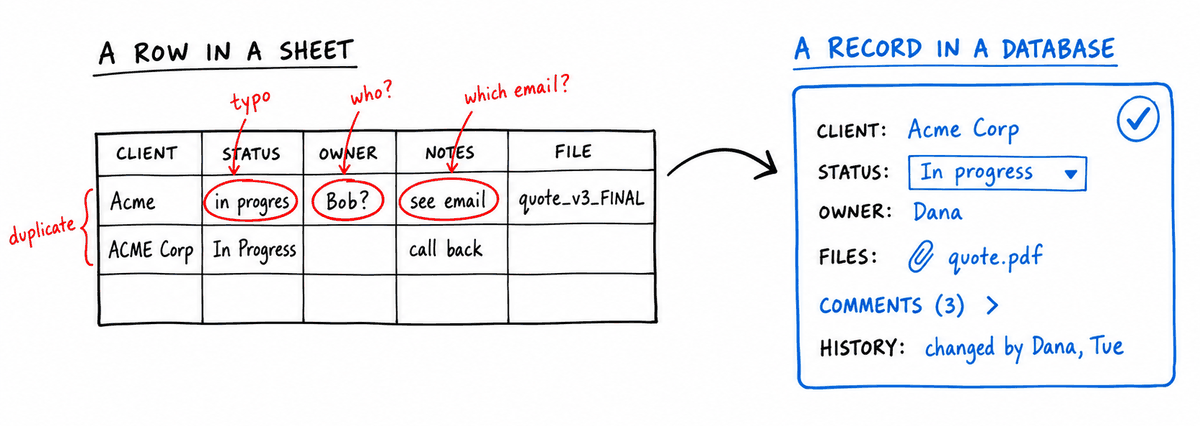
Moving from Google Sheets is not just moving rows. Before choosing an alternative, identify what the sheet currently does:
- List every spreadsheet, tab, named range, column, formula, validation rule, and protected range.
- Identify the real records and relationships behind the cells.
- Separate calculations used for analysis from rules that run the business process.
- Map editors, viewers, commenters, link sharing, and range protections to business roles.
- Inventory Google Forms, Apps Script, macros, add-ons, charts, pivots, imports, and external links.
- Decide which comments, notes, file attachments, revisions, and audit evidence must be retained.
- Measure rows, columns, attachments, API traffic, and expected growth.
- Rebuild one representative workflow and verify it with the people who use it.
Google Sheets can download data as Excel, OpenDocument, CSV, PDF, and other formats. CSV is useful for moving one flat tab at a time; XLSX can carry more workbook structure. Neither format should be assumed to recreate Apps Script, sharing permissions, Google Forms, add-ons, automations, comments, or the behavior of linked spreadsheets in a new platform.
A staged migration is usually safer: import a copy, define field types and relationships, rebuild intake and automation, validate record counts and critical values, then keep the old spreadsheet read-only until the new workflow is trusted.
Google Sheets alternative FAQ
What is the best Google Sheets alternative for small business?
InfoLobby is a strong choice when a shared spreadsheet has become an operational system for customers, requests, orders, assets, or other structured records. Google Sheets remains stronger for formulas, analysis, charts, planning, and flexible document collaboration.
Is InfoLobby cheaper than Google Sheets?
Not automatically. Google Sheets is available free to individual users, while Google Workspace business plans charge per user for a larger productivity suite. InfoLobby starts at $29/month with unlimited users, but the purchase is for a managed database and operational workspace rather than a spreadsheet.
Does Google Sheets have a row limit?
Google documents a limit of 10 million cells per spreadsheet rather than one fixed row limit. The effective row ceiling depends on the number of columns. For example, 20 columns consume the cell allowance at about 500,000 rows.
Can InfoLobby replace Google Sheets formulas?
InfoLobby provides calculated fields, reports, a visual flow builder, and PHPScript for business logic, but it is not a drop-in replacement for every spreadsheet formula. Inventory formulas and decide which belong in fields, automation, reporting, or a separate analysis sheet.
Can several people use InfoLobby at once?
Yes. All current InfoLobby plans include unlimited users, with Read Only, Read & Write, and Admin workspace roles. The collaboration model centers on records, tasks, comments, files, notifications, and activity rather than simultaneous editing of arbitrary cells.
Can I import Google Sheets data into InfoLobby?
Yes. Download a sheet in a tabular format such as CSV or XLSX, clean the headers and values, and import it into the appropriate tables. Formulas, scripts, comments, sharing rules, forms, charts, and integrations require separate migration planning.
Should I replace every spreadsheet?
No. Keep spreadsheets that are primarily calculators, analyses, forecasts, or temporary plans. Move the processes that need structured intake, repeatable rules, narrower permissions, related records, collaboration context, or dependable history.
Can Google Sheets and InfoLobby be used together?
Yes. A practical setup is to keep operational records in InfoLobby and use exports or API integrations when spreadsheet analysis is useful. This preserves Sheets' analytical flexibility without making a workbook the only system of record.
Bottom line
Google Sheets is one of the best tools for collaborative spreadsheet work. InfoLobby becomes the better alternative when the spreadsheet is being asked to behave like operational software.
Choose Google Sheets for formulas, analysis, quick planning, charts, and flexible collaboration. Choose InfoLobby for managed relational data, controlled forms, permissions, tasks, comments, files, history, automation, API access, and a path to your own MySQL and S3 infrastructure.
Sources checked
- Google Drive file limits
- Google Workspace pricing
- Google Sheets API usage limits
- Download a Google Sheets file
- InfoLobby features
- InfoLobby pricing
This page was last updated on 2026-10-07. Competitor pricing and limits change often and vary by region, so check the vendor's own pricing page before deciding. Where a specific figure was verified, the date it was checked is noted beside it.