Most teams do not have a signing problem. They have a handover problem.
The signature itself is easy. Somebody uploads a PDF, the client clicks through, a signed copy comes back by email. What breaks is everything around it: the contract was assembled from data in your system, signed in a different one, and filed in a third. Nothing that happens after the signature can be triggered by it, because the system that runs your work never finds out.
So somebody watches an inbox, downloads the PDF, renames it, drops it in a folder, updates a status field, and tells the delivery team to start. That person is the integration.
What signing separately actually costs
Worth being specific, because "we already have DocuSign" is a reasonable answer to the wrong question.
The status is guesswork between send and sign. The record says "sent for signature" and stays that way. Whether the client opened it yesterday or has not seen it at all lives in a different product's dashboard, so chasing is done on a hunch.
The signed copy detaches from the deal. It is in a folder, or an inbox, or the signing tool's archive. Six months later, proving what was agreed means remembering which of those it was.
Nothing downstream fires. The signature is the single most important state change in the whole deal, and it cannot start the project, raise the invoice, or notify the delivery lead, because it happened somewhere else.
Per-envelope pricing shapes behaviour. Teams start batching, or skip signing the small stuff, because each send has a marginal cost. That is a pricing model changing your process.
None of these are fixed by a better signing tool. They are fixed by the signature being a field on the record.
What the build looks like
| Table | Key fields | Links to |
|---|---|---|
| Clients | Name, contact, email, address, status | Agreements, Projects |
| Agreements | Reference, client, type, value, start date, status, agreement body (rich text), client signature, contractor signature | Clients, Projects |
| Projects | Name, agreement, owner, start date, stage | Agreements, Clients |
The agreement body is a Text Area field set to HTML Rich Text. That field holds the contract itself, and it is what the signature signs. You can type it, paste it, or have an automation assemble it per record from the client name, the scope, and the fee, so every agreement is generated from the data rather than retyped alongside it.
The signature fields point at that body. Two of them, if both parties sign, each recording its own signer independently and in any order.
How the signing actually runs
Create a signature form on the Agreements table and pick which signature it collects. Then open the record and copy its share link, or let an automation do it: when Status becomes "Ready to sign", email the client a link to their own agreement.
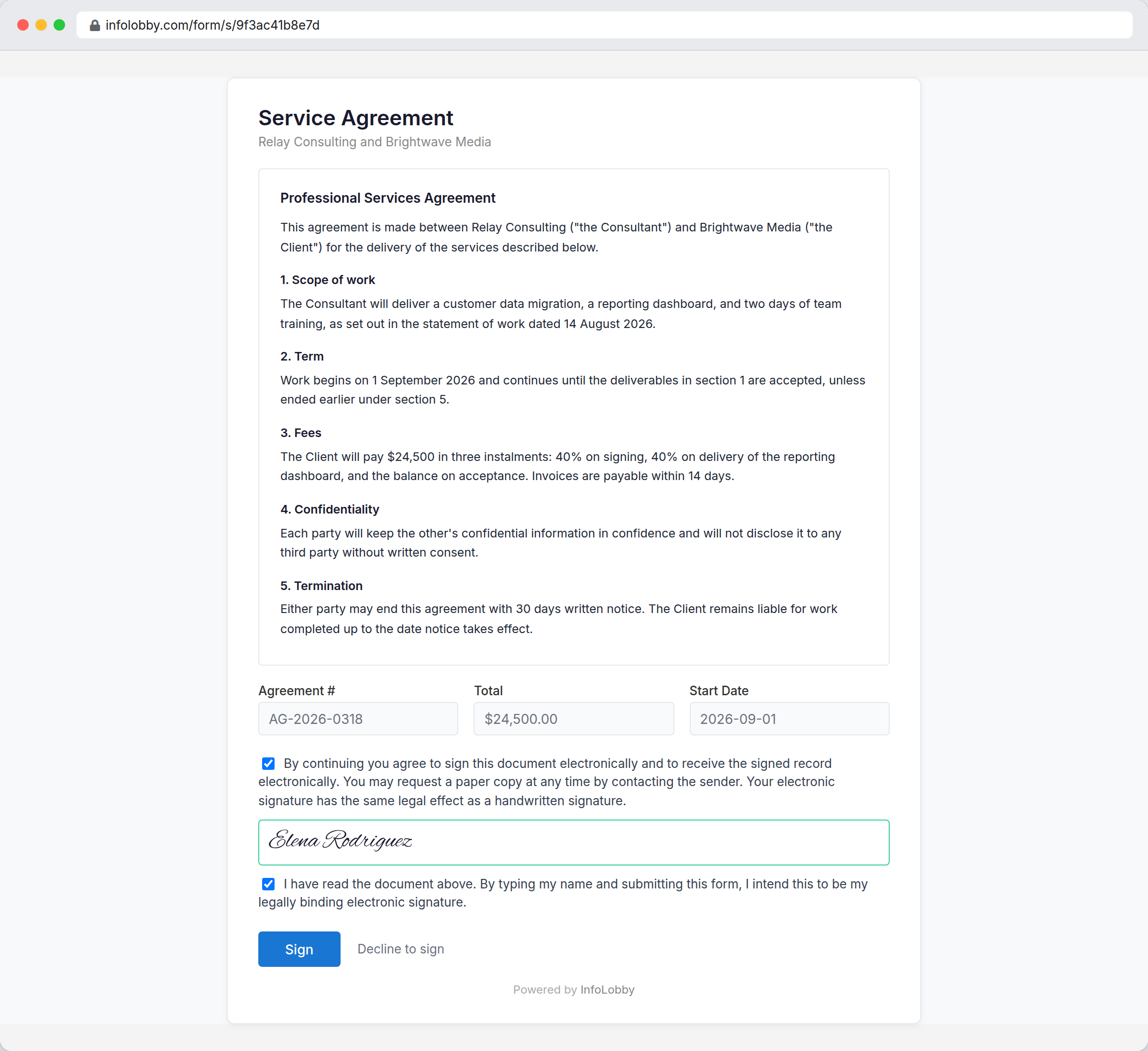
The signer sees the document first, at full height, with no form furniture in front of it. Below it, a consent statement, a box to type their name, and a confirmation that they intend that name as their signature. The name box stays locked until both statements are confirmed, because a name in a text box is not a signature. The confirmation is what makes it binding.
Anything else you put on the form sits between the document and the signature, read-only unless you unlock it. That is how you collect a job title, a PO number, or a delivery address at the same time. The document is the one thing that can never be unlocked.
They can also decline. A refusal is recorded on the record as firmly as a signature, with the reason if they gave one, so the record distinguishes "nobody has signed yet" from "this was refused on 12 March".
What gets recorded
This is the part that separates a signature from a name in a field.
- The exact time, from our servers rather than the signer's device, so it cannot be backdated by changing a computer's clock.
- The wording they agreed to, word for word, so the record proves what was actually shown to them.
- A complete copy of the document as it stood at that moment, kept separately and never altered.
- A fingerprint of that document, so any later change is detectable.
- The signer's IP address and browser, and whether the signature came through a form, the app, or the API.
The retained copy is the one that matters most. A fingerprint can prove a document changed, but it cannot show what the original said. Keeping the copy is what lets you produce the signed agreement years later, which is exactly what the law asks for.
You can still edit the agreement afterwards. Nothing is silently overwritten: the signature immediately shows a red warning on the record, and the copy taken at signing is still there. Freezing the document outright would strand records with no way out, and would not stop a change made outside InfoLobby anyway. Making it loud is more useful than pretending it cannot happen.
What the signature can start
Because it is a field, a change to it is a record event like any other, and an automation can trigger on it:
- Mail the signer their certificate of completion, attached, generated at the moment it goes out.
- Move the record to "Signed" and set the countersign deadline.
- Create the project and its first three tasks.
- Raise the deposit invoice for the percentage due on signing.
- Notify the delivery lead in the same thread the sales conversation happened in.
That last point is the whole argument. None of it requires anyone to notice that a PDF arrived.
What this is not
- Not certificate-backed signing. These are simple electronic signatures. InfoLobby does not issue EU Qualified or Advanced eIDAS signatures, which need a trust service provider.
- Not identity verification. The signature proves that whoever was at the keyboard typed that name and agreed to be bound by it. It does not prove they are the person that name belongs to. No ID capture, no knowledge-based authentication, no SMS one-time codes.
- Not contract lifecycle management. No clause library, no template assembly with negotiated variables, no redlining or version comparison between counterparties. Ironclad and Juro own that. This signs the contract you already have.
- Not a validated Part 11 system. Regulated quality environments needing 21 CFR Part 11 validation should buy a QMS.
What it costs
Signing is included on every plan. There is no per-signature charge, no envelope count, and no separate e-signature tier, which is the main reason teams here stop deciding whether a given document is "worth" sending for signature.
Plans are $29, $59, and $129 a month with unlimited users. The limit worth checking is web forms, at 2 on Starter, 10 on Team, and unlimited on Business. Create, edit, and signature forms all draw on that same allowance, and a two-party contract needs a form per party, so a team signing two contract types with both sides signing should plan for Team.
Related
- Approval workflow software for the decision that happens before the signature
- Client portal software for giving clients a view of the work the contract covers
- Custom CRM for the quoting motion that produces the contract
InfoLobby plan pricing and limits, and the competitor claims on this page, were last checked on 2026-08-27. Competitor pricing changes often and varies by region, so confirm current figures on the vendor's own pricing page before deciding. Our plans are on the pricing page.