Field service software is built around the technician. Jobber, ServiceTitan, Housecall Pro, and FieldPulse all solve the same core problem well: get the right person to the right address with the right information, then collect payment. If that is your problem, buy one of them and stop reading.
This page is about the other half of a service business. The permit that has been pending for three weeks. The warranty claim the manufacturer has not answered. The subcontractor invoice that does not match the quote. The customer who has called four times about the same recurring fault and is now a retention problem.
None of that fits a dispatch screen, so it lives in a spreadsheet, a shared inbox, and the office manager's head.
The jobs your field software has no screen for
Ask any service business owner what the office actually spends its day on and the list is remarkably consistent across trades.
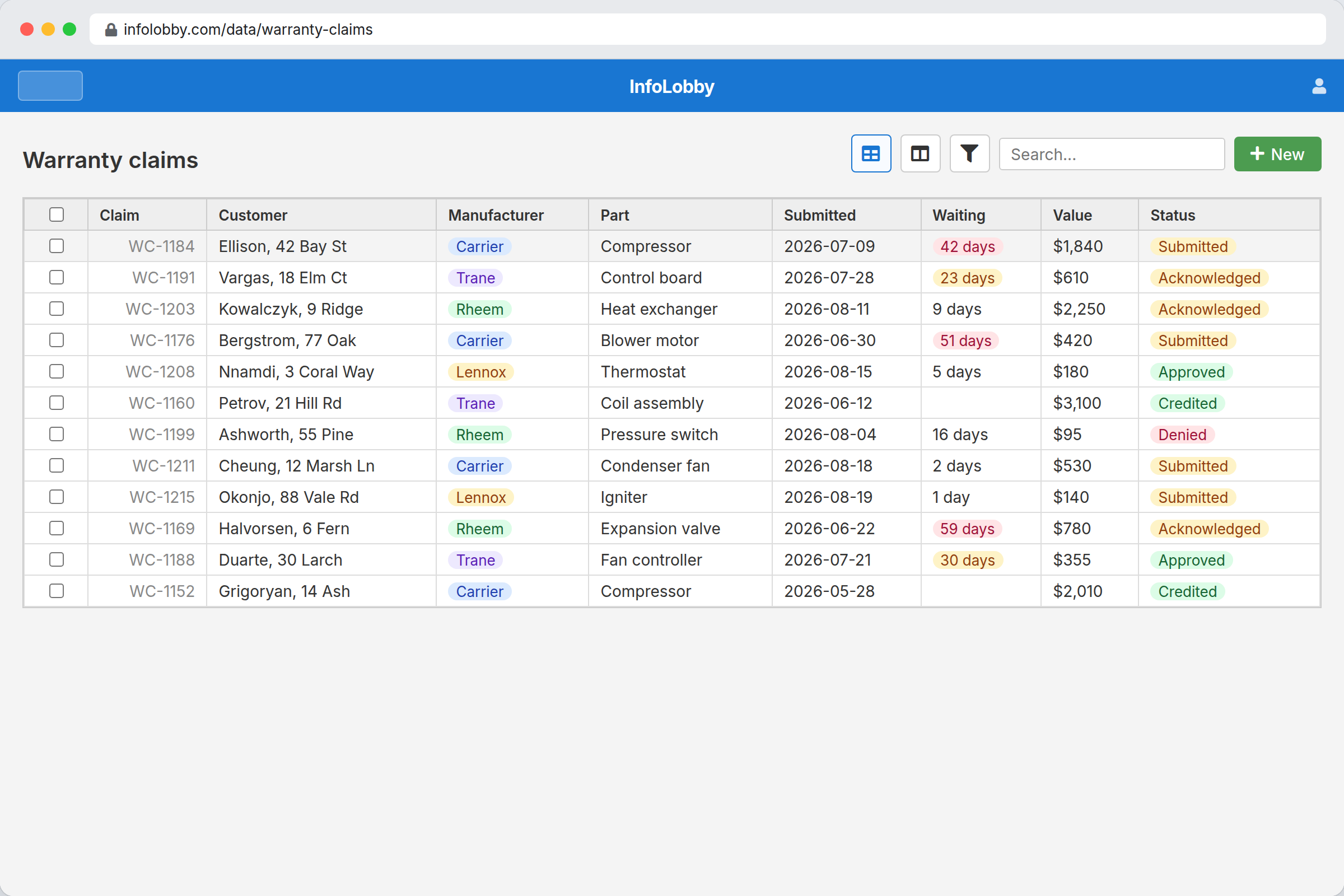
Warranty and manufacturer claims. A part fails, a claim is filed, and then it waits. There is no dispatch record for "waiting on Carrier", so it lives on a note until someone remembers.
Permits and inspections. Applied, pending, approved, scheduled, failed, re-inspected. Multiple stages, external dependencies, and a date that matters. Field software tracks a job, not a permit's independent lifecycle.
Subcontractor coordination. Who was assigned, what was quoted, what was invoiced, and whether those three agree. This has its own approval path and rarely matches the job schedule.
Callbacks and recurring faults. The third visit to the same address for the same issue is a different conversation than the first. Recognizing that pattern requires querying history across jobs, which is a reporting question rather than a scheduling one.
Equipment returns and RMAs. Parts ordered wrong, returned, credited. A small money leak that nobody owns.
Each of these is a record with an owner, a status, a date, and a next action. That is precisely what a database does, and precisely what a dispatch board does not.
A worked example: the warranty claim queue
Start with one table and expand later. Most businesses that adopt this start with warranty claims because the money is visible.
| Field | Type | Purpose |
|---|---|---|
| Claim reference | Text | The manufacturer's number |
| Customer / Address | Text or Connection | Ties back to the job |
| Manufacturer | Category | Filter and chase by vendor |
| Part / Serial | Text | What failed |
| Submitted | Date | The clock starts here |
| Status | Category | Submitted, acknowledged, approved, denied, credited |
| Value | Number | What is outstanding |
| Owner | User | One name |
| Last chased | Date | Drives the follow-up automation |
Then one workflow: if status is Submitted or Acknowledged and Last chased is more than fourteen days ago, notify the owner.
That single automation is usually what pays for the subscription. Claims stop aging silently, and the total outstanding value becomes a number on a screen rather than a guess.
Sitting beside your field software, not replacing it
The integration pattern that works is selective rather than total.
Do not sync every job. Push a record into InfoLobby when something becomes an exception: a warranty claim is opened, a permit is required, a callback is logged, a subcontractor is assigned. Everything routine stays where it belongs, in the field product.
That happens through the REST API, available on every plan, or an outbound HTTP call from a workflow. The result is an exception queue rather than a duplicate database, which matters because a duplicated job list immediately drifts out of sync and stops being trusted.
What the per-technician math looks like
Figures below were read from each vendor's own pricing page on 2026-08-20. Field service pricing changes frequently and several vendors quote only on request.
| Product | Model | Published rates |
|---|---|---|
| ServiceTitan | Quote only, per technician | No public list pricing |
| FieldPulse | Quote only, per seat | No public list pricing. Separate full-access and field-only seat types |
| Jobber | Tiered by user count | On annual billing: Core $21 (1 user), Connect $70 to $210, Grow $105 to $280, Plus $280 to $371 |
| Housecall Pro | Tiered, extra users charged | Basic $59 annual / $79 monthly (1 user), Essentials $149 / $189 (5 users), Max $299 / $329 (8 users) |
| InfoLobby | Flat, unlimited users | $29 / $59 / $129 |
The relevant point is not that InfoLobby is cheaper, because at the low end it is not. It is that the office layer does not add per-head cost on top of a product already charging per technician. Housecall Pro charges $100 per additional user on Essentials and $75 on Max, and ServiceTitan states its pricing is per technician. Adding the office manager, the parts coordinator, and two subcontractors to InfoLobby changes the bill by nothing.
Plan limits are workspaces and records rather than people. Starter is $29 with 3 workspaces, 250,000 records, and 2 web forms. Team is $59 with 10 workspaces, 1,000,000 records, and 10 forms. Businesses running separate intake forms per service line usually need Team.
One honest caveat on that comparison: Jobber Core at $21 a month is cheaper than InfoLobby Starter, so a single-operator business is not saving money by adding this. The per-head argument only starts paying once there are office staff who need access and would otherwise be seats.
What this will not do
This list is the important part of the page.
No scheduling or dispatch. There is no calendar view, no drag-and-drop board, no route optimization. You can store a date on a record and filter by it. You cannot dispatch from it.
No technician mobile app. Field staff are not the intended users. There is no offline mode, no mobile job flow, no photo capture built for someone standing on a roof.
No payments or invoicing. No card processing, no invoice generation, no QuickBooks sync out of the box.
No GPS or fleet tracking. Nothing about vehicle location.
If reading that list makes InfoLobby sound useless, that is the correct conclusion for a business whose problem is dispatch. The businesses this helps already have dispatch handled and have discovered that the office work around it is the part still running on spreadsheets.
Which trades this actually suits
The pattern holds across HVAC, solar, electrical, plumbing, restoration, and specialty home services, but the fit is strongest where three things are true.
There is meaningful work between the sale and the completed job: permits, engineering, equipment lead times, inspections. Solar and HVAC installation are the clearest cases, because a job can sit in progress for weeks with several external dependencies.
There is a warranty or claims relationship with a manufacturer, which creates a queue nobody owns by default.
There are subcontractors, which creates coordination and approval work outside the technician schedule.
A single-van service business doing same-day repairs has none of those, and genuinely does not need this. The value starts when a job stops being a single visit.
Sources checked
- InfoLobby plan limits, pricing, and web form counts: current pricing page, checked 2026-08-20
- Jobber pricing, checked 2026-08-20. Figures quoted are annual billing; monthly billing costs more
- Housecall Pro pricing, checked 2026-08-20, including the per-additional-user rates
- FieldPulse pricing and ServiceTitan pricing: both quote-only at the time of checking, with no public list pricing to cite
InfoLobby plan pricing and limits, and the competitor claims on this page, were last checked on 2026-08-20. Competitor pricing changes often and varies by region, so confirm current figures on the vendor's own pricing page before deciding. Our plans are on the pricing page.