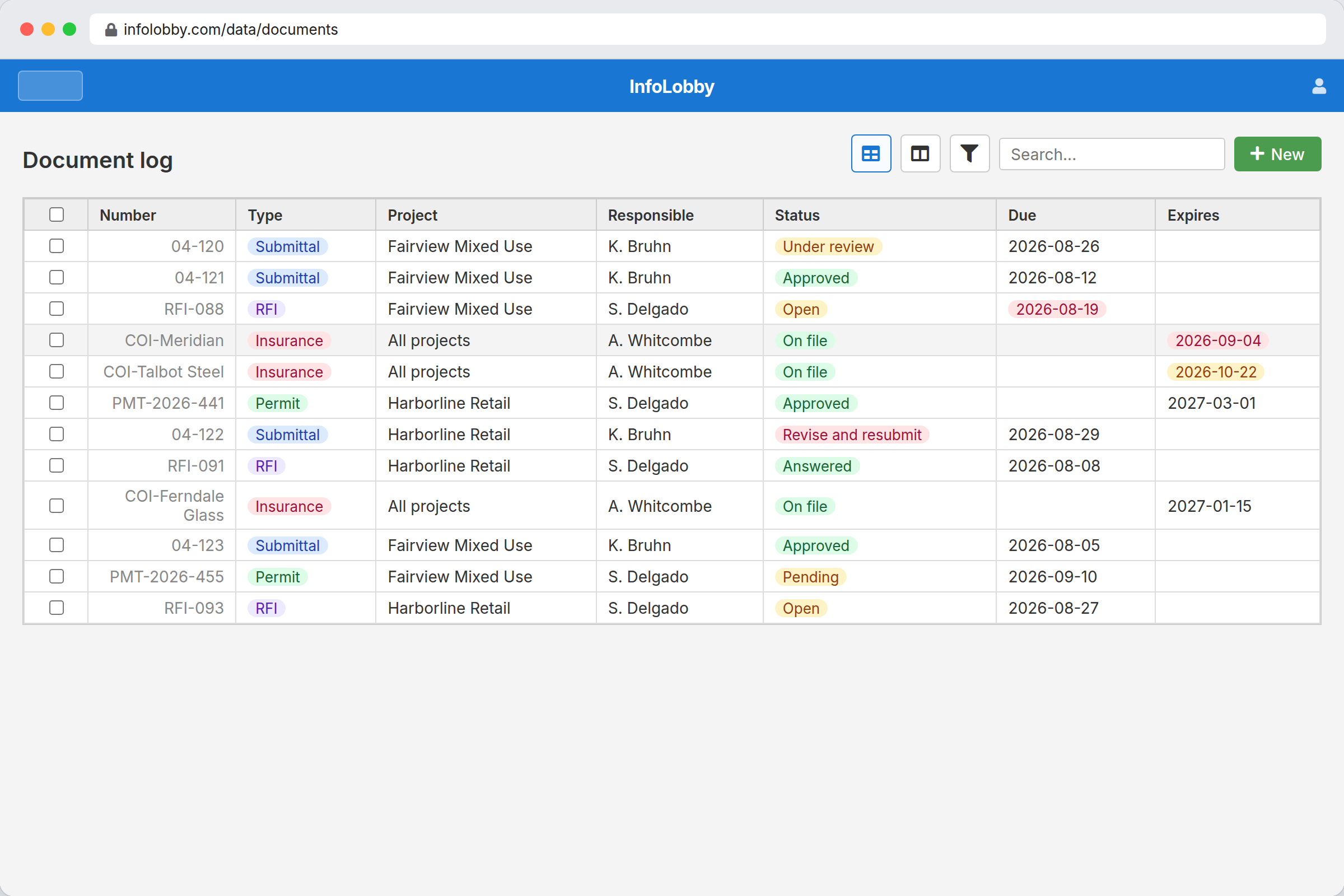
Document control on a construction project fails quietly. Nobody notices the problem on the day it happens. They notice it eleven months later, when a subcontractor's certificate of insurance turns out to have expired before the incident, or when a submittal approval that everyone remembers giving cannot be located.
The tools that solve this properly are Procore, Autodesk Construction Cloud, and their peers. On a large commercial project they are the right answer and the cost is not the deciding factor. On a $2M residential build run by an eleven-person contractor, they are priced for a different business, so the document log is a spreadsheet, the documents are in Dropbox, and the approvals are in email.
InfoLobby covers the log, the approvals, the expiry dates, and the history at $29 to $129 per month. It does not do drawings, and the section on Bluebeam below is not a hedge.
Submittals, RFIs, and the log that goes stale
The document log is a spreadsheet in most small contracting businesses, and it degrades in a predictable way.
Someone maintains it carefully for the first two months. Then a submittal comes back revised and the row gets edited rather than a new row added, so the revision history disappears. Then two people have the file open and one set of changes is lost. Then the project gets busy and the log falls three weeks behind, at which point nobody trusts it and everyone goes back to searching email.
The failure is not laziness. It is that a spreadsheet has no concept of a revision, no owner on a row, and no way to tell you something has been sitting for eleven days.
The document control build
Two tables, connected.
Documents holds one record per submittal, RFI, permit, or certificate:
| Field | Type | Purpose |
|---|---|---|
| Number | Text | Your existing numbering |
| Type | Category | Submittal, RFI, permit, COI, closeout |
| Project | Connection | Links to a Projects table |
| Responsible | User or Text | Who owns the next action |
| Submitted | Date | When the clock started |
| Status | Category | Open, under review, approved, rejected, revise and resubmit |
| Due | Date | Drives the overdue view |
| Files | File | Every revision, on this record |
| Expires | Date | Certificates and permits only |
Projects holds the job, the client, the general contractor, and the dates.
The important behaviour is that revisions attach to the same record rather than creating a new row or a new filename. Revision 3 of submittal 04-120 is on the submittal 04-120 record, alongside revisions 1 and 2, with a change history showing when each arrived and who changed the status.
That history is what a spreadsheet cannot reproduce and what actually matters in a dispute. It records who approved which revision and when, without anyone maintaining it deliberately.
Certificates of insurance, which is where most contractors start
If you adopt one thing from this page, adopt this.
Store subcontractor certificates as records with an Expires date. Build a workflow that notifies the responsible person thirty days before expiry, and a view showing everything expiring in the next sixty days.
The reason this is the usual starting point is that the failure mode is severe and the fix is trivial. An expired COI discovered after an incident is a liability event. An expired COI flagged thirty days out is a phone call.
The same pattern covers permits, licences, bonds, and prequalification renewals. One date field and one workflow, repeated.
Collecting documents without email attachments
Subcontractors are the weak point in most document processes, because they are outside your systems and have no incentive to follow your conventions.
A web form fixes the common case. The subcontractor submits a certificate or a closeout document through a link, it lands as a record with the right fields populated, and nobody re-types anything or fishes an attachment out of a thread.
For ongoing access, a Read Only or Read and Write role in one workspace works, and since users are unlimited on every plan, giving fifteen subcontractors access costs nothing. That is a meaningful difference from products that price per user, where the practical answer is usually to not give subcontractors access at all.
Starter includes 2 web forms, Team 10, Business unlimited. A contractor running separate forms for COIs, closeout documents, and RFI submissions needs Team at $59 per month.
What Procore costs, and when it is worth it
Checked 2026-08-20. Construction platform pricing is almost entirely quote-based, which is itself the useful finding: none of the major platforms will tell you what they cost without a sales conversation.
| Product | Model | Published rates |
|---|---|---|
| Procore | Quote only, Annual Construction Volume | No public rates. Charges against the aggregate dollar value of your projects, not seats |
| Autodesk Construction Cloud | Quote only | No public rates. Bundled by product area |
| Bluebeam | Per user, subscription | Bluebeam's pricing page blocks automated retrieval, so no figure is quoted here |
| InfoLobby | Flat, unlimited users | $29 / $59 / $129 |
One correction to a claim this page could easily have made and should not: Procore includes unlimited users too. Its model charges on construction volume rather than seats, so "unlimited users" is not a differentiator against it. The differentiator is that a $29 to $129 monthly subscription needs no quote, no annual commitment, and no volume threshold.
Procore is worth its price on projects where the whole platform gets used: drawings, models, field reports, financials, and document control together. Buying it for document control alone is not a sensible trade, and buying it at all is difficult for a contractor whose annual volume puts the quote out of reach.
File storage is the limit to watch here rather than records. Starter includes 25GB, Team 100GB, Business 500GB. Full plan sets consume storage quickly, so a contractor storing drawings should plan on Business at $129 per month. A contractor storing only submittals, COIs, and permits will sit comfortably on Team.
Where Bluebeam stays in the stack
InfoLobby does not do drawings, and this is not a small caveat.
There is no PDF markup, no annotation, no plan overlay, no version comparison across a drawing set, no measurement or takeoff, and no model coordination. Those are the daily tools of the people actually building the thing.
Keep Bluebeam. The division that works is that Bluebeam is where drawings are marked up and reviewed, and InfoLobby is where the log lives: what was submitted, who owns it, what status it is in, when it is due, and what the history was. Storing the marked-up PDF as a revision on the record connects the two without pretending one replaces the other.
A contractor whose actual problem is drawing coordination should not buy this. A contractor whose actual problem is that nobody knows the current status of nineteen open submittals should.
Sources checked
- InfoLobby plan limits, pricing, storage, and web form counts: current pricing page, checked 2026-08-20
- Procore pricing, checked 2026-08-20. Quote-only, on an Annual Construction Volume model, with unlimited users included
- Autodesk Construction Cloud pricing, checked 2026-08-20. Quote-only, bundled by product area
- Bluebeam pricing: the page blocks automated retrieval, so no Bluebeam figure is quoted here. Read it at the source
InfoLobby plan pricing and limits, and the competitor claims on this page, were last checked on 2026-08-20. Competitor pricing changes often and varies by region, so confirm current figures on the vendor's own pricing page before deciding. Our plans are on the pricing page.