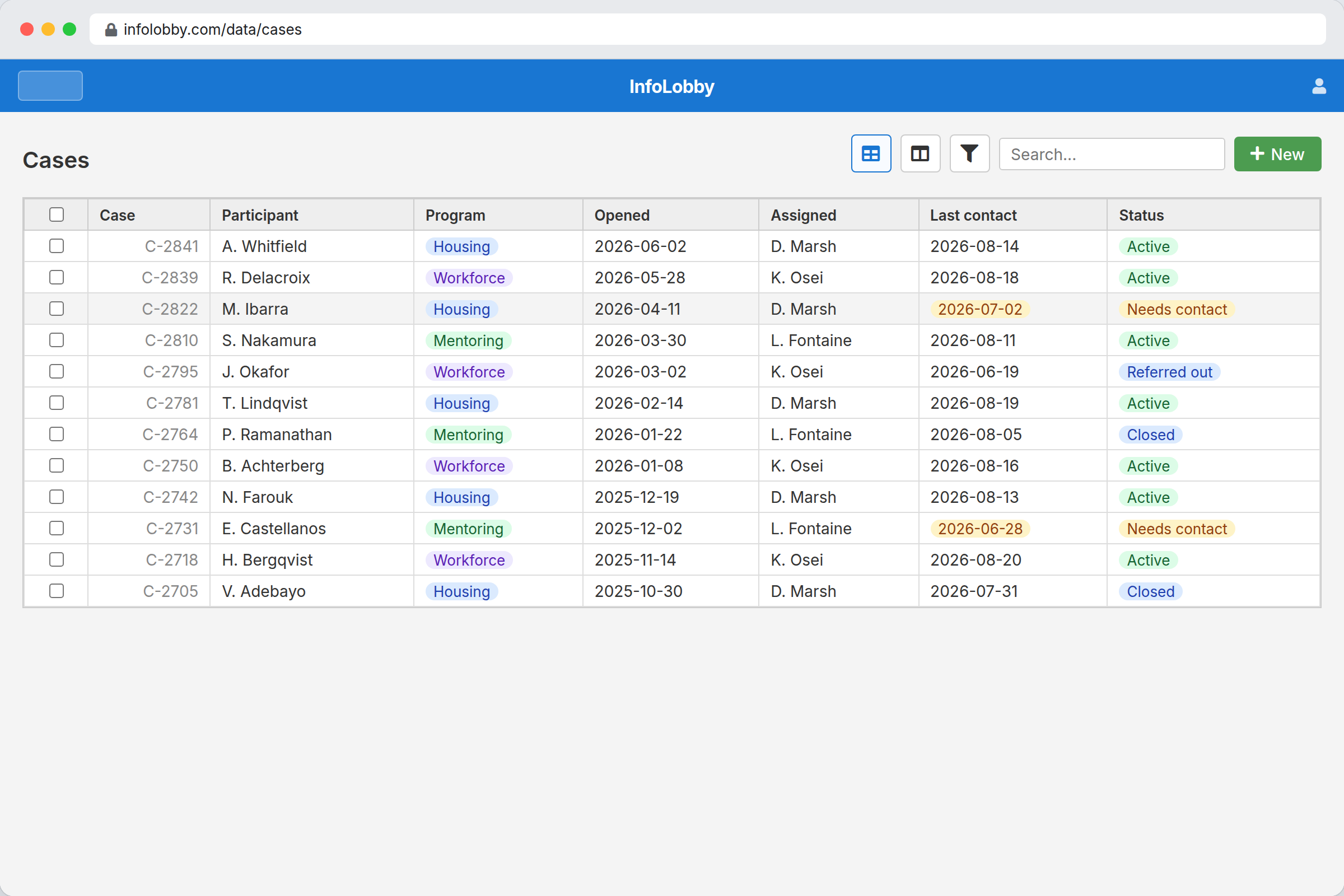
Case management software has a funding problem. The good products, Apricot and Penelope among them, were built for agencies with grant-funded technology budgets and implementation support. A four-person program running a food pantry, a housing navigation service, or a youth mentoring cohort has neither, so it runs on a spreadsheet, a stack of intake forms, and one staff member who knows where everything is.
The spreadsheet is not the real risk. The real risk is the quarterly report. When a funder asks how many unduplicated participants received a service in Q2, the honest answer is often "give us a few days", and the number that eventually goes out is assembled by hand from three sources by someone who is fairly sure it is right.
InfoLobby gives small programs structured case records, form-based intake, and countable service data, at $29 to $129 per month with unlimited users. It is a general database you shape into a case system, which is both the advantage and the limitation.
What a case record actually has to hold
Programs differ enormously, but the underlying shape is consistent. Three connected tables cover most of it.
Participants holds the person, once. One record per human being, regardless of how many times they come through the door. This is what makes unduplicated counts possible later, and getting it right at the start is the single most important structural decision.
Cases connects to a participant. One record per episode of service:
| Field | Type | Purpose |
|---|---|---|
| Participant | Connection | Links to the person |
| Program | Category | Which of your programs |
| Opened / Closed | Date | Defines the reporting period |
| Assigned staff | User | Ownership |
| Status | Category | Active, closed, referred out |
| Presenting need | Category | What they came for |
| Outcome | Category | What happened, for reporting |
Service events connects to a case. One record per contact:
| Field | Type | Purpose |
|---|---|---|
| Case | Connection | The episode it belongs to |
| Date | Date | The reporting axis |
| Service type | Category | What was provided |
| Staff | User | Who provided it |
| Units | Number | Hours, meals, nights, whatever you count |
| Notes | Long text | The narrative record |
Separating participants from cases from service events is what makes a funder report a filter rather than a project. "How many unduplicated participants received housing navigation in Q2" becomes a count of distinct participants on service events filtered by type and date. That query is the reason to do this at all.
Intake without typing everything twice
The most common workflow in a small program is also the most wasteful: a paper or digital intake form is completed, then someone retypes it into the tracking spreadsheet, usually days later and sometimes incorrectly.
A web form writes directly into the participant and case records. Staff complete it on a tablet during intake, or a partner agency completes it as a referral, and the record exists the moment it is submitted. No retyping, no lag, no transcription errors.
Plan limits matter here. Starter includes 2 web forms, Team includes 10, and Business is unlimited. A program with a general intake, a referral form, and a separate form per program will pass 2 quickly, so most organizations doing form-based intake should plan on Team at $59 per month.
Notes staff can write and funders never see
Case notes carry different sensitivity than case data, and the permission model needs to reflect that.
Workspace roles are Read Only, Read and Write, and Admin. A common arrangement puts identifying details and narrative notes in a workspace restricted to program staff, while a board member or a volunteer coordinator gets Read Only access to a workspace holding counts and outcomes without names attached.
Because users are unlimited on every plan, this is a permissions decision rather than a budget one. That matters more in nonprofits than almost anywhere else: per-seat pricing is precisely why volunteers and part-time staff usually end up sharing a login, which is the worst possible outcome for a system holding client data.
Confidentiality, and what we do not claim
This section is deliberately blunt because the sector deserves it.
InfoLobby is not HIPAA compliant. We do not sign business associate agreements and we make no claims under HIPAA or 42 CFR Part 2. If your program provides health services, behavioral health, or substance use treatment covered by those rules, use a vendor that will sign a BAA. This is disqualifying, not a limitation to work around.
We hold no SOC 2 or ISO 27001 certification. If a funder or a government contract requires a certified vendor, that requirement decides the question.
Many social service programs, including food assistance, housing navigation, mentoring, workforce development, and legal aid intake, fall outside those regimes. Confirm your own obligations before storing client data in any system, including this one.
What the alternatives cost
Figures below were read from each vendor's own pricing page on 2026-08-20. Several vendors in this category quote only on request, and nonprofit discounts are common but not always published.
| Product | Model | Published rates |
|---|---|---|
| Apricot (Bonterra) | Quote only | No public list price. Prebuilt outcome frameworks |
| Penelope (Athena) | Quote only | No public list price. Clinical and social service case management |
| CharityTracker | Per user | Basic $20, Plus $40, Pro $60 per user/mo. Annual saves about 10% |
| InfoLobby | Flat, unlimited users | $29 Starter, $59 Team, $129 Business |
CharityTracker is worth taking seriously before choosing InfoLobby. It is purpose-built, and its shared referral network between agencies in a region is something a general database simply cannot replicate. If that network exists in your area and your peers use it, that alone is a strong reason to choose it.
The pricing shape is the difference. CharityTracker bills per user, so a program with two full-time staff and six part-time caseworkers is paying for eight seats. At Basic that is $160 a month, against $59 for InfoLobby Team with no seat count at all. For a program with one or two users, CharityTracker Basic at $20 is cheaper than InfoLobby and comes configured, which is the honest recommendation at that size.
When a purpose-built product is the better choice
You need prebuilt outcome frameworks. Apricot ships with validated assessment instruments and standard outcome measures. Building those yourself is possible and tedious, and you will not get validation for free.
You need a referral network. Covered above. CharityTracker's inter-agency model is not reproducible here.
You have no one to build it. This is a database you configure. Someone on staff needs to enjoy structuring information, or you need a few days of help. Programs without that person are better served by a product that arrives configured.
You report against a standard framework. If your funder requires HMIS participation or a specific data standard, use a system already certified against it.
You need it working next week. Expect to spend real time on structure, then adjust for a month as staff use it. That is the cost of flexibility.
Where InfoLobby wins is the program whose model does not match a template: a service nobody built software for, an outcome nobody else measures, a workflow that changed twice last year and will change again. Fitting that into a fixed schema is worse than building it, and building it is what this is for.
Sources checked
- InfoLobby plan limits, pricing, and web form counts: current pricing page, checked 2026-08-20
- CharityTracker pricing, checked 2026-08-20. Priced per user, with community-wide discounts for coalitions
- Apricot by Bonterra and Penelope: both quote-only at the time of checking, with no public list pricing to cite
- HIPAA and certification status: InfoLobby signs no BAAs and holds no SOC 2 or ISO 27001 certification as of 2026-08-20
InfoLobby plan pricing and limits, and the competitor claims on this page, were last checked on 2026-08-20. Competitor pricing changes often and varies by region, so confirm current figures on the vendor's own pricing page before deciding. Our plans are on the pricing page.