A six-person firm and a six-hundred-person firm have the same document problem and completely different budgets for solving it. The enterprise answer is iManage or NetDocuments: email filing, Word integration, records management, a security program with certifications attached. The small-firm answer is usually a folder structure on a shared drive, a matter list in Excel, and a retention schedule that exists mostly in the office manager's memory.
That works until it doesn't. A paralegal leaves and takes the filing logic with them. A matter has to be reconstructed for a fee dispute. Someone asks which version of the engagement letter was actually signed, and the folder has four.
InfoLobby sits between those two answers. It organizes documents around matter records with versions, permissions, and retention dates, at a flat $29 to $129 per month with unlimited users. It is not a certified legal DMS, and the section on where it is the wrong tool is the one to read first if your firm answers to a client security questionnaire.
Why folders stop working before firms notice
Folder structures fail in a specific order.
First, naming drifts. Smith_Engagement_FINAL.docx acquires _FINAL_v2 and then _FINAL_USE_THIS. Nobody can tell which was sent without opening all three and comparing.
Second, the matter list and the folders disagree. A matter closes but the folder stays. A matter is renamed after a party changes, and the folder isn't.
Third, permissions become all-or-nothing. Either everyone can see the whole drive, or someone maintains per-folder permissions by hand, which nobody does consistently past about thirty matters.
Fourth, retention becomes theoretical. Files that should have been destroyed three years ago are still there, which is a liability rather than an oversight.
None of these are storage problems, which is why buying more storage never fixes them. They are all record-keeping problems: the documents are fine, the information about the documents is missing.
The matter and document structure
The build is two related tables and takes about an afternoon.
Matters holds one record per matter:
| Field | Type | Purpose |
|---|---|---|
| Matter number | Text | Your existing numbering scheme |
| Client | Connection | Links to a Clients table |
| Practice area | Category | Filters and reporting |
| Responsible attorney | User | Ownership and permission scoping |
| Status | Category | Open, closed, on hold |
| Opened / Closed | Date | Drives retention calculations |
| Retention until | Date | Calculated from the closing date |
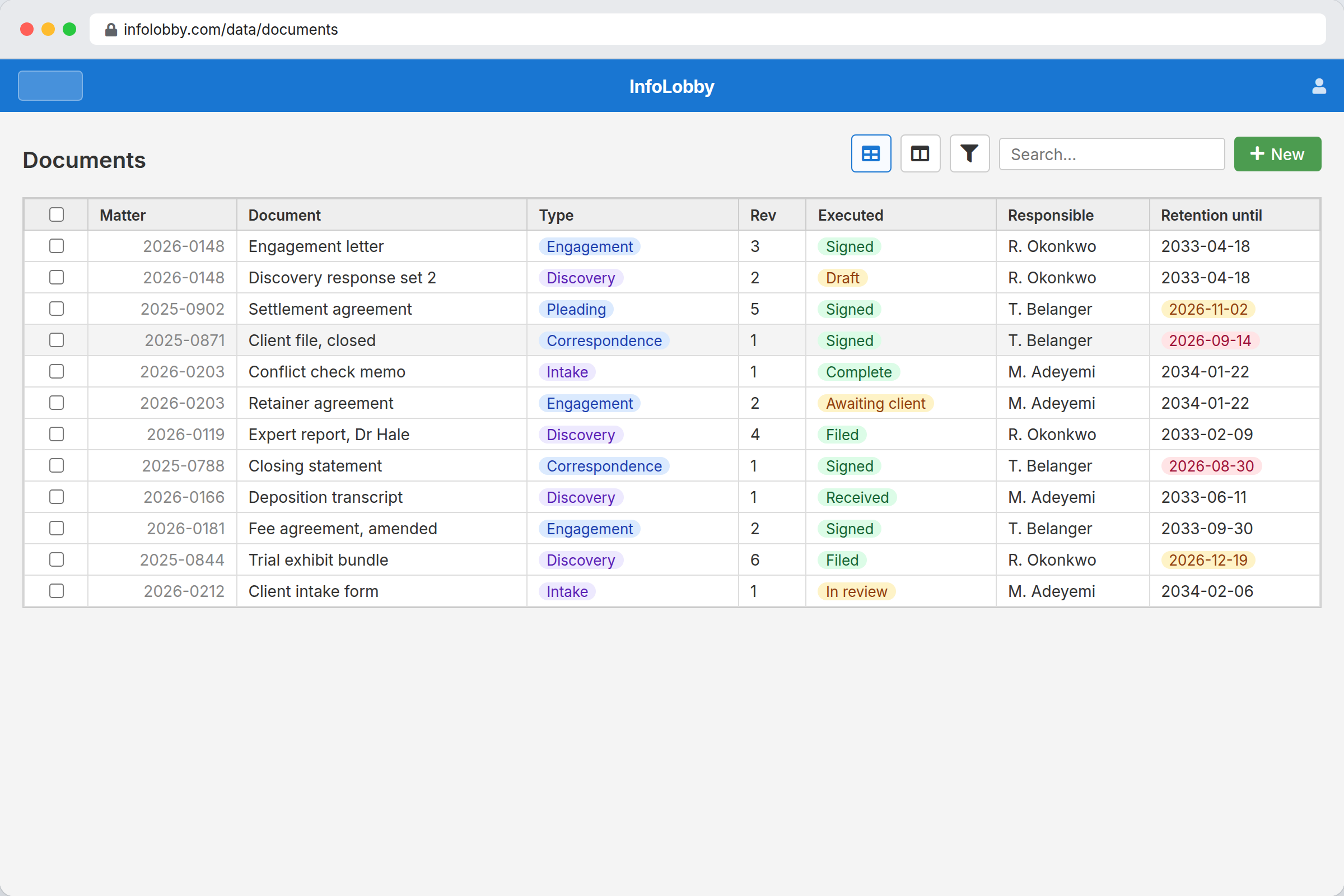
Documents holds one record per document, connected to a matter:
| Field | Type | Purpose |
|---|---|---|
| Matter | Connection | The link that replaces the folder path |
| Document type | Category | Pleading, correspondence, engagement letter, discovery |
| File | File | The document itself, with revisions on the same record |
| Executed | Yes/No | Separates signed from draft without a filename convention |
| Received / Filed | Date | What the log used to record |
The point is the connection field. A document belongs to a matter as data, not as a location, so renaming a matter or reorganizing practice areas doesn't strand anything. Filtering to every executed document across all matters in a practice area is a view, not a search through folders.
Every record carries a change history: who changed which field, when, and what the previous value was. That is the part a shared drive cannot reproduce, and it is usually why firms move.
Retention dates that actually fire
Retention is the clearest win because it is pure record-keeping and firms almost universally do it badly.
Store Retention until on the matter, calculated from the closing date according to your jurisdiction's rules and your engagement terms. Then build one workflow: ninety days before that date, notify the responsible attorney with a link to the matter.
That is the entire automation, and it converts a policy nobody executes into a task that arrives on time. The same pattern covers limitation periods, engagement letter renewals, and annual conflict re-checks.
What the alternatives cost
Figures below were read from each vendor's own pricing page on 2026-08-20. Legal software pricing changes frequently and per-user pricing shifts the comparison with headcount, so confirm before deciding.
| Product | Model | Published rates |
|---|---|---|
| iManage | Quote only | No public list price |
| NetDocuments | Quote only | No public list price |
| SmartVault | Per user, 2 to 3 seat minimum | Business Pro $55/user/mo annual, $75 monthly. Accounting Unlimited $85 annual, $110 monthly |
| MyCase | Per user | Basic $50, Pro $100, Advanced $130 per user/mo on annual billing. $60, $120, and $150 monthly |
| Clio | Per user | Clio's pricing page blocks automated retrieval, so no figure is quoted here. Check it directly |
| InfoLobby | Flat, unlimited users | $29 Starter, $59 Team, $129 Business |
The structural difference is the per-user line. At eight people, MyCase Basic at $50 per user is $400 a month before anyone opens it, and SmartVault Business Pro at $55 is $440. InfoLobby's $59 Team plan is $59 whether the firm is three people or thirty, which is why the fit is best for firms where paralegals, contract attorneys, and admin staff all need access and per-seat pricing has been the reason they don't have it.
Note the direction of the trade honestly: those per-user products include billing, calendaring, and legal-specific document handling that InfoLobby does not have. You are not buying the same thing more cheaply.
Storage matters too. Starter includes 25GB, Team 100GB, Business 500GB. A litigation practice storing discovery productions will move past 25GB quickly, so budget for Team or Business rather than Starter.
Where this is the wrong tool
Say no to InfoLobby if any of these apply.
You need a certified vendor. InfoLobby holds no SOC 2, ISO 27001, or equivalent certification. If a client security questionnaire requires one, or your malpractice carrier does, this is disqualifying and no amount of feature fit changes that. iManage, NetDocuments, and SmartVault exist for exactly this reason.
You need full-text search inside documents. Search covers record fields and database text, not the contents of attached PDFs and Word files. For a firm whose core workflow is finding a phrase across ten thousand documents, that is a hard stop.
You need email filing and Word integration. There is no Outlook add-in that files a message to a matter, and no Word integration that saves a draft into the DMS. Those are the daily-use features enterprise legal DMS products are built around.
You want one system for billing and calendaring. InfoLobby does not do time entry, trust accounting, or court date calculation. Clio and MyCase do, and a small firm that wants a single tool should buy one of those and stop reading here.
The realistic pattern is a firm that already runs Clio or MyCase for billing and calendaring, and wants the matter and document layer to be structured rather than a drive full of folders. That is a supplement, not a replacement, and the firms who get value from it are the ones who understand that going in.
Sources checked
- InfoLobby plan limits and pricing: current pricing page, checked 2026-08-20
- MyCase pricing, checked 2026-08-20
- SmartVault pricing, checked 2026-08-20. Seat minimums apply per plan
- Clio pricing: the page blocks automated retrieval, so no Clio figure is quoted on this page. Read it at the source
- iManage and NetDocuments: both quote-only at the time of checking, with no public list pricing to cite
- Certification status: InfoLobby holds no SOC 2 or ISO 27001 certification as of 2026-08-20. This page will be updated if that changes
InfoLobby plan pricing and limits, and the competitor claims on this page, were last checked on 2026-08-20. Competitor pricing changes often and varies by region, so confirm current figures on the vendor's own pricing page before deciding. Our plans are on the pricing page.